
Before choosing any VoIP API or building advanced voice automation, it helps to understand how the full communication pipeline works end-to-end. Most teams focus only on AI logic, yet real-time voice depends equally on audio transport, signaling, network stability, and latency control.
This article brings everything together so founders, product teams, and engineering leads can see how the components align in real products.
With this clarity, decision-making becomes easier, whether the goal is adding simple calling features or building fully automated AI-driven voice agents that respond instantly and operate at scale.
What Is a VoIP API and Why Do Modern Applications Need It?
Voice over Internet Protocol (VoIP) API allows developers to embed voice calling into applications. In other words, instead of relying only on chat or email, your product can place voice calls over the internet using a cloud VoIP service. This makes communication richer, faster, and more human. The CPaaS/VoIP market is rapidly expanding – estimates place the global CPaaS market at approximately USD 12–20B in the mid-2020s, with high-teens to 20%+ CAGR depending on source.
- VoIP API vs Internet Calling API: These terms are often used interchangeably. Both refer to programming interfaces that let apps make and receive calls over IP networks.
- SIP API: A type of VoIP API built around the Session Initiation Protocol (SIP). SIP APIs are often used when you need to connect your app to traditional telephony (PSTN) via SIP trunking.
- Programmable telephony: This is the larger concept – you are not just calling but controlling voice interactions, bridging users, playing audio, recording calls, or building voice-based workflows.
Applications need a VoIP API today because businesses demand more natural, real-time engagement. For example, a customer service app can turn into a voice assistant, or a sales tool can place automated, personalized calls. When integrated correctly, it can reduce friction and deepen customer relations.
How Does a VoIP API Power Real-Time Voice Communication Inside Applications?
To understand how VoIP APIs support voice in applications, you need to grasp two core planes: signaling and media.
- Signaling: This involves call setup, control, and teardown. The API handles HTTP or REST requests to create calls, transfer, or hang up.
- Media: Once a call is established, the actual voice data flows. Audio is captured, encoded (for instance, in Opus), transported over RTP (Real-Time Protocol), and finally decoded on the other end.
When you make a voice call via a VoIP API:
- Your app sends a request to the voice platform (control plane) to initiate a call.
- The platform returns a media address (for example, a WebRTC or SIP endpoint) to which your app sends or receives voice.
- Audio packets stream in real time, enabling a live conversation.
This separation – signaling vs media – matters a lot. By keeping them separate, the system stays more flexible, scalable, and responsive. It also allows you to build programmable telephony features, such as playing audio, recording, or detecting DTMF (keypad tones) during the call.
What Are the Core Components Behind Voice Call Integration?
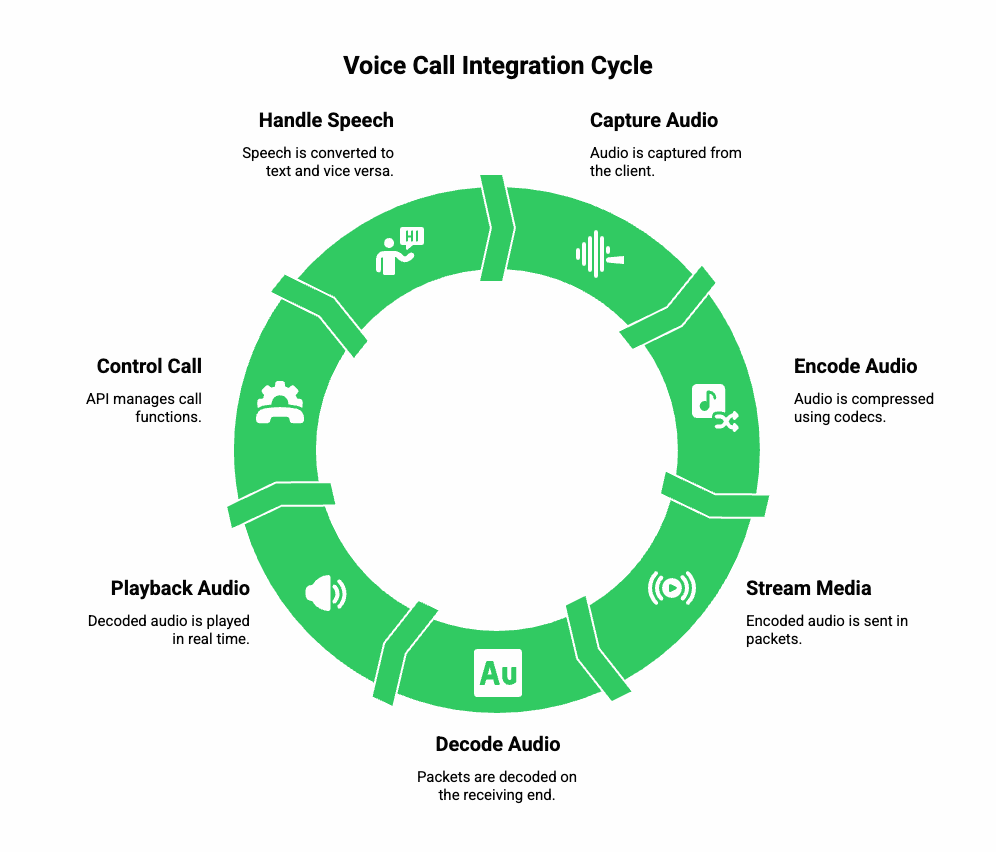
To embed voice calls smoothly into your product, you must know the main pieces working under the hood. Here are the building blocks:
a) Protocols and Codecs
- SIP vs WebRTC: If you’re building in-app calling, WebRTC is ideal – it supports browsers and mobile apps, and handles NAT traversal. For telephony or PSTN integration, SIP API is more common.
- Codecs: Codecs like Opus or G.711 are used to compress and transmit voice. Opus gives good quality at low bitrate, while G.711 is standard for PSTN compatibility.
b) Media Streaming
- Capture: Audio is captured from the client (browser or app) at a certain sample rate (e.g., 16 kHz or 48 kHz).
- Transport: Media is sent in RTP packets, secured with SRTP (Secure RTP), and possibly tunneled over DTLS if using WebRTC.
- Playback: On the receiving side, packets are decoded and played back in real time.
c) Call Control & Events
- The API gives you endpoints to create, bridge, hold, play audio, record, or hang up a call.
- Webhooks or callbacks give your app real-time updates about call status (connected, ringing, completed) or media events (DTMF pressed, recording available).
d) Speech Handling
- Speech to Text (STT): You stream the incoming audio to an ASR engine to convert spoken words into text.
- Text to Speech (TTS): For responses, you convert text back to audio using a TTS engine.
- These pipelines often work in real time so that conversation feels natural.
How Do AI Voice Agents Fit Into the VoIP API Architecture?
Voice agents powered by large language models (LLMs) represent the future of voice automation. To build them, you combine a few key parts:
- STT (Speech Recognition)
- Audio from the call is sent to a streaming STT engine.
- You receive partial (interim) transcripts – this helps respond faster rather than waiting until someone finishes speaking.
- Audio from the call is sent to a streaming STT engine.
- Orchestration / Context Management
- You manage the conversation’s state in your backend.
- You might apply Retrieval-Augmented Generation (RAG) to bring in knowledge from your data (e.g., a knowledge base, user history) before passing a prompt to the LLM.
- You manage the conversation’s state in your backend.
- LLM / Agent Logic
- Your LLM receives contextual input (transcripts, knowledge) and generates a response.
- You control how the LLM is prompted, what tools it can call (for example, to look up a customer’s record), and how much memory (past conversation) to include.
- Your LLM receives contextual input (transcripts, knowledge) and generates a response.
- TTS (Speech Synthesis)
- Once the LLM gives a text response, you send it to a TTS service.
- Use streaming TTS (if your service supports it) so that the agent can start speaking even before the whole text is ready.
- Once the LLM gives a text response, you send it to a TTS service.
- Back to the Call
- The audio from TTS is streamed back into the call via your VoIP API, closing the loop.
- If the user interrupts (barge-in), you should detect that and end or pause TTS for a natural flow.
- The audio from TTS is streamed back into the call via your VoIP API, closing the loop.
By connecting STT, LLM, orchestration, and TTS over a VoIP API, you turn a simple voice call into a fully conversational, intelligent agent.
What Are the Most Effective Architectural Patterns for Building Voice Experiences?
Not all voice architectures are equal. Depending on your use case, you might adopt different patterns:
Pattern A: WebRTC-First (Client-Side)
- Ideal for in-app voice, softphone, or browser-based voice agents.
- Flow: Web app ↔ WebRTC SDK ↔ VoIP API → STT / LLM / TTS → WebRTC playback.
- Pros: Very low latency, direct media path; Cons: requires NAT traversal, depends on client’s bandwidth.
Pattern B: Server-Side Media Bridge
- Best when you need to support PSTN numbers or external phone calls.
- Flow: SIP trunk – VoIP provider – Server-side media relay – STT / LLM / TTS – back via SIP.
- Pros: easier to scale, better control over media; Cons: additional cost for media relay, more complex infrastructure.
Pattern C: Hybrid (Edge + Central)
- Useful for global scale and low latency.
- Flow: Edge media nodes (close to users) handle RTP, central backend handles LLM + orchestration.
- Pros: lower jitter and latency, regional compliance; Cons: requires syncing session state across regions.
Which pattern you choose depends on your priorities: if you care about lowest possible delay, go WebRTC-first; if you need telephony numbers, go server-bridge; and if you scale globally, hybrid may be best.
How Do You Implement Voice Call Integration Step-by-Step?
Here’s a practical, high-level implementation path you can follow when building voice communication inside your app:
- Set Up Telephony or Client
- Choose whether you’re accepting PSTN / SIP calls (via a SIP trunk) or building in-app voice (using a WebRTC client).
- Register numbers or deploy client SDK.
- Choose whether you’re accepting PSTN / SIP calls (via a SIP trunk) or building in-app voice (using a WebRTC client).
- Initialize Call via API
- Use your VoIP API’s REST endpoint to create a new call / media session.
- The API returns media connection details (WebRTC SDP or SIP endpoint).
- Use your VoIP API’s REST endpoint to create a new call / media session.
- Stream Media to STT
- Start capturing RTP audio and forward it to a speech-recognition engine.
- Use streaming protocols (WebSockets, gRPC) so you can process partial transcriptions.
- Start capturing RTP audio and forward it to a speech-recognition engine.
- Process Through Orchestrator
- As partial transcripts arrive, forward them to your orchestration logic.
- Use RAG or memory store to supply context to your LLM (past conversation, knowledge base).
- As partial transcripts arrive, forward them to your orchestration logic.
- Generate LLM Response
- Your LLM processes the prompt (transcript + context) and returns a text response.
- Optionally call external tools (CRM, databases) for enriched responses.
- Your LLM processes the prompt (transcript + context) and returns a text response.
- Convert Text to Speech
- Send the LLM output to a TTS engine.
- Prefer streaming TTS to reduce delay in playback, and handle SSML if you need emphasis or pauses.
- Send the LLM output to a TTS engine.
- Play Audio Back
- Pipe the TTS audio into the RTP channel managed by your VoIP API.
- Support barge-in: if the caller talks, pause or stop the TTS cleanly.
- Pipe the TTS audio into the RTP channel managed by your VoIP API.
- Close Call & Clean Up
- When the call ends, stop all media streams.
- Save transcripts, audio recordings, metadata to your backend.
- Track metrics: response latency, ASR error rate, TTS playback time, call duration.
- When the call ends, stop all media streams.
Explore how Elastic SIP Trunking paired with modern LLMs unlocks high-volume, intelligent communication workflows that scale effortlessly across business operations.
Where Does FreJun Teler Fit Into This Architecture?
FreJun Teler acts as the real-time voice transport layer in this overall architecture. In simple terms, Teler provides the media infrastructure so your LLM-powered agent can talk over actual phone or VoIP calls.
- It handles low-latency streaming, minimizing the delay between when a user speaks and when your system processes it.
- It supports both SIP API (for trunking or PSTN) and WebRTC / VoIP SDKs (for in-app voice).
- It gives you the flexibility to plug in any STT, any TTS, and any LLM, because Teler stays agnostic about what AI you use.
- It is built for global scale: have media PoPs distributed around the world, to reduce jitter and maintain call quality.
- For mission-critical apps, Teler also offers enterprise-grade security, session-level reliability, and service SLAs.
Simple pseudocode (conceptual):
onIncomingCall(callId):
session = Teler.createMediaSession(callId)
sttStream = startSTT(session.media)
for each partial in sttStream:
sendToOrchestrator(partial, callId)
This way, Teler forms the foundation on which your AI voice agent is built: it doesn’t decide what your AI thinks, but it reliably carries voice to and from your AI.
How Do You Ensure Low Latency, High Quality, and Reliability in VoIP API Implementations?
When you embed voice at scale, performance becomes the biggest challenge. Even a small delay or jitter can break the conversational flow, especially when using STT → LLM → TTS loops. Therefore, the architecture must focus on reducing latency across three layers: network, media, and AI pipeline.
a) Network Stability
A stable network path is essential for smooth internet calling APIs.
- Use edge media servers: Routing RTP to the closest region lowers round-trip time.
- Enable jitter buffers: Adaptive jitter buffering reduces uneven packet arrival without adding too much delay.
- Prefer UDP over TCP: RTP generally works on UDP for lower latency. TCP should be used only for signaling.
- Handle NAT traversal: WebRTC’s ICE, STUN, and TURN servers ensure peer connectivity even in restrictive networks.
b) Media Processing Path
Voice quality depends heavily on audio encoding and transport.
- Choose the right codec:
- Low-latency calls – Opus
- PSTN bridging – G.711
- Low-latency calls – Opus
- Use VAD (Voice Activity Detection) to reduce unnecessary bandwidth.
- Monitor packet loss: Even a 3–5% loss can distort voice.
- Measure end-to-end media latency: Capture – Encode – Transport – Decode – Playback.
c) AI Pipeline Latency
For conversational agents, AI latency can break flow if not optimized.
- Streaming STT reduces transcription delay.
- Streaming TTS decreases playback start time.
- LLM token streaming helps your agent begin speaking earlier.
- Tool calling caching reduces round-trip calls to CRM or database services.
Target latency benchmarks for natural interaction:
| Component | Good | Acceptable | Poor |
| STT start latency | < 300 ms | < 600 ms | > 1s |
| LLM response start | < 400 ms | < 800 ms | > 1.2s |
| TTS audio start | < 250 ms | < 500 ms | > 800 ms |
| End-to-end round trip | < 1s | < 2s | > 3s |
Keeping end-to-end latency under one second is a key priority for voice-driven AI workflows.
How Do You Scale Voice Communication When User Traffic Grows?
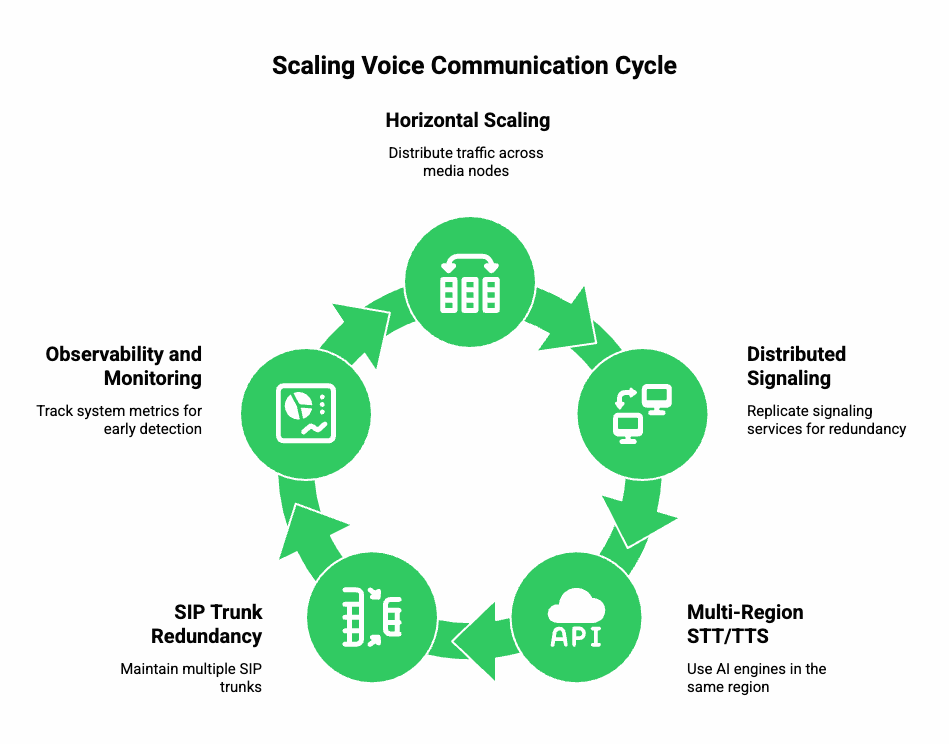
As usage grows, you must ensure your VoIP API setup scales seamlessly. Scaling voice infrastructure is harder than scaling text/chat, because audio streams are continuous and time-sensitive.
a) Horizontal Scaling of Media Servers
- Distribute traffic across multiple media nodes.
- Auto-scale based on concurrent call count or bandwidth.
- Isolate media servers by geography or business unit to avoid noisy-neighbor effects.
b) Distributed Signaling Layer
Even though signaling is lightweight, it must be redundant.
- Replicate signaling services across regions.
- Use sticky sessions or token-based routing.
- Employ retry logic for call initiation API calls.
c) Multi-Region STT + TTS
Using AI engines in the same region as your media stream reduces latency.
- If your media is in Mumbai, run STT/TTS in Mumbai or nearby regions.
- For global apps, replicate the entire pipeline across continents.
- Ensure fallback: If a TTS region fails, redirect to the next best.
d) SIP Trunk Redundancy
If your application uses SIP API or PSTN calling:
- Maintain multiple SIP trunks from different providers.
- Failover rules: if trunk A fails, retry via trunk B automatically.
- Maintain number routing through multiple carriers to avoid outages.
e) Observability and Monitoring
When scaling voice, observability becomes a core requirement.
Track system metrics including:
- Call initiation success rate
- End-to-end latency
- MOS (Mean Opinion Score)
- STT accuracy
- TTS speed
- Jitter/packet loss levels
A solid monitoring layer helps detect voice degradation early and fix the route.
How Do You Maintain Security and Compliance While Using VoIP APIs?
Voice communication systems handle sensitive data. Even basic customer queries involve personal information, call recordings, transcripts, and agent responses. Therefore, you must address both transport security and data governance.
a) Transport Security
- TLS for signaling: All API calls, WebRTC signaling, and SIP signaling must be encrypted.
- SRTP for media: Secure RTP encrypts audio packets.
- DTLS for WebRTC: Ensures key exchange is secure.
- Token-based authentication: Avoid using static API keys inside clients.
b) Data Security
- Encrypt call recordings (AES-256 at rest).
- Encrypt transcripts stored in your database.
- Use short-lived tokens for TTS/STT and LLM services.
- Mask sensitive data before storing transcripts (e.g., card numbers).
c) Compliance
Depending on your geography and industry, you may need:
- GDPR (EU) – user data rights
- HIPAA (healthcare) – medical call handling
- PCI-DSS – financial workflows
- TRAI (India) – telephony regulations and call masking
- SOC 2 – security processes
Ensure your VoIP provider supports compliance frameworks that match your business.
What Are Common Pitfalls to Avoid When Implementing Voice Communication?
Many teams make similar mistakes while integrating a VoIP API, especially when building AI-driven voice agents. Avoiding these early improves your launch quality significantly.
a) Not Monitoring Media Latency
Teams often monitor only LLM latency, but forget audio latency. Both matter equally.
b) Incorrect Audio Sample Rates
STT accuracy drops sharply if audio is:
- Too compressed
- Incorrect sample rate
- Mono/stereo mismatch
Most AI engines expect 8kHz (telephony) or 16kHz/24kHz (WebRTC).
c) Single-region Setup
Doing everything in one zone slows down global users.
d) No Barge-In Support
If the user speaks while TTS is playing and your system can’t interrupt, the experience feels robotic.
e) Lack of Session State Management
LLM agents need memory; otherwise they repeat questions. Maintaining short-term context is essential.
How Do You Choose the Right VoIP API Provider for AI Voice Use Cases?
Choosing a provider requires evaluating multiple criteria-not just call pricing. AI-driven conversations demand more from VoIP infrastructure.
Key evaluation criteria:
1. Media Latency
- Edge servers in your target geography
- WebRTC and SIP support
- Sub-500ms expected round-trip
2. Flexibility
- Use any STT/TTS engine
- Use any LLM (OpenAI, Anthropic, local models, etc.)
- Fine-grained control over media streams
3. Reliability & Redundancy
- Multiple carrier partnerships
- Distributed SIP routing
- Multi-region failover
4. Developer Control
- Clear APIs
- Webhooks for call events
- Ability to stream RTP in both directions
5. Telephony Coverage
- Virtual numbers
- Caller ID masking
- Global calling support
How Does FreJun Teler Solve These Challenges in Real AI Applications?
Below is a technical deep dive into how Teler enhances VoIP-based AI systems without repeating the earlier introduction.
a) Ultra-Low-Latency Media Routing
Teler uses globally distributed media nodes designed for:
- Sub-250ms one-way media latency
- Region-aware call routing
- Optimized jitter buffers
This keeps the STT → LLM → TTS loop responsive.
b) Full Flexibility With AI Stack
Unlike telephony platforms tied to a specific AI model, Teler allows you to bring your own:
- STT engine
- TTS engine
- LLM
- RAG pipeline
- Tool-calling architecture
This ensures you can build voice agents exactly the way you want.
c) Native Support for PSTN, SIP, and WebRTC
This makes Teler suitable for:
- Customer support
- Automated outbound calls
- Voice bots
- App-to-phone and app-to-app calling
- Mixed PSTN + WebRTC interactions
d) Enterprise-Grade Reliability
Teler offers:
- Multiple carrier-level SIP routes
- Redundant media clusters
- Automatic failover
- High-availability signaling
This ensures your AI agent never drops calls during heavy traffic.
e) Developer-Centric Design
Instead of forcing developers to use tightly coupled components, Teler provides:
- Clear VoIP API endpoints
- Real-time media access
- Webhooks for every call event
- Ability to inject or receive audio streams
This makes integration intuitive for engineering teams.
What Are the Best Practices to Follow for a Production-Grade Integration?
Below is a practical checklist.
a) Media Best Practices
- Always use Opus for WebRTC calls.
- Normalize audio levels before sending to STT.
- Enable silence detection for efficiency.
b) AI Pipeline Best Practices
- Use partial transcripts to reduce response delay.
- Stream TTS back immediately-not after generating full audio.
- Add guardrails to avoid long or irrelevant LLM responses.
c) Telephony Best Practices
- Maintain multiple SIP trunks.
- Validate phone numbers before initiating calls.
- Enable real-time call event logging.
d) Reliability Best Practices
- Run STT/TTS in the same region as your VoIP media server.
- Add retry logic for call setup.
- Monitor MOS score and alert on drops.
Final Thoughts
Building voice communication into applications is now a core capability, especially as real-time customer interactions keep shifting from text to conversational automation. When teams blend VoIP APIs for call control, WebRTC or SIP APIs for transport, and STT + LLM + TTS for intelligence, they unlock voice experiences that feel natural, responsive, and scalable. However, performance still depends on a stable media pipeline that can handle low latency and unpredictable network behavior.
This is where FreJun Teler becomes essential. Teler offers a global, reliable voice infrastructure that connects your AI stack to real callers with consistently low latency.
Ready to build? Schedule a demo
FAQ –
1. How long does it take to integrate a VoIP API into an application?
Most teams complete basic call setup in days, while full automation requires additional time for routing, testing, and voice experience tuning.
2. Can I use my own LLM or TTS models with a VoIP API?
Yes. Most VoIP APIs support external STT, LLM, and TTS engines through webhook or streaming interfaces for flexible AI architectures.
3. What latency should I target for smooth voice calls?
Aim for sub-200ms round-trip latency to maintain natural pacing, reduce talk-over issues, and support interruption handling during conversations.
4. Do VoIP APIs require special hardware or telecom infrastructure?
No. Modern VoIP APIs work over internet protocols, eliminating the need for physical PBXs or specialized on-premise telecom equipment.
5. Can VoIP APIs handle global calling without extra configuration?
Most providers support international routing, though you may need geo-optimized regions or additional compliance steps for specific countries.
6. How reliable are cloud-based VoIP services for production systems?
With failover routing, distributed nodes, and SIP redundancy, cloud VoIP platforms maintain strong reliability for enterprise-grade applications.
7. What’s the biggest challenge in building voice agents over phone calls?
Maintaining low audio latency and consistent ASR accuracy across unpredictable network environments remains the primary engineering challenge.
8. Can I record calls when using VoIP APIs?
Yes. Most platforms offer server-side call recording with encryption options, though compliance requirements vary by region.
9. How is billing usually handled in VoIP API platforms?
Billing typically includes per-minute usage, phone numbers, SIP trunks, and additional charges for outbound routing or advanced features.
10. How do I scale voice automation as call volume grows?
Use elastic media clusters, distributed SIP gateways, and stateless AI services to avoid bottlenecks and maintain consistent performance.