
Voice-based AI systems are moving beyond demos into real production workloads. As businesses deploy AI agents for support, sales, operations, and automation, voice has become the most natural interface for real-world interaction. However, building reliable voice experiences is not as simple as connecting an LLM to speech models. Real-time audio capture, streaming, and playback require dedicated infrastructure.
This is where a voice chat SDK becomes critical. It provides the real-time communication backbone that allows speech-to-text, AI processing, and text-to-speech systems to work together smoothly. Understanding how a voice chat SDK works is essential before designing scalable AI voice applications.
What Is A Voice Chat SDK?
A Voice Chat SDK is a software development kit that enables applications to send and receive live audio over a network in real time.
Instead of engineers building audio capture, streaming, network handling, and playback from scratch, a voice chat SDK provides these as ready-to-use components.
In simple terms, it handles everything required to make two-way voice communication work reliably.
A modern voice chat SDK typically includes:
- Real-time audio capture from microphones or phone calls
- Audio encoding and decoding
- Low-latency media transport
- Playback and device handling
- Session and connection management
Because of this, a voice chat SDK becomes the foundation for AI voice communication SDKs, voice apps, and voice-driven chatbots.
What A Voice Chat SDK Is Not
To avoid confusion, it helps to clarify what it does not do:
- It does not perform speech-to-text (STT)
- It does not generate speech (TTS)
- It does not provide AI reasoning or LLM logic
Instead, it acts as the real-time voice transport layer between the user and your backend systems.
Why Do AI Applications Need A Voice Chat SDK?
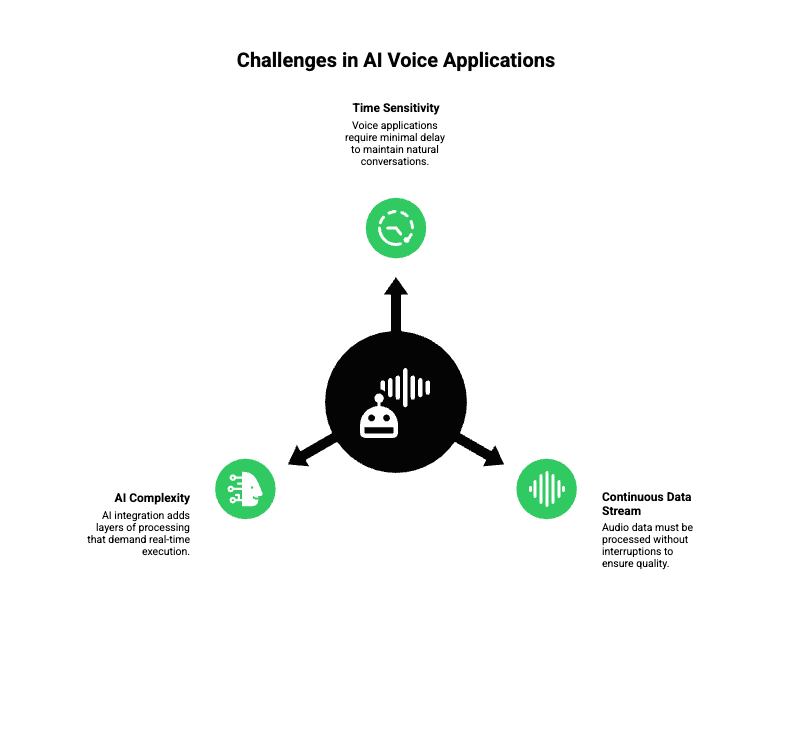
At first, many teams assume they can build voice features by combining microphones, APIs, and cloud servers. However, voice introduces constraints that text-based systems never face.
Because of this, AI applications depend heavily on voice chat SDKs.
Voice Is Time-Sensitive By Nature
Unlike text, voice has no tolerance for delay. If a system pauses even briefly, users notice immediately.
For example:
- A delay over 300 ms feels unnatural
- Pauses break conversational flow
- Jitter and dropped frames reduce trust
Therefore, AI voice experiences require consistent, low-latency streaming.
Audio Data Is Continuous And Unforgiving
Voice produces a continuous stream of packets. If packets arrive late or out of order, audio degrades instantly.
Without a dedicated voice SDK:
- Packet loss becomes audible
- Synchronization breaks
- Call quality drops under load
As a result, voice chat SDKs exist to handle these exact problems at scale.
AI Adds More Complexity, Not Less
When AI is added, complexity increases further:
- Streaming audio must be fed to STT systems
- Partial transcripts must be processed in order
- Responses must be generated while the user is still speaking
- Audio responses must stream back without interruption
This is why voice SDK for chatbots and AI systems must be designed for real-time execution, not batch processing.
How Does A Voice Chat SDK Work Under The Hood?
To understand how voice chat SDKs operate, it helps to follow the audio from start to finish.
Below is a simplified but accurate technical flow.
Step 1: Audio Capture
First, the SDK captures audio from:
- Device microphones (web, mobile, desktop)
- Phone calls (PSTN or VoIP)
During capture:
- Audio is split into frames (typically 10–20 ms)
- Volume normalization may happen
- Noise and echo can be reduced
At this stage, the goal is to collect clean input without adding delay.
Step 2: Audio Encoding
Next, raw audio is encoded into compressed formats suitable for streaming.
Common codecs include:
- Opus (low latency, high quality)
- G.711 (telephony-friendly)
- AAC (higher compression)
Encoding matters because:
- Smaller packets reduce network load
- Efficient codecs lower latency
- Codec selection impacts call quality
Therefore, most voice chat SDKs automatically choose the best codec based on network conditions.
Step 3: Real-Time Media Transport
Once encoded, audio packets are sent over the network using real-time protocols.
Typically:
- WebRTC handles peer-to-peer transport
- RTP over UDP is used for speed
- SRTP encrypts audio streams
Importantly, voice chat SDKs manage:
- Jitter buffers
- Packet ordering
- Network adaptation
Without this layer, developers would need to handle real-time networking manually, which is extremely difficult.
Step 4: Audio Playback
Finally, received audio is:
- Decoded
- Buffered carefully
- Played back through speakers
At this stage:
- Over-buffering increases latency
- Under-buffering causes choppiness
Voice SDKs constantly balance these trade-offs. Because of that, playback feels smooth even when networks fluctuate.
Telecom standards set the perceptual latency target: one-way delay should remain below 150 ms for natural, uninterrupted dialogue – a useful engineering benchmark for voice SDKs and the full STT/LLM/TTS pipeline.
What Core Capabilities Should A Modern Voice Chat SDK Provide?
Not all SDKs are built the same. However, several core capabilities are essential for AI voice use cases.
Real-Time Bidirectional Streaming
- Audio flows both ways continuously
- Partial frames are processed immediately
- Required for conversational AI
Adaptive Network Handling
- Packet loss recovery
- Dynamic bitrate adjustment
- Region-aware routing
Session Management
- Call lifecycle control
- Reconnection without losing state
- Stable session identifiers
Audio Processing
- Echo cancellation
- Noise suppression
- Automatic gain control
Security And Encryption
- Encrypted media streams
- Authentication tokens
- Secure session teardown
Without these features, voice experiences degrade quickly as traffic grows.
How Do Voice Chat SDKs Power AI Voice Agents And Chatbots?
At this point, it becomes clear that voice SDKs are not optional for AI. They are foundational.
To understand why, let’s look at how AI voice agents are structured.
The Standard AI Voice Agent Stack
A production-ready voice agent typically includes:
| Component | Responsibility |
| Voice Chat SDK | Real-time audio transport |
| STT Engine | Convert speech to text |
| LLM | Reasoning and response logic |
| RAG (Optional) | Context and knowledge retrieval |
| Tool Calling | External actions and APIs |
| TTS Engine | Convert text to speech |
In this setup:
- The voice SDK does not “think”
- The LLM does not “listen”
- STT and TTS do not manage connections
Instead, each layer stays focused on its responsibility.
Why The Voice SDK Must Be Independent
Because voice SDKs are transport layers, they must:
- Stay agnostic to AI models
- Stream data continuously
- Support long-lived sessions
This separation allows teams to swap:
- LLM providers
- STT or TTS vendors
- Knowledge systems
Without rebuilding voice infrastructure.
How Does A Complete AI Voice Flow Work In Practice?
Now that we understand the pieces, let’s walk through a live call.
Step-By-Step Voice AI Flow
- A user speaks into a device or phone
- Audio is streamed via the voice chat SDK
- Streaming STT converts speech into partial text
- The LLM consumes partial transcripts
- Context and tools are applied if needed
- A response is generated incrementally
- TTS produces audio in chunks
- Audio is streamed back through the SDK
Because of this pipeline:
- Users hear responses faster
- Conversations feel natural
- Interruptions can be handled cleanly
This streaming-first approach separates production systems from demos.
What Are The Biggest Technical Challenges In AI Voice Applications?
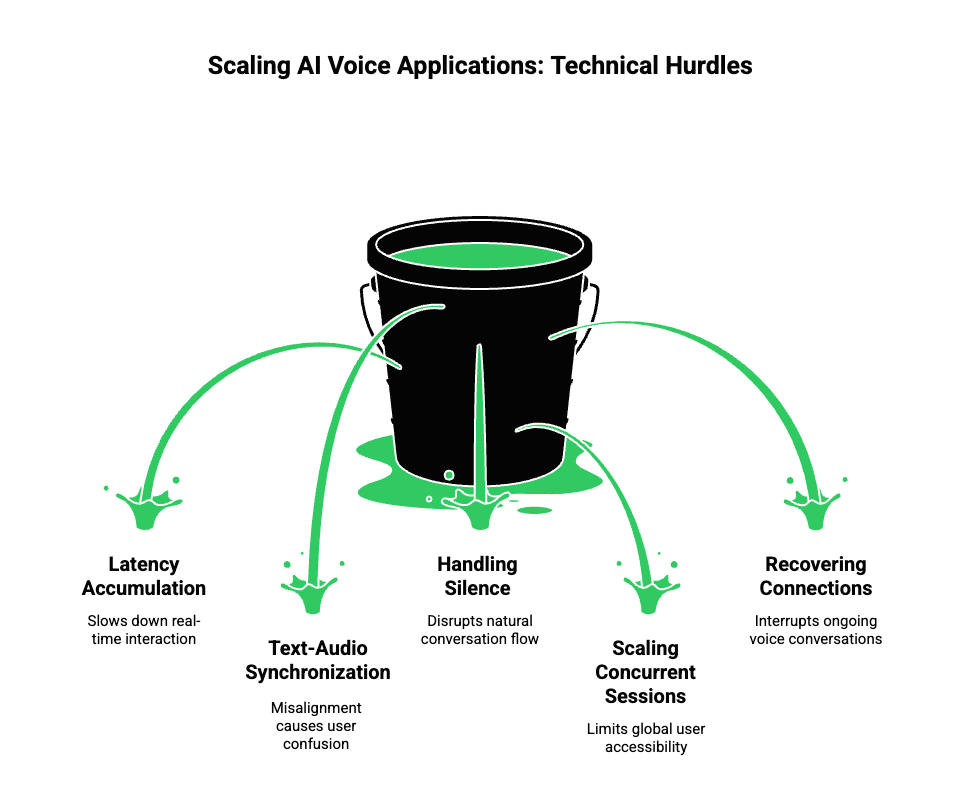
Despite modern tooling, voice AI remains difficult to scale.
Common challenges include:
- Latency accumulation across components
- Synchronization between text and audio
- Handling silence and interruptions
- Scaling concurrent voice sessions globally
- Recovering from dropped connections
For this reason, most failures in AI voice apps occur outside the LLM, not inside it.
Why Do Traditional Voice Chat SDKs Fall Short For AI Use Cases?
Most existing voice chat SDKs were designed long before LLM-driven applications existed. As a result, their architecture reflects older assumptions.
Built For Human-to-Human Conversations
Traditional voice SDKs work well when:
- Two humans are speaking
- Conversations are short-lived
- Logic lives on the client
- Low-level audio quality is the main goal
However, AI voice applications behave very differently.
AI Voice Conversations Are System-Driven
In AI-driven calls:
- Conversations are long-running
- The backend owns the dialogue state
- Audio must be streamed to multiple services
- Responses must begin before full user input is complete
Because of this, SDKs designed for gaming or social apps often struggle with:
- Backend-controlled sessions
- Streaming partial transcripts
- Streaming partial audio responses
- Maintaining context across reconnects
As a result, teams end up writing custom glue code that is hard to maintain.
What Changes When Voice Becomes An AI Transport Layer?
When voice is used for AI agents, it stops being a UI feature and becomes infrastructure.
This shift introduces new requirements.
Voice Must Stay Stable, Not Just Fast
For AI applications:
- Sessions must persist across network blips
- Context must not reset on reconnect
- Audio streams must be predictable
Therefore, the voice layer becomes a transport channel, similar to how HTTP or gRPC works for APIs.
The Backend Must Control The Conversation
Unlike consumer chat apps:
- The client should not own logic
- The backend must orchestrate STT, LLM, RAG, and tools
- Voice becomes an input-output pipe, not a decision layer
This separation is critical for production AI systems.
How Should a Voice Chat SDK Support AI Architectures?
Before introducing any platform, it helps to define what an AI-ready voice SDK must enable.
Required Capabilities For AI Voice Systems
A voice chat SDK for AI should support:
- Long-lived, backend-controlled sessions
- Streaming audio input and output
- Event-driven APIs for partial data
- Stable identifiers for each conversation
- Easy integration with external AI services
Without these capabilities, teams face scaling and reliability issues quickly.
How Does FreJun Teler Fit Into The Voice Chat SDK Landscape?
FreJun Teler is designed specifically for this AI-first voice architecture.
Rather than focusing only on voice calls or in-app chat, Teler provides global voice infrastructure for AI agents and LLM-powered systems.
What FreJun Teler Is
At its core, FreJun Teler acts as:
- A real-time voice transport layer
- An interface between phone/VoIP networks and AI systems
- A model-agnostic voice API built for LLM workflows
Instead of owning AI logic, Teler focuses on doing one thing well: making real-time voice reliable, fast, and controllable from the backend.
Where FreJun Teler Sits In The AI Voice Stack
To understand its role, let’s place Teler inside a typical AI voice architecture.
High-Level Architecture
User (Phone / VoIP / Web)
↓
FreJun Teler (Voice Streaming & Session Control)
↓
Application Backend
↓
STT → LLM → RAG / Tools → TTS
↑
Streaming Audio Output
In this model:
- Teler manages voice connectivity and media streaming
- Your backend owns conversation logic
- AI services remain interchangeable
This structure keeps systems modular and easier to evolve.
How Can Teams Build AI Voice Agents Using Teler With Any LLM?
One of the most common challenges teams face is vendor lock-in. FreJun Teler avoids this by staying model-agnostic.
Bring Your Own AI Stack
Using Teler, teams can choose:
- Any LLM (OpenAI, Anthropic, open-source, or private)
- Any STT engine (streaming or batch)
- Any TTS provider (low-latency or high-quality)
- Any RAG or tool-calling system
Because Teler only handles voice transport, the AI stack remains fully under your control.
Step-By-Step Implementation Flow
Below is a practical implementation sequence.
1. Call Or Session Starts
- A phone call or VoIP session connects to Teler
- A stable session ID is created
- Audio streaming begins immediately
2. Audio Is Streamed To Your Backend
- Encoded audio frames are delivered in real time
- No buffering waits for the full utterance
3. Streaming STT Consumes Audio
- Partial transcripts are generated
- Events are sent as speech progresses
4. LLM Processes Partial Context
- Transcripts are appended incrementally
- Context from memory, RAG, or tools is injected
- Tool calls happen if required
5. TTS Streams Speech Back
- Generated speech is chunked
- Audio is streamed back without waiting
- Playback happens smoothly via Teler
This streaming pipeline significantly improves perceived responsiveness.
How Does Teler Help With Conversational Context?
Context is one of the hardest problems in voice AI.
Why Context Breaks Easily In Voice Systems
Without a stable transport layer:
- Sessions reset on reconnection
- Partial conversations are lost
- AI responses become inconsistent
FreJun Teler solves this by:
- Maintaining stable connections
- Allowing backend-controlled session state
- Making reconnection transparent to AI logic
As a result, context management becomes a backend problem, where it belongs.
What About Latency And Global Scale?
Latency is not just about speed. It is about predictability.
How Teler Improves Real-Time Performance
FreJun Teler is built on:
- Geographically distributed infrastructure
- Low-latency media streaming
- Optimized audio playout paths
Because of this:
- Time-to-first-response is reduced
- Audio jitter is minimized
- Voice quality stays consistent across regions
This matters most when deploying AI agents globally.
How Should Founders And Engineering Leads Decide When To Use Teler?
Not every application needs AI voice. However, certain signals indicate clear fit.
You Likely Need AI Voice Infrastructure If:
- Your AI must speak to users in real time
- Conversations last more than a few turns
- You need backend-owned dialogue control
- Human-like responsiveness matters
- You plan to scale beyond demos
In such cases, building on basic voice APIs usually leads to technical debt.
What Should Teams Look For When Choosing A Voice SDK For AI?
Before closing, here is a simple evaluation checklist.
AI-Ready Voice SDK Checklist
- Does it support real-time streaming in both directions?
- Can the backend fully control sessions?
- Is it agnostic to LLM, STT, and TTS providers?
- Does it scale globally with low latency?
- Are reconnections handled cleanly?
- Is security built into the transport layer?
If the answer to several of these is “no,” the SDK may not be suitable for AI workloads.
Final Thoughts: Voice Chat SDKs Are The Backbone Of AI Voice Systems
To answer the core question clearly, a voice chat SDK provides the real-time audio transport layer needed to build voice-enabled applications. In AI systems, it becomes the foundation that allows speech-to-text engines, large language models, and text-to-speech services to work together without delay.
As AI transitions from text-first interfaces to voice-first experiences, infrastructure choices matter more than model selection. Systems that separate voice transport from AI logic scale faster, remain flexible, and perform more reliably in production.
FreJun Teler supports this shift by providing global, low-latency voice infrastructure for AI agents. It allows teams to integrate any LLM stack and speech engine without rebuilding voice systems from scratch.
Schedule a demo to explore how FreJun Teler can power your AI voice architecture.
FAQs –
1. What Is A Voice Chat SDK Used For?
A voice chat SDK enables real-time voice communication by handling audio capture, streaming, and playback across networks.
2. How Does A Voice Chat SDK Work With AI?
It streams audio to speech models and AI systems, then returns generated voice responses in real time.
3. Is A Voice Chat SDK Required To Build AI Voice Agents?
Yes, production-grade AI voice agents require a voice SDK to manage real-time audio reliably.
4. Can Voice Chat SDKs Work With Any LLM?
Most modern voice SDKs are model-agnostic and can integrate with any LLM or AI agent.
5. How Is Voice Chat Different From Text-Based Chat?
Voice chat requires low-latency audio streaming, synchronization, and error handling that text systems do not.
6. What Makes A Voice SDK Scalable?
Scalability depends on real-time streaming reliability, geographic distribution, and separation from AI logic.
7. Can Voice Chat SDKs Support Global Calling?
Yes, advanced SDKs support PSTN, SIP, VoIP, and regional routing worldwide.
8. Are Voice Chat SDKs Secure For Enterprise Use?
Enterprise-grade SDKs include encryption, access control, and secure media transport protocols.
9. How Do Voice SDKs Handle Network Latency?
They optimize packet streaming, buffer management, and regional routing to reduce delays.
10. When Should Teams Use FreJun Teler?
Teams should use FreJun Teler when building real-time AI voice systems that need global reach and flexibility.