
Voice automation is no longer limited to basic IVRs or simple click-to-call tools. Today, product teams need real-time, AI-driven communication systems that can understand intent, respond intelligently, and operate at scale across global customer touchpoints. As businesses adopt LLM-powered workflows, the voice call API has become the critical interface connecting telephony networks with AI decision-making engines.
This blog breaks down how a modern voice call API works, how it automates customer communication, and why engineering teams choose voice-first infrastructure to build reliable inbound and outbound automation. The goal is to make implementation clear, structured, and technically meaningful.
What Is a Voice Call API and Why Does It Matter?
A voice call API is a programmable interface that lets developers make, receive, and control voice calls via code. Unlike traditional telecom setups, this API-based model abstracts away the underlying telephony complexity – such as SIP trunks, PSTN connectivity, or media routing – allowing your application to focus on high-level logic.
By using a cloud calling API, organizations can automate business calls, handle high call volumes, and build intelligent voice workflows. In effect, a voice API becomes the bridge between telephony and your backend systems. 88% of organizations report regular AI use in at least one business function.
This matters because voice remains a powerful channel for customer communication: it’s real-time, personal, and capable of handling nuanced conversations. However, scaling voice manually is costly and complex. APIs open a way to scale customer interactions with automation, reliability, and global reach.
Why Are Businesses Struggling to Scale Customer Calls With Traditional Telephony?
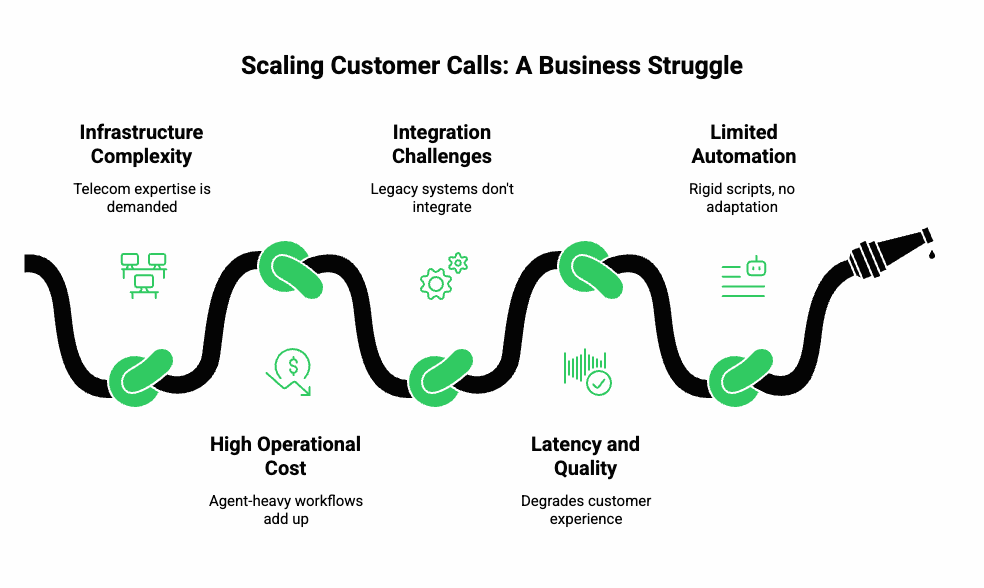
Scaling voice-based customer interactions is hard for several reasons:
- Infrastructure Complexity: Setting up carrier connections (SIP, PSTN) demands telecom expertise.
- High Operational Cost: Maintaining call centers or agent-heavy workflows adds up fast.
- Integration Challenges: Legacy phone systems often don’t integrate smoothly with modern backend services (CRMs, databases, AI).
- Latency and Quality Issues: Poor audio quality, jitter, or delays degrade customer experience.
- Limited Automation: Traditional IVRs or call-routing systems rely on rigid scripts. They can’t handle natural language or adapt on the fly.
As a result, many businesses are stuck: they need voice for critical tasks (support, sales, reminders), but scaling manually is inefficient and inflexible.
How Does a Voice Call API Actually Work Behind the Scenes?
To understand how you can automate and scale voice communication, let’s examine what really happens under the hood when you use a voice API.
Key Building Blocks:
- Signaling Layer: This manages call control – establishing, transferring, hanging up calls. Often via SIP or WebRTC.
- Media Layer: This is where audio data (voice) is streamed in real-time, using protocols like RTP or SRTP for security.
- Event System: The API sends webhooks or callbacks to your backend so you can react to lifecycle events (call started, ended, media started, DTMF pressed).
- Codec & Codec Negotiation: Voice APIs support codecs such as Opus, G.711, etc., to adapt to network conditions.
- Recording / Storage: If needed, media streams can be recorded and stored or forwarded to your storage backends.
Call Flow Example:
- Your application requests createCall(to, from).
- The API returns a call identifier, and then rings the destination.
- When the other party answers, the API triggers a call.answered event.
- Your application then opens a media stream: the caller’s audio starts flowing to your system.
- Meanwhile, you can send audio (pre-recorded or synthesized) back into the call.
- As the call proceeds, more events fire (DTMF, hangup, media stop), so your backend orchestrates what to do next.
In this way, a voice call API lets you control virtually every aspect of a call programmatically – from call setup to audio routing to cleanup.
What Does “Automating Customer Communication” Mean in the Age of Smart Voice Agents?
Automation in voice communication has moved far beyond scripted IVRs. Today, intelligent voice agents can:
- Listen to what the caller says (live transcription)
- Understand intent using language models
- Fetch relevant data (e.g., order status, appointment times) via tools or APIs
- Respond naturally via text-to-speech (TTS)
- Maintain conversational context across multiple calls
In short, automation now means building voice agents that feel like a human, but operate at scale.
This shift is powered by combining:
- STT (Speech-to-Text): Converts live audio into text in real time.
- LLM / Agent Layer: Processes the text, reasons over the context, and optionally calls tools or databases.
- RAG (Retrieval-Augmented Generation): Adds relevant external data or documents to the LLM prompt so that the agent can provide specific, up-to-date answers.
- TTS (Text-to-Speech): Converts generated text into audio that is streamed back to the caller.
When these components work together over a robust voice API, you get a fully automated, intelligent communication channel.
How Do Modern Voice Agents Combine LLMs, STT/TTS, RAG, and Tool Calling?
Let’s dig into the technical anatomy of a modern voice agent and how each component plays a role.
- Streaming STT
- As soon as the caller speaks, media is streamed to your backend.
- Use real-time ASR (Automatic Speech Recognition) to generate partial and final transcripts.
- Partial transcripts allow your system to start reasoning before the speaker finishes, reducing latency.
- As soon as the caller speaks, media is streamed to your backend.
- LLM or Agent Layer
- Once you get a transcript (partial or final), you pass it to your LLM or custom agent.
- You manage the conversation state (history, context) yourself.
- You can also embed external knowledge using RAG: for example, fetch related documents or records, then build a combined prompt for the LLM.
- Once you get a transcript (partial or final), you pass it to your LLM or custom agent.
- Tool Calling
- Your LLM or agent can invoke backend tools: database queries, API calls, or business logic. For example, getUserSubscription(userID) or rescheduleAppointment(…).
- These tool calls need to be built securely (authentication, input validation, rate limits).
- Your agent readjusts its response based on tool results before generating the final reply.
- Your LLM or agent can invoke backend tools: database queries, API calls, or business logic. For example, getUserSubscription(userID) or rescheduleAppointment(…).
- TTS Playback
- The agent’s response text goes to a TTS engine (you can choose your preferred provider).
- For low latency, you can use chunked synthesis: as text is emitted, chunks are synthesized and streamed progressively.
- This synthesized audio is pushed back into the voice API’s media stream so the user hears it in real time.
- The agent’s response text goes to a TTS engine (you can choose your preferred provider).
- Session Management & Control
- You listen for events: DTMF input, hangups, transfers, errors.
- Based on these events, you modify the call logic (e.g., redirect to agent, record the call, or end the session).
- You listen for events: DTMF input, hangups, transfers, errors.
This layered architecture ensures flexibility: you can swap any LLM, STT, or TTS provider without touching your voice infrastructure logic.
How Can Teler Become the Voice Layer for Your AI Agents or LLM Workflows?
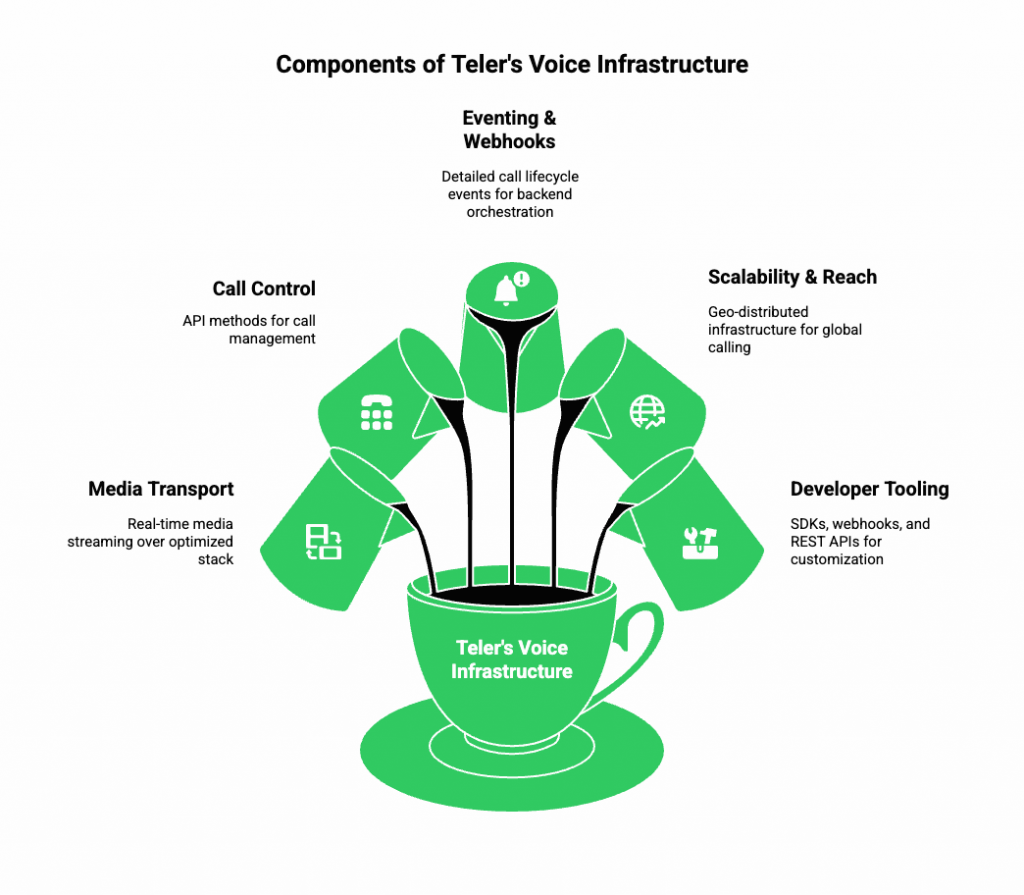
When you build voice agents that combine LLMs, STT, TTS, and tool-calling, you need a reliable, low-latency, globally distributed voice infrastructure. That’s exactly what FreJun Teler provides.
- Media Transport: Teler offers real-time media streaming over its optimized stack. It handles RTP/SRTP, codec negotiation, and packet relay.
- Call Control: You can initiate, answer, transfer, and terminate calls using simple API methods. Teler supports SIP, WebRTC, and PSTN.
- Eventing & Webhooks: Teler emits detailed call lifecycle events (e.g., call.answered, media.started, dtmf.received) so your backend can orchestrate logic precisely.
- Scalability & Reach: With its geo-distributed infrastructure, Teler enables global calling without managing your own carrier relationships or media relays.
- Developer Tooling: Teler provides clean SDKs (client & server), webhooks, and REST APIs to build and customize flows easily.
By relying on Teler for voice, your engineering team can focus entirely on AI and business logic – without having to manage telephony infrastructure.
What Is the Complete Architecture for Implementing Teler + Any LLM + Any STT/TTS?
Here is a technical architecture blueprint showing how to integrate Teler with any combination of LLM, STT, and TTS engines.
Architecture Diagram (Conceptual):
Caller → Teler (SIP/WebRTC)
↓ media stream
Backend Relay / Media Layer
↓
Streaming STT Engine → Transcript
↓
Conversation Orchestration Module
(LLM + RAG + Tool-calling)
↓
Response Text → TTS Engine
↓ synthesized audio
→ Teler (playback)
↓
Caller
Key Components & Data Flow:
- Teler Call Control: Manages call setup, teardown, DTMF, and session events.
- Media Relay / Proxy: A component (or set of distributed components) relays the RTP/SRTP media to your backend. This can sit close to Teler’s edge to reduce latency.
- Streaming STT Engine: Receives audio frames, converts to partial/final text, and emits transcripts with confidence scores.
- Conversation Orchestrator:
- Keeps track of conversation context (history, slots, memory).
- Calls a retrieval layer (RAG) to fetch relevant documents or database entries.
- Invokes the LLM with prompt + context + retrieved data.
- Executes tool calls as needed and integrates results.
- Produces the final response text.
- Keeps track of conversation context (history, slots, memory).
- TTS Engine: Takes response text; optionally performs chunked synthesis; generates an audio stream.
- Teler Playback API: Receives synthesized audio in real time and plays it back into the call.
- Event Webhooks: At every step, Teler notifies your backend about media.started, dtmf, call.ended, etc., enabling stateful logic.
Technical Considerations:
- Use partial transcripts from STT to reduce latency in LLM inference.
- Run the LLM in streaming mode (if supported), so you can begin generating responses even before the full prompt is ready.
- Use chunked TTS to synthesize and stream audio incrementally for faster playback.
- Design your tool-call API with idempotency and rate limits, because tool calls are expensive and often stateful.
- Maintain session context (conversation history + tool states) in a persistent store (Redis, vector DB, etc.).
- Monitor media quality: track jitter, packet loss, round-trip time (RTT), and MOS (Mean Opinion Score) for each call.
Explore how Elastic SIP Trunking powers high-volume AI automation workflows and strengthens your voice infrastructure for global call scaling.
How Do You Automate Outbound Calling Workflows at Scale?
Outbound calling is one of the strongest applications of a voice call API, especially for product teams aiming to automate sales, reminders, or operational updates. To scale this efficiently, the system must manage concurrency, retries, routing, and state reporting.
Here is how a robust outbound call automation system works:
1. Campaign Initialization
You define:
- Target numbers
- Retry logic
- Time windows
- Priority rules
- Expected outcomes (e.g., “reach customer”, “collect input”, “verify OTP”)
All these parameters are stored in a job queue or workflow scheduler.
2. Parallel Call Execution
When the campaign runs, the application uses the outbound call API to initiate thousands of calls concurrently.
To ensure reliability:
- Allocate concurrency limits per region or provider.
- Use rate limiting to avoid carrier blocks.
- Track call attempt status through callbacks like call.initiated, call.ringing, call.answered.
3. Live Call Automation
Once the call connects, you can automate the full experience:
- Stream real-time audio to STT
- Process conversation using your LLM agent
- Play messages using TTS
- Collect DTMF or spoken inputs
- Trigger tool calls (payments, verification, support lookup)
4. Intelligent Retry Logic
Instead of static retry intervals, you can automate dynamic retrying using:
- Time-of-day success patterns
- Call outcome codes (e.g., unreachable, busy, voicemail)
- Customer history
- Priority rules
5. Result Logging & Data Sync
After each call, results are stored in your CRM or database:
- Duration
- Customer intent
- Disposition result
- Transcript
- Follow-up actions
This level of automation dramatically improves efficiency compared to manual dialing or legacy outbound calling tools.
How Can You Automate Inbound Calls Using a Voice Call API?
Inbound call management is essential for support, order tracking, and service workflows. With a cloud calling API, you can automate major parts of inbound calls without routing everything to human agents.
Key Capabilities With Modern Voice Routing Software
- Intelligent routing based on account type or priority
- Voice agents answering the call before it reaches an agent
- Fetching data automatically using RAG + backend tools
- Call deflection to WhatsApp, SMS, or self-serve workflows
- Callback scheduling when queues get busy
Inbound Call Automation Flow
- Call Arrives – Routing Logic
The caller is identified via:
- CLI (Caller ID)
- CRM lookup
- Previous session history
- CLI (Caller ID)
- Initial Greeting via TTS
A context-aware greeting is played. - Real-Time Understanding
The caller’s speech is converted into text via STT.
The transcript goes to your LLM agent for intent detection. - Intelligent Workflow Execution
Based on intent, your agent may:
- Check order status
- Reschedule appointments
- Create a support ticket
- Initiate verification flows
- Transfer to an agent
- Check order status
- Escalation to Human Agent (If Needed)
You can use:
- Blind transfer
- Warm transfer with context
- Whisper instructions to the human agent
- Blind transfer
This structure allows you to automate up to 70% of routine inbound calls while still keeping human escalation available.
What Production Challenges Should Engineering Teams Expect?
When deploying voice agents in real-world environments, several technical challenges emerge. Knowing them early helps keep the system stable and scalable.
1. Latency Across Data Flow
Latency accumulates across:
- Media relay
- STT
- LLM inference
- TTS
- Network jitter
Goal: Keep round-trip latency under 1.5–2 seconds for natural interactions.
2. Media Quality Issues
You must monitor:
- Jitter (ms)
- Packet loss (%)
- Codec mismatches
- Echo and background noise
High packet loss degrades STT accuracy and agent performance.
3. Call Drop and Failover
Telephony is aggressive with timeouts. Your backend must handle:
- SIP 480/503 responses
- Provider failover
- Redial strategies
- Webhook retries
4. Scaling LLM Usage
Heavy LLM workloads can create:
- Cost spikes
- Queuing delays
- Cold starts
Mitigation methods:
- Use streaming mode
- Cache past conversation context
- Use smaller models when possible
- Load balance between providers
5. Secure Tool Calling
Every tool call triggered by the LLM must include:
- Input validation
- Access control
- Rate limiting
- Logging
- Redaction of sensitive data
Without this layer, agents can trigger unintended or unsafe operations.
How Should You Monitor Voice Agent Performance in Production?
Monitoring goes beyond call logs. You need a full observability stack.
1. Call-Level Metrics
Track:
- Answer rate
- Connection success
- Average call duration
- Call transfer rate
- First-response latency
- TTS playback latency
- STT error rate
2. Audio Quality Metrics
- MOS score estimation
- Jitter & packet loss stats
- Regional carrier performance
3. AI Layer Metrics
- Transcript accuracy
- Intent recognition accuracy
- LLM response time
- Tool-call success rate
- TTS synthesis speed
4. Business Metrics
- Resolution rate
- Drop-offs
- CSAT
- Conversion rate (sales calls)
A combination of telephony + AI + business metrics provides a full view of performance.
How Do You Choose the Right Voice Call API Provider?
Since this blog avoids comparing specific competitors, here’s a neutral evaluation framework.
Infrastructure Criteria
| Area | What to Check | Why It Matters |
| Global Routing | Multiple carrier partners | Reduces failures & improves reach |
| Media Relay | Low-latency RTP across regions | Better STT performance |
| Scalability | Support for thousands of concurrent calls | Needed for campaigns |
| Reliability | SIP failover + redundancy | Avoids downtime |
| Codec Support | Opus, G.711, PCM | Higher audio clarity |
Developer & AI Integration Criteria
- Webhooks that fire quickly
- Media streaming APIs
- Ability to attach STT / TTS in real time
- Transparent call logs
- Easy-to-test sandbox modes
- Simple outbound call API
- Flexible inbound routing rules
- Proper debugging tools
Security & Compliance
- Encryption (TLS, SRTP)
- PCI/ISO compliance
- Data retention customization
- PII redaction support
Choosing the right infrastructure ensures your LLM agent performs consistently across thousands of calls.
What Are the Best Use Cases for Automated Voice Communication?
Voice automation is unlocking value across industries. These are the strongest use cases for business call automation:
Customer Support
- Handle FAQs
- Automate appointment scheduling
- Provide ticket status updates
Sales & Lead Qualification
- Lead outreach
- Qualification questions
- Meeting booking via voice
Operations
- Delivery updates
- Payment reminders
- Verification calls
Healthcare
- Appointment reminders
- Prescription updates
- Patient follow-ups
Fintech
- KYC verification
- Fraud alerts
- Transaction updates
The shared theme: any workflow requiring real-time, large-scale communication can be automated with a voice call API + LLM pipeline.
How Do You Future-Proof Your Voice Automation Strategy?
To stay flexible and avoid lock-in, follow these principles:
1. Keep STT, TTS, and LLM Decoupled
Your architecture should allow swapping providers easily.
2. Use Streaming Everywhere
- Streaming STT
- Streaming LLM output
- Streaming TTS
This reduces latency dramatically.
3. Store Context Outside the Model
Do not rely on the LLM to remember the conversation. Store it in your own session store.
4. Build Tooling with Strict Boundaries
Make tools modular and permission-based.
5. Monitor Quality Continuously
Telephony networks change daily – monitoring ensures consistent call quality.
Ready to Build Scalable Voice Automation?
Modern customer communication demands systems that can operate at scale, react in real time, and integrate seamlessly with AI workflows. A well-structured voice call API offers engineering teams the foundation for low-latency, automated interactions across inbound and outbound use cases. When paired with contextual LLMs, flexible STT/TTS engines, and reliable cloud calling APIs, organizations can replace rigid IVRs with intelligent, instruction-followed voice agents that adapt to each conversation.
To accelerate this shift, FreJun Teler provides the global voice infrastructure, real-time media streaming, and developer-first API needed to deploy production-grade voice automation quickly.
Build your AI-powered communication layer today – schedule a demo.
FAQs –
1. How quickly can we integrate a voice call API into an existing product?
Most teams integrate within days using SDKs, webhooks, and straightforward call-control endpoints.
2. Can we use our own LLM, TTS, or STT provider with the API?
Yes, modern voice call APIs allow bring-your-own-model setups for flexible and modular voice agent design.
3. What latency should we expect during real-time conversations?
With optimized media streaming pipelines, responses typically remain sub-300ms for natural voice interaction.
4. Is outbound call scaling handled automatically by the API?
Yes. Outbound APIs manage concurrency, pacing, retries, and routing for thousands of automated calls.
5. How does the API handle noisy environments during voice capture?
Advanced audio preprocessing stabilizes speech input and reduces noise before forwarding it to your AI.
6. Can we integrate voice routing for multi-department call flows?
Yes. Voice routing software enables conditional routing, skill-based distribution, and context-aware transfers.
7. How do businesses secure customer conversations on the platform?
Encryption, permission-controlled endpoints, and secure media channels protect both signaling and audio streams.
8. Can the API automate appointment reminders or verification calls?
Yes. Outbound call APIs can run workflows for reminders, verification, NPS collection, and follow-ups.
9. How does it support multilingual customer communication?
You can plug in multilingual TTS/STT engines, enabling real-time translation and localized voice responses.
10. What is required to deploy a full AI voice agent?
You need an LLM, STT/TTS engines, tool-calling logic, and a reliable voice API to handle telephony operations.