
Real-time voice systems fail or succeed on execution, not ambition. As teams move from prototypes to production voice agents, performance limits become visible very quickly. Latency compounds across networks, codecs, and AI pipelines, while minor audio degradation can severely impact speech recognition and user trust. Therefore, reducing lag and improving clarity requires a system-wide mindset rather than isolated tuning.
Engineering leaders must design for streaming constraints from the beginning and verify assumptions with real metrics. When voice infrastructure, media streaming, and AI orchestration are aligned, teams can ship voice agents that feel natural, responsive, and dependable under real-world conditions.
Why Is Latency And Audio Clarity Critical In Real-Time Media Streaming?
Real-time media streaming is no longer limited to video broadcasts or live events. Today, it powers voice agents, AI-driven calls, customer support bots, and automated outreach systems. However, when latency increases or audio quality drops, the experience breaks immediately.
Latency refers to the delay between when a user speaks and when a response is heard. Even a few hundred milliseconds can make conversations feel unnatural. Meanwhile, poor audio clarity affects speech recognition accuracy, which then impacts AI decision-making.
As a result, teams building voice-based systems must treat latency and clarity as core product requirements – not optional optimizations.
Key reasons this matters:
- Conversational flow depends on fast turn-taking
- Speech-to-text accuracy degrades with noise and compression artifacts
- AI responses feel disconnected when delays accumulate
- Users interrupt, repeat themselves, or drop calls when lag is noticeable
Therefore, minimizing latency in calls while maintaining clean audio is essential for any production-grade real-time media streaming system.
What Happens End-To-End In A Real-Time Voice Streaming Pipeline?
Before optimizing anything, it is important to understand how real-time voice flows through a system. Most teams underestimate how many stages audio passes through before reaching a listener.
A typical real-time streaming pipeline looks like this:
- Audio Capture
- Microphone captures raw audio samples
- Audio is segmented into frames
- Microphone captures raw audio samples
- Encoding And Packetization
- Audio frames are compressed using a codec
- Frames are packetized for network transport
- Audio frames are compressed using a codec
- Network Transport
- Packets travel across the network
- Jitter, packet loss, and congestion occur
- Packets travel across the network
- Processing Layer
- Speech-to-text converts audio to text
- AI or LLM processes the input
- Text-to-speech generates audio output
- Speech-to-text converts audio to text
- Playback And Jitter Buffering
- Output audio is buffered
- Audio is decoded and played
- Output audio is buffered
However, each stage introduces delay. Meanwhile, clarity can be lost at multiple points if audio is compressed too aggressively or packets arrive out of order.
Because of this, effective low-latency optimization requires visibility across the entire pipeline rather than focusing on one component.
What Are The Most Common Causes Of Lag In Real-Time Streaming Systems?
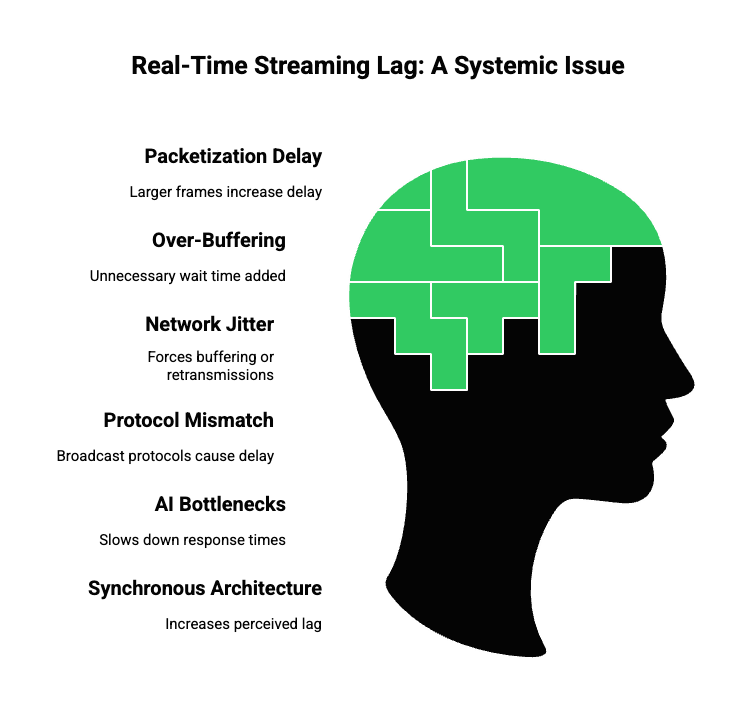
Latency rarely comes from one single issue. Instead, it compounds across layers. Therefore, identifying root causes is critical before applying fixes.
Common Sources Of Latency
- Packetization Delay: Larger audio frames reduce CPU usage but increase delay.
- Over-Buffering: Fixed jitter buffers often overcompensate, adding unnecessary wait time.
- Network Jitter And Packet Loss: Inconsistent packet arrival forces buffering or retransmissions.
- Protocol Mismatch: Using broadcast-oriented protocols for interactive calls leads to seconds of delay.
- AI Processing Bottlenecks: Large STT models, slow vector searches, or serialized pipelines slow responses.
- Synchronous Architecture: Waiting for full AI responses before starting playback increases perceived lag.
As a result, teams must treat real-time streaming as a full system problem rather than a networking-only issue.
Which Streaming Protocols Minimize Latency In Real-Time Calls?
Protocol choice has a direct impact on call latency, reliability, and clarity. However, many systems still default to protocols designed for one-way media delivery.
WebRTC is the recommended transport for conversational voice because it offers built-in NAT traversal, adaptive congestion control, and typical real deployments show 100 – 300 ms round-trip conversational latencies.
Common Protocol Options Compared
| Protocol Type | Typical Latency | Best Use Case | Limitations |
| WebRTC | 100–300 ms | Real-time calls, voice agents | More complex signaling |
| RTP / SRTP | 150–400 ms | SIP and telephony systems | Requires tuning |
| HLS / DASH | 5–30 seconds | Video streaming | Too slow for interaction |
While HTTP-based streaming works well for large audiences, it is unsuitable for conversational AI. Instead, UDP-based, real-time protocols are designed to minimize latency in calls.
Therefore, best practices for streaming voice include:
- Bidirectional transport support
- Adaptive congestion control
- Built-in jitter handling
- End-to-end encryption with minimal overhead
Choosing the right protocol early prevents architectural rewrites later.
How Do Codec And Audio Settings Affect Latency And Clarity?
Audio codecs play a critical role in balancing speed and quality. However, choosing the wrong settings can introduce delay or degrade speech clarity.
Key Codec Considerations
- Codec Type
- Opus: Low-latency, adaptive, ideal for voice
- PCM/G.711: Simple, low CPU, higher bandwidth
- Opus: Low-latency, adaptive, ideal for voice
- Frame Size
- Smaller frames reduce delay
- Larger frames increase efficiency but add latency
- Smaller frames reduce delay
- Bitrate
- Variable bitrate adapts better to speech
- Constant bitrate offers predictability
- Variable bitrate adapts better to speech
- Sampling Rate
- 16 kHz mono is optimal for speech recognition
- Higher rates increase data without major gains
- 16 kHz mono is optimal for speech recognition
As a result, improving audio quality for AI requires tuning codecs specifically for speech – not generic media streaming settings.
How Can Network Design Reduce Jitter And Packet Loss?
Latency alone does not break conversations. In fact, jitter – variation in packet arrival – often causes more damage to perceived quality.
Best Practices To Stabilize Networks
- Use adaptive jitter buffers instead of fixed buffers
- Cap buffer size to prevent runaway latency
- Deploy media servers closer to users
- Monitor packet loss and RTT continuously
- Adjust bitrate dynamically when congestion increases
Meanwhile, systems should avoid aggressive retransmissions for voice. Late packets are often worse than dropped packets in real-time media streaming.
Therefore, well-designed systems prioritize continuity over perfection.
How Do You Optimize AI Processing Without Breaking Conversational Flow?
AI adds intelligence to voice systems. However, it also introduces new latency risk if handled incorrectly.
Common AI-Induced Delays
- Waiting for full speech transcripts
- Blocking LLM calls
- Sequential STT → AI → TTS pipelines
- Slow retrieval in RAG systems
Optimization Techniques
- Use streaming speech recognition
- Start AI processing on partial transcripts
- Generate TTS incrementally
- Parallelize RAG retrieval with transcription
- Cache frequent responses
As a result, users hear responses faster, even if full processing continues in the background.
What Should Teams Measure To Improve Real-Time Streaming Quality?
Optimization without measurement leads to guesswork. Therefore, tracking the right metrics is mandatory.
Key metrics include:
- One-way and round-trip latency
- Jitter and packet loss
- Audio frame drop rates
- Speech recognition delay
- AI response time
Meanwhile, correlating these metrics across the pipeline helps teams identify where lag truly originates.
Where Do Most Voice Streaming Architectures Break In Production?
In theory, many real-time voice systems look solid. However, once they go live, hidden weaknesses start to surface. This usually happens because early architectural choices were optimized for demos rather than production traffic.
Common breaking points include:
- Tight coupling between voice transport and AI logic
- Blocking request-response flows instead of streaming pipelines
- Over-reliance on a single telephony or VoIP provider
- Lack of control over buffering and jitter handling
- No clear separation between media streaming and AI orchestration
As a result, teams struggle to iterate. Even small latency improvements require full-stack changes. Therefore, successful teams design for real-time constraints from the start.
Why Voice Infrastructure Must Be Separated From AI Logic?
As voice agents become more complex, AI stacks continue to evolve rapidly. Models change, tools expand, and retrieval strategies improve. Meanwhile, voice transport remains a real-time, low-level problem that must stay stable.
Because of this, modern systems separate responsibilities clearly:
- Voice Layer
- Audio capture and playback
- Streaming and transport
- Latency, jitter, and packet handling
- Audio capture and playback
- AI Layer
- STT, LLM, TTS
- Context handling
- Tool calling and RAG
- STT, LLM, TTS
This separation allows teams to upgrade AI models without reworking call infrastructure. More importantly, it keeps latency predictable as systems scale.
Where Does FreJun Teler Fit In A Real-Time Media Streaming Stack?
FreJun Teler operates at the voice and media streaming layer. Rather than being an AI platform or a calling-only service, it provides the real-time transport and infrastructure required for voice agents to function reliably.
In practice, this means:
- Teler handles real-time audio streaming over calls
- Developers bring their own STT, LLM, and TTS
- AI logic stays fully controlled by the application
- The voice layer remains optimized for low latency
As a result, teams avoid vendor lock-in while still benefiting from production-grade voice infrastructure.
How Does Teler Reduce Latency In Real-Time Calls?
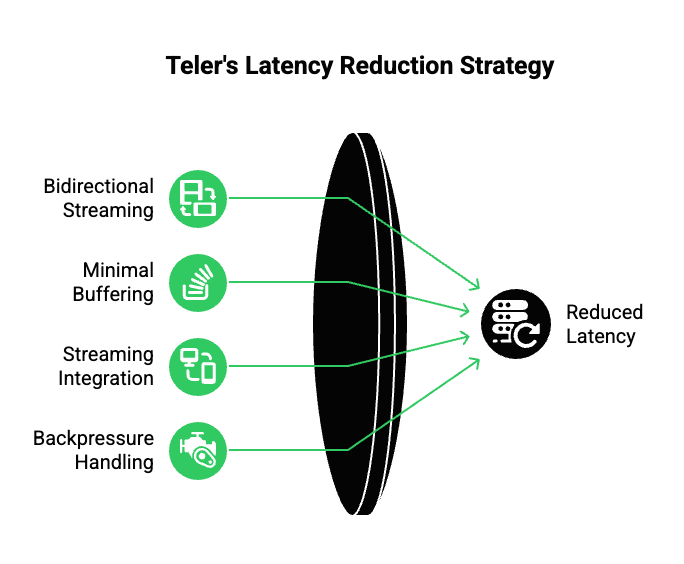
Latency reduction in Teler is not based on a single optimization. Instead, it comes from consistent design choices across the streaming pipeline.
Key Technical Mechanisms
- Bidirectional Real-Time Streaming: Audio flows in and out of calls continuously, not in chunks.
- Minimal Buffering By Default: Teler prioritizes low-latency playback over excessive smoothing.
- Streaming-Friendly Integration: Audio can be forwarded to STT engines as soon as frames arrive.
- Backpressure Handling: When AI processing slows, the system adapts without blocking audio flow.
Because of this, end-to-end latency stays within conversational limits even as AI workloads increase.
How Does Teler Improve Audio Clarity For AI Systems?
Audio clarity directly affects speech recognition accuracy and downstream AI behavior. Therefore, Teler focuses on preserving signal quality throughout transport.
Key practices include:
- Consistent audio framing without re-encoding where possible
- Support for voice-optimized codecs
- Clean separation between network jitter handling and playback buffering
- Stable streaming channels that reduce packet reordering
As a result, STT engines receive clearer input. Meanwhile, TTS output reaches users without distortion or clipping.
How Does Teler Support Any LLM, STT, Or TTS?
One of the most common concerns for engineering teams is flexibility. Different use cases demand different AI components. Therefore, Teler remains model-agnostic by design.
Supported Patterns
- Streaming audio to any cloud or on-prem STT
- Sending partial transcripts to any LLM
- Receiving incremental text output from AI agents
- Streaming generated speech from any TTS engine
Because Teler acts as the transport layer, AI logic remains fully decoupled. This allows teams to experiment with models without changing call infrastructure.
How Does A Typical Voice Agent Flow Look With Teler?
While implementations vary, most production pipelines follow a similar pattern.
End-To-End Flow
- Incoming call connects to Teler
- Audio is streamed in real time
- Audio frames are forwarded to STT
- Partial transcripts are sent to the AI agent
- LLM processes intent and context
- TTS generates audio as text streams out
- Audio response streams back to the caller
Because each step is streaming-based, no single stage blocks the conversation. Therefore, perceived responsiveness remains high.
How Does Teler Handle Scale And Reliability?
Scaling real-time systems introduces unique challenges. Traffic spikes, network variation, and global latency differences must be handled without degrading quality.
Teler addresses this through:
- Geographically distributed infrastructure
- High-availability routing
- Graceful handling of degraded network conditions
- Isolation between calls to prevent cascading failures
Meanwhile, developers can focus on AI logic instead of managing call reliability.
What Metrics Matter When Using Teler In Production?
Low-latency optimization does not end at deployment. Continuous monitoring is required.
With Teler-based systems, teams typically track:
- Audio ingress and egress latency
- Packet loss and jitter rates
- STT and TTS processing times
- AI response delays
- Call-level quality indicators
These metrics help teams make targeted improvements rather than guessing.
How Does Teler Compare To Call-Centric Platforms?
Many platforms treat AI as an add-on to calling. However, this approach often limits flexibility.
Key Differences
| Capability | Call-Focused Platforms | Teler |
| Voice Streaming | Basic | Real-time, bidirectional |
| AI Integration | Limited | Fully flexible |
| Latency Control | Minimal | Tunable and observable |
| Model Choice | Restricted | Bring your own |
As a result, Teler aligns better with teams building long-term AI-driven voice systems.
How Should Teams Move From Prototype To Production?
Prototypes often work with shortcuts. However, production systems demand discipline.
Best practices include:
- Design for streaming from day one
- Separate voice infrastructure from AI logic
- Avoid blocking pipelines
- Instrument every stage
- Optimize continuously using real metrics
When these principles are followed, low-latency real-time media streaming becomes sustainable rather than fragile.
Final Takeaway
Reducing lag and improving clarity is not about a single optimization. Instead, it requires the right streaming protocols, careful codec and buffer tuning, network-aware design, and streaming-first AI pipelines. Most importantly, it depends on having a reliable voice infrastructure layer built specifically for real-time media.
When these elements align, real-time voice agents feel natural, responsive, and reliable at scale.
FreJun Teler enables this alignment by handling the hardest part – real-time voice streaming over telephony and VoIP – so engineering teams can focus on building better AI, faster.
Schedule a demo to see how Teler powers low-latency, production-grade voice agents.
FAQs –
- What causes lag in AI voice agents?
Lag usually comes from buffering, network jitter, slow AI processing, or non-streaming protocols used in real-time calls. - How much latency is acceptable for real-time voice calls?
Interactive conversations usually feel natural when end-to-end latency stays under 400 milliseconds. - Why does audio quality matter for AI voice systems?
Poor audio reduces speech-to-text accuracy, which directly impacts AI understanding and response quality. - Which protocol is best for low-latency voice streaming?
WebRTC or RTP-based streaming works best for real-time, bi-directional voice interactions. - Can I use any LLM with real-time voice systems?
Yes, as long as the system supports streaming inputs and outputs without blocking audio flow. - What role do codecs play in reducing latency?
Codec choice affects encoding delay, bandwidth usage, and speech clarity for AI transcription. - Why do prototypes feel faster than production systems?
Prototypes often skip buffering, retries, and scale-related logic needed in production environments. - How does buffering impact perceived lag?
Excess buffering smooths audio but adds delay, making conversations feel slow or disconnected. - Is network latency or AI latency more important?
Both matter, but network jitter and buffering often cause larger real-world delays than AI inference. - How does FreJun Teler help improve call performance?
Teler provides real-time media streaming infrastructure that reduces latency while keeping audio clear.