
AI voice agents are redefining how humans interact with technology – but true conversational realism isn’t about intelligence alone. It’s about responsiveness, continuity, and flow. This is where media streaming becomes indispensable. By enabling real-time audio streaming for AI, it powers seamless, speech-to-speech communication that feels naturally human.
In this blog, we’ll explore how media streaming minimizes conversational latency, supports speech-to-speech pipelines, and transforms standard AI chat models into real-time voice agents capable of live dialogue – with the precision and performance today’s businesses demand.
What Makes AI Voice Agents Feel Human?
Every day, voice interfaces are replacing traditional support systems and IVRs. From customer service to proactive sales calls, users now expect to speak naturally with technology. Yet the secret behind a realistic voice agent is not only its vocabulary – it’s the speed, tone, and continuity of its replies.
A human-like voice agent must:
- Listen while a person speaks
- Interpret partial phrases in real time
- Respond within milliseconds
- Maintain context between turns
Most text-based AI systems can think fast but speak slowly because their voice layer isn’t built for real-time communication. The missing link is media streaming – the technology that carries live audio between the caller and the AI with minimal delay.
When media streaming is correctly implemented, every word the user says is captured, processed, and answered almost instantly. This creates a conversation that sounds natural, not mechanical.
What Is Media Streaming and Why Does It Matter for Conversational AI?
In simple terms, media streaming is the continuous transmission of audio or video data from one point to another without waiting for the entire file to finish.
For voice AI, it means:
- Capturing speech input from a phone, browser, or app
- Sending the audio to an AI backend continuously
- Returning synthesized audio in parallel
Instead of a record – upload – process – respond loop, streaming turns the interaction into a flow. That time difference transforms the experience. A delay beyond one second feels robotic, but when round-trip latency drops below 500 milliseconds, users perceive it as a natural conversation.
Moreover, streaming unlocks speech-to-speech streaming – where speech goes in and synthesized speech comes out continuously. This capability allows the AI agent to interrupt, clarify, or overlap slightly with human speech, mimicking real conversation.
How Does the Real-Time Audio Streaming Pipeline Work?
To understand how AI voice agent streaming operates, imagine a circular loop that never pauses.
Step 1 – Voice Capture
When a user speaks, their voice is captured through a VoIP call, PSTN line, or web microphone.
Audio is encoded using low-latency codecs such as Opus, G.722, or L16 PCM to preserve quality while minimizing packet size.
Step 2 – Real-Time Transmission
The encoded audio travels through a WebSocket or RTP (Real-time Transport Protocol) channel to the backend.
Packets include timestamps and sequence numbers so the system can reconstruct audio accurately even if packets arrive out of order.
Step 3 – Streaming Speech-to-Text (STT)
As each audio packet arrives, the speech recognition engine transcribes partial text.
Partial transcripts let the AI start reasoning before the user finishes speaking – the key to fast replies. Modern streaming ASR systems deliver partial transcriptions in tens to a few hundred milliseconds, enabling the AI to begin composing a response before the speaker finishes.
Step 4 – LLM or Agent Processing
The transcribed text flows into the AI model or orchestrator.
Here, the system uses context memory and retrieval (RAG) to decide on the next response.
The output text is sent immediately to a Text-to-Speech engine, without waiting for the user to stop.
Step 5 – Streaming Text-to-Speech (TTS)
The TTS service converts the generated text into audio chunks.
Each chunk (typically 20-50 milliseconds) streams back through the same channel for live playback.
The listener hears the AI reply almost in sync with their own speech.
Step 6 – Playback and Loop
The playback engine injects synthesized speech into the ongoing call.
At this stage, STT and TTS run simultaneously – one listening, the other speaking – while the orchestrator maintains dialogue state.
Latency checkpoints to aim for
- Audio capture to STT output – < 150 ms
- STT to AI response – < 300 ms
- TTS to playback – < 200 ms
These micro-latencies ensure that the total conversational delay remains within the “human comfort zone.”
Why Is Low Latency the Secret Ingredient of Human-Like Conversations?
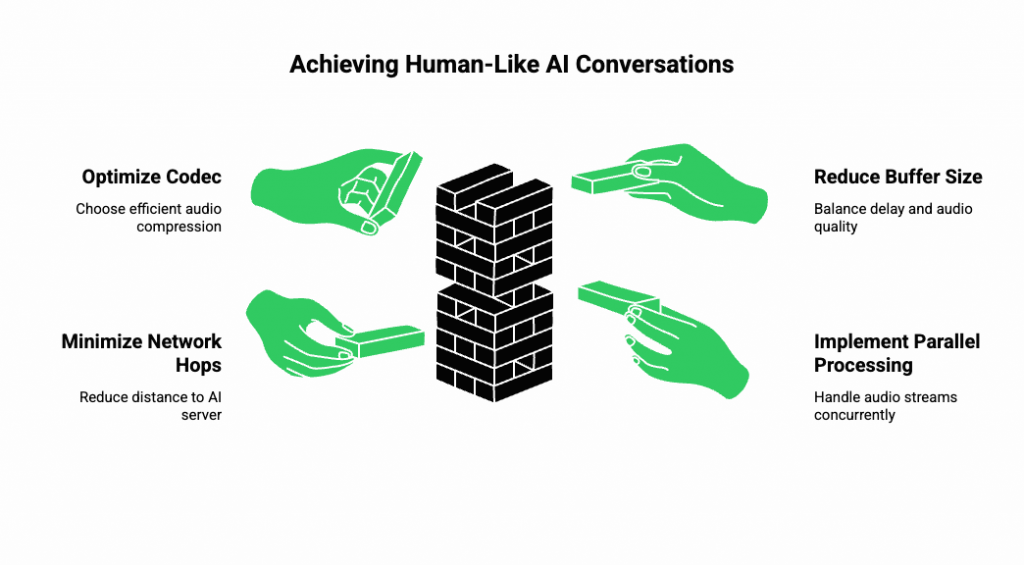
Latency is the time between when a user finishes speaking and when they hear the AI respond.
Even small delays change perception. Humans subconsciously expect quick turn-taking. When an agent replies within half a second, the conversation flows smoothly. If it hesitates, the illusion of intelligence disappears.
Conversational AI latency depends on several technical factors:
- Codec choice: Opus and G.722 offer wide bandwidth at low bit rates.
- Buffer size: Smaller buffers reduce delay but increase risk of audio drops.
- Network distance: The number of hops between caller and AI server directly adds milliseconds.
- Parallel processing: Handling STT and TTS streams concurrently cuts response time in half.
For production systems, the target is a sub-500 ms round trip – the threshold where real-time audio streaming for AI starts to feel conversational rather than sequential.
What Are the Key Components Behind AI Voice Agent Streaming?
Building a dependable streaming pipeline requires coordination across multiple subsystems.
Below is a simplified breakdown for founders and engineering leads designing a voice AI architecture.
Speech-to-Speech Streaming
This process merges continuous STT and TTS streams into one seamless channel.
Flow
- Input speech – Chunked audio frames sent via WebSocket to STT
- Partial text – Forwarded to LLM in real time
- LLM output – Chunked text to TTS stream
- TTS audio frames – Returned for live playback
Because both directions remain open, the user and AI can talk almost simultaneously. This is the technical backbone of human-like interactivity.
Transport Protocols
The transport layer decides how audio travels.
| Protocol | Used For | Strengths | When to Use |
| RTP | PSTN / SIP calls | Lowest latency, telephony native | Direct voice calls and SIP trunks |
| WebRTC | Browser / mobile apps | Built-in echo cancel & NAT traversal | In-app voice agents |
| WebSocket | AI data streaming | Simple to integrate, binary support | Bridging AI backend and voice infra |
Each layer can carry PCM or Opus frames, depending on required fidelity.
For global systems, developers often combine RTP for telephony and WebSocket for AI to achieve both reliability and flexibility.
Session Management
A conversation isn’t just a stream of words; it’s a session.
Each session must preserve:
- Caller ID and metadata
- Conversation state or memory
- Start / end timestamps for analytics
In AI voice agent streaming, the backend maintains a session object that holds context so the AI can reference earlier exchanges.
Efficient session management avoids the “context amnesia” that frustrates callers.
Error Recovery and Jitter Control
Network instability can cause packet loss or variable delays.
To counter this, systems use:
- Jitter buffers that temporarily store audio to smooth playback.
- Forward Error Correction (FEC) to rebuild lost packets.
- Silence detection to pause processing when no speech is present.
- Automatic gain control (AGC) to stabilize volume across devices.
These controls ensure the AI doesn’t sound distorted or clipped, even on congested networks.
Scalability and Concurrency
Real-time voice applications must handle many simultaneous streams without performance loss.
To scale effectively:
- Use event-driven servers capable of asynchronous I/O.
- Implement load balancing based on active stream count.
- Distribute media servers geographically to reduce round-trip latency.
- Monitor metrics like packet loss, jitter, and queue depth per region.
Modern streaming frameworks use stateless workers so sessions can migrate if a node fails, ensuring high availability.
Security and Compliance
Streaming audio often contains sensitive information. Therefore, encryption and compliance are essential.
Best practices include:
- SRTP/TLS for transport-level encryption.
- Ephemeral tokens for stream authentication.
- Data retention policies that erase raw audio after session closure.
- Compliance alignment with GDPR, HIPAA, or local voice regulations.
Strong security preserves user trust while meeting enterprise standards.
How Can Builders Implement Real-Time Speech-to-Speech Streaming?
Turning theory into a production-grade system involves combining multiple specialized components – voice infrastructure, AI reasoning, and real-time synthesis – into one orchestrated flow.
Below is a simplified architecture that most product teams follow when designing AI voice agent streaming:
- Voice Gateway – handles inbound and outbound calls (SIP, WebRTC, or VoIP).
- Streaming Bridge – converts live audio into continuous WebSocket or RTP packets.
- Speech-to-Text (STT) Engine – converts audio chunks to partial transcripts.
- LLM Layer – interprets intent and generates the next response (optionally powered by RAG).
- Text-to-Speech (TTS) Engine – streams audio back to the caller.
- Session Orchestrator – maintains dialogue state and context.
Each layer must stream continuously rather than wait for completion events.
A good mental model:
The faster your AI begins to think and the earlier it begins to speak, the more “alive” it feels.
To achieve that, developers use bi-directional media streaming, keeping both listening and speaking channels open throughout the call. This enables the AI to detect hesitation, barge-in, or intent shifts in real time – just as humans do.
Explore our guide on integrating Teler with AgentKit to deploy real-time AI voice agents through the MCP Server in minutes.
How Does FreJun Teler Power This Real-Time Infrastructure?
FreJun Teler acts as the media backbone that connects telephony and AI engines seamlessly.
Where most providers focus only on basic calling or SIP trunking, Teler is optimized for programmable, low-latency media streaming designed specifically for voice AI use cases.
The Core of Teler: Programmable SIP with Streaming Control
Teler allows developers to:
- Capture and stream audio from any PSTN, SIP, or WebRTC call directly to an AI backend via WebSocket.
- Receive real-time audio streams from AI engines and inject them back into live calls.
- Control calls programmatically using APIs (mute, record, transfer, or bridge).
This turns every Teler call into a programmable audio pipeline, not just a static conversation.
| Feature | Traditional Telephony API | FreJun Teler |
| Media control | Post-call recording only | Real-time bi-directional streaming |
| AI integration | Manual or external gateway | Native WebSocket & SIP support |
| Latency optimization | Fixed regional servers | Edge-based media relays |
| Flexibility | Voice-only | Extensible to LLM, TTS, STT, RAG stacks |
The outcome: speech-to-speech streaming with near-zero lag and full control over the conversational loop.
Connecting Teler with AI Engines
Teler’s design makes it easy to pair with any combination of:
- LLMs (OpenAI, Anthropic, Gemini, or custom fine-tuned models)
- STT/TTS engines (Deepgram, AssemblyAI, ElevenLabs, Azure Cognitive Speech, etc.)
- Vector retrieval (RAG) for dynamic knowledge fetching
A simplified orchestration might look like this:
Caller – Teler SIP Gateway – Streaming Bridge
– STT Engine – LLM Orchestrator – TTS Engine – Teler Playback
Because Teler streams audio in both directions over WebSockets, each component can process data asynchronously – reducing total conversational latency from several seconds to a few hundred milliseconds.
Deployment Flexibility
FreJun Teler’s architecture supports multiple deployment modes for different teams:
| Mode | Best For | Description |
| Full cloud | Startups, PoCs | Teler-managed servers stream media directly to AI endpoints |
| Hybrid edge | Enterprises | On-premise AI models, Teler connects via local relay |
| API orchestration | Developers | REST + WebSocket SDKs for full control of session logic |
This flexibility allows founders, PMs, and engineering leads to pick the best path based on compliance, latency, and infrastructure preferences.
Example: End-to-End Latency Comparison
| Step | Traditional API Flow | Teler Streaming Flow |
| Audio Capture | 500 ms | 80 ms |
| STT Processing | 700 ms | 200 ms |
| LLM Reasoning | 600 ms | 400 ms (overlap) |
| TTS Generation | 900 ms | 250 ms |
| Total Round Trip | ~2.7 s | ~0.93 s |
This difference – almost 3x faster – defines whether a conversation feels human-like or laggy.
How Does Streaming Enable True Human-Like Behaviours?
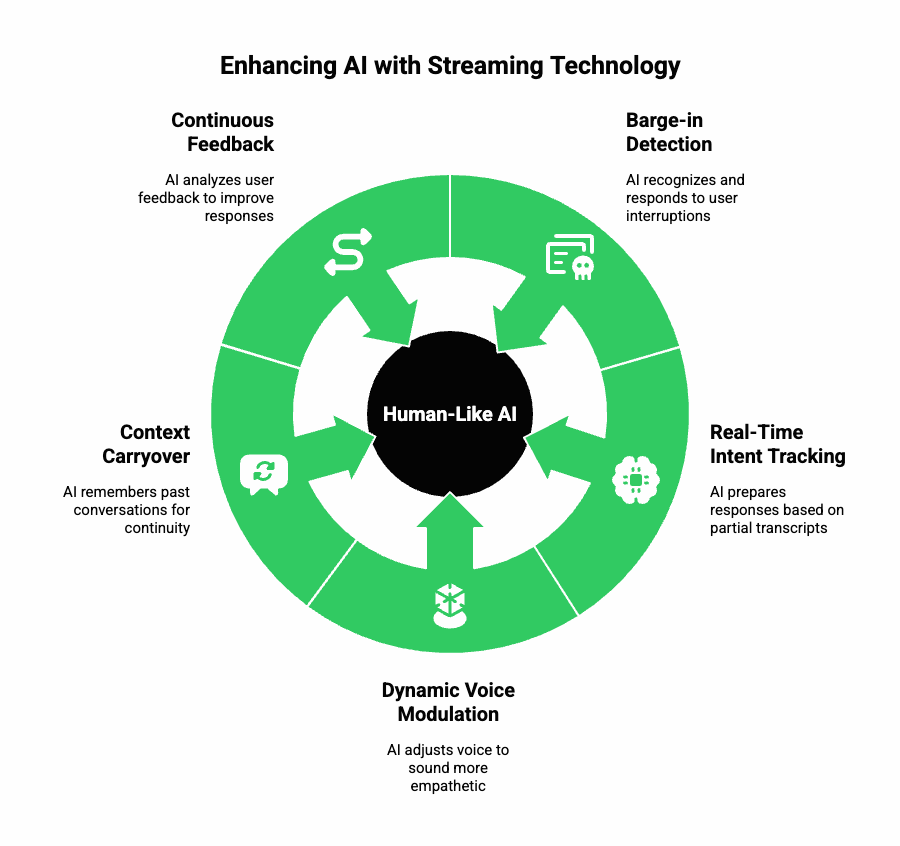
When properly implemented, streaming lets AI agents do things that static systems can’t – because they no longer “wait their turn.”
Some advanced conversational behaviors powered by streaming include:
1. Barge-in Detection
The AI can recognize when the user interrupts and stop speaking mid-sentence, mirroring natural human etiquette.
2. Real-Time Intent Tracking
Partial transcripts allow the AI to start preparing responses before the user finishes speaking, reducing wait time.
3. Dynamic Voice Modulation
Streaming TTS engines can adjust pitch, tone, or pace mid-response – sounding more adaptive and empathetic.
4. Context Carryover
By maintaining a persistent session memory, the AI can recall earlier exchanges even after long pauses.
5. Continuous Feedback
Silence detection and emotional prosody analysis help AI determine when to pause, rephrase, or confirm understanding.
In short, streaming transforms voice bots into conversational partners that listen, interpret, and respond with near-human reflexes.
Sign Up with FreJun Teler Now!
How Can Teams Build Their Own Conversational AI Stack with Teler?
Below is a step-by-step engineering playbook for teams planning to build a real-time conversational AI pipeline with FreJun Teler.
Step 1: Capture Real-Time Audio
Use Teler’s programmable SIP or WebRTC interface to capture the caller’s voice and start streaming via WebSocket.
POST /api/v1/stream/start
{
“stream_url”: “wss://your-backend/voice/stream”,
“codec”: “opus”,
“direction”: “bidirectional”
}
Step 2: Transcribe with Low-Latency STT
Pipe the live audio to your STT engine and handle interim results:
{ “text_partial”: “Can you help me…”, “confidence”: 0.92 }
Partial text can be passed to your LLM immediately, rather than waiting for final transcripts.
Step 3: Process with LLM + RAG
Feed each partial transcript to your agent logic. Use retrieval augmentation (RAG) to bring in contextual data – such as FAQs, CRM entries, or recent transactions – without retraining the model.
Step 4: Stream Back Synthesized Speech
Send the generated text chunks to your TTS engine and stream the audio output back to Teler for playback.
This creates a full speech-to-speech streaming loop – where both speaking and listening happen continuously.
Step 5: Monitor Latency Metrics
Instrument every stage. Measure:
- Audio capture delay
- STT turnaround
- AI reasoning time
- TTS synthesis speed
- Playback delivery
A single bottleneck can double perceived latency, so continuous monitoring is key.
Step 6: Scale with Edge Relays
As traffic grows, deploy regional Teler relays near your users to cut down round-trip time. Edge nodes buffer and compress media intelligently, maintaining call quality even in variable networks.
What Are the Common Challenges and How to Overcome Them?
| Challenge | Impact | Mitigation |
| STT misrecognition | Incorrect responses | Use domain-tuned STT models and partial corrections |
| Network jitter | Choppy audio | Enable jitter buffers and packet recovery |
| LLM latency spikes | Delayed responses | Cache frequent responses or use prompt streaming |
| Voice overlap | Broken audio flow | Implement adaptive barge-in logic |
| TTS inconsistency | Robotic tone | Choose neural TTS with emotion modulation |
Combining these optimizations can reduce conversational AI latency by up to 70%, improving overall user satisfaction.
What Are the Real-World Use Cases of AI Voice Agent Streaming?
| Industry | Example Application | Streaming Advantage |
| Customer Support | Real-time call deflection and triage | Instant responses improve retention |
| Telemedicine | Virtual nurse or appointment scheduling | Natural dialogue builds trust |
| Finance | Transaction verification bots | Secure, compliant, low-latency voice |
| Recruitment | Candidate screening voice agents | Scalable and personal conversations |
| Media & Entertainment | Interactive streaming hosts | Seamless speech-to-speech interactivity |
In all these cases, media streaming bridges the gap between structured automation and real conversational flow.
What’s Next for Media Streaming in Conversational AI?
As LLMs evolve, the future of AI voice agents will depend on the tightness of their media loop.
We’re moving toward:
- Ultra-low-latency edge inference
- Multimodal understanding (combining tone, emotion, and context)
- Adaptive streaming compression that prioritizes speech clarity over bandwidth
- Real-time translation and accent adaptation across regions
FreJun Teler’s programmable media layer is already designed for this future – offering developers a foundation that can plug into any AI engine and scale globally.
Final Thoughts
Human-like conversations in AI aren’t born from larger models; they’re built through smoother, faster, and more natural media streaming. The real differentiator lies in how efficiently audio travels between human speech and machine response. When latency drops and continuity rises, interactions start feeling genuinely human.
By pairing LLM intelligence with low-latency, real-time audio streaming, FreJun Teler bridges this critical gap. Its global voice infrastructure simplifies the entire speech-to-speech pipeline, capturing, processing, and responding to live audio in milliseconds.
For founders, product teams, and engineers building scalable voice AI systems, Teler provides the missing foundation.
Schedule a demo today to experience how your AI agents can truly talk, think, and respond – like humans do.
FAQs –
- What is media streaming in AI voice agents?
It’s the real-time transfer of audio data between user, AI, and response systems with minimal delay. - Why does low latency matter in AI conversations?
Low latency keeps dialogue natural, avoiding awkward pauses and ensuring a human-like conversational rhythm. - Can I use any AI model with FreJun Teler?
Yes. Teler is model-agnostic and integrates seamlessly with any LLM, TTS, or STT engine. - How fast can Teler process live conversations?
Teler’s optimized infrastructure achieves sub-500ms round-trip latency for real-time, fluid speech interactions. - Is FreJun Teler suitable for enterprise-scale voice AI systems?
Absolutely. It’s built for enterprise-grade reliability, global scale, and secure voice data handling. - Does media streaming replace APIs for AI voice calls?
Not entirely, streaming complements APIs by enabling continuous, bi-directional voice flow instead of request-response batches. - Can Teler connect to PSTN or VoIP networks?
Yes. Teler supports cloud telephony, SIP, and VoIP integrations for inbound and outbound AI-powered calls. - How do I handle speech interruptions during live calls?
Teler’s session management ensures seamless recovery and maintains conversation flow despite network or speech interruptions. - Can developers control the AI’s dialogue logic?
Yes. You maintain full logic control while Teler manages the voice streaming and call transport layer.
What are the main use cases for AI voice agent streaming?
Customer service bots, outbound campaigns, and interactive conversational agents across industries benefit from streaming-based systems.