
Building real-time voice infrastructure is no longer a luxury for AI products – it’s the foundation of responsive, human-like digital interactions.
Developers today must go beyond simple voice APIs and focus on transport-level optimization, codec tuning, and parallel AI streaming to keep conversations fluid.
Now, let’s bring it all together with the core takeaway on how to future-proof your AI voice systems with precision engineering.
This guide walked through every layer – from media routing to real-time inference – to help teams cut latency, boost clarity, and scale globally.
What Does “Low-Latency Media Streaming” Really Mean for Developers?
In simple terms, media streaming is the continuous transmission of audio or video data from a source to a destination over the internet. When we talk about low-latency streaming, we refer to minimizing the delay between when the data is created and when the end user hears or sees it.
Latency in streaming systems can come from several stages:
| Stage | Description | Typical Delay |
| Capture & Encode | Converting raw voice to digital packets | 20–60 ms |
| Network Transport | Sending packets over the internet | 50–150 ms |
| Decode & Playback | Reassembling and playing the stream | 10–50 ms |
| Total Round-Trip | Combined delay user perceives | 150–300 ms (target) |
In real-time voice systems, every millisecond counts. If total round-trip latency exceeds about 300 ms, the user begins to experience noticeable lag, which breaks conversational flow.
Therefore, developers aim for sub-200 ms latency from microphone to speaker for interactive use cases such as live voice chat, AI call handling, and customer support automation.
Low-latency streaming explained simply: it is the engineering discipline of compressing this timeline without sacrificing quality or reliability.
Why Does Latency Matter So Much in AI-Powered Voice Applications?
Even a slight delay can make a conversation feel robotic or unresponsive. Imagine saying “Hello” and waiting half a second before hearing “Hi there.” That pause breaks natural rhythm. User studies and peer-reviewed research show that even modest delays materially change turn-taking behavior and reduce perceived naturalness – experiments report thresholds where interaction quality drops sharply as delay passes ~150–300 ms.
Modern voice agents combine several real-time components:
- Speech-to-Text (STT): Converts spoken words into text.
- Language Logic: Determines the intent and formulates a reply.
- Text-to-Speech (TTS): Generates the audio response.
- Retrieval and Tools: Fetch context or perform actions during a call.
Each stage introduces small processing delays. When added together, these can easily exceed 700 ms if not optimized. For applications like automated receptionists or AI customer care, the goal is to keep end-to-end delay below 400 ms.
Hence, a low-latency streaming infrastructure becomes the foundation on which responsive, human-like voice systems are built. It ensures that the user and the machine can speak almost simultaneously, maintaining natural interaction flow.
How Does Media Streaming Actually Work in Real-Time Audio Delivery?
At its core, real-time streaming follows a predictable pipeline:
- Capture: Microphone records audio input.
- Encode: Audio is compressed using a codec such as Opus or PCM.
- Transport: Packets are transmitted through a network protocol (UDP, TCP, WebRTC).
- Decode: Receiver reconstructs the audio stream.
- Playback: Sound is delivered to the listener’s speaker or headset.
Each component contributes to total delay. For developers, the focus is to streamline these transitions. Techniques include faster encoding algorithms, minimal buffering, and optimized routing across servers.
Latency Metrics to Track
- Round-Trip Time (RTT): Total time for audio to travel to destination and back.
- Jitter: Variation in packet arrival times; high jitter causes choppy audio.
- Packet Loss: Dropped packets due to network instability.
- Mouth-to-Ear Latency: The perceptible delay between someone speaking and another hearing.
Understanding these metrics helps developers diagnose where delays originate and what optimizations are most effective.
Which Streaming Protocols Are Best for AI and Voice Applications?
Choosing the right protocol is the first real design decision in any developer guide to media streaming. The correct protocol determines how data travels, how fast it arrives, and how resilient the connection remains under pressure.
Common Streaming Protocols
| Protocol | Latency Range | Ideal Use Case | Notes |
| WebRTC | 100–300 ms | Interactive voice & video | Peer-to-peer; supports NAT traversal, SRTP security. |
| SRT (Secure Reliable Transport) | 300–800 ms | Broadcast ingest, high reliability | Uses ARQ and FEC for recovery. |
| RTMP | 1–5 s | Legacy live video streams | Still used for ingestion to CDNs. |
| LL-HLS / CMAF | 2–5 s | Scalable live streaming | Ideal for viewer scale, not interactivity. |
| WebSockets / RTP | 100–400 ms | Custom implementations | Useful when building bespoke AI pipelines. |
For AI voice streaming, WebRTC remains the preferred option because it delivers consistent sub-300 ms performance with built-in echo cancellation and adaptive jitter buffering.
When ultra-low latency is essential, pairing WebRTC with edge relays or regional servers can push delays below 150 ms.
What Happens Behind the Scenes of Low-Latency Audio Processing?
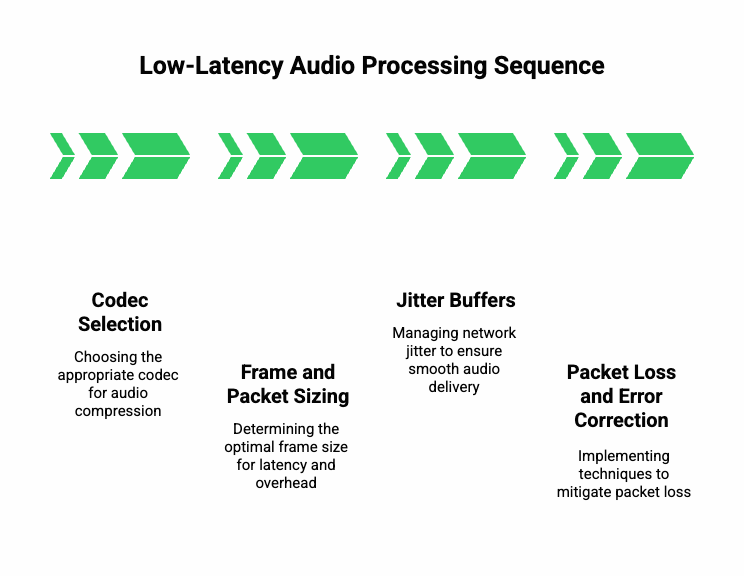
To truly master real-time streaming, developers must understand how audio data is packaged, transmitted, and reconstructed.
1. Codec Selection
A codec compresses audio before transmission.
- Opus: Most flexible, adjustable bitrate 6 kbps–510 kbps, ideal for both music and speech.
- PCM (Linear): Uncompressed, highest quality but bandwidth-heavy.
- AMR-WB: Common in telecom networks for PSTN bridging.
Best practice: Use Opus with frame sizes between 10 ms and 20 ms for speech, balancing fidelity and responsiveness.
2. Frame and Packet Sizing
Smaller frames lower algorithmic delay but increase packet overhead.
- 10 ms frames → lower latency, higher packet count.
- 40 ms frames → fewer packets, higher latency.
The sweet spot for voice is 20 ms. Developers can tune this in the encoder settings of WebRTC or RTP.
3. Jitter Buffers
Networks are unpredictable. A jitter buffer stores incoming packets briefly to smooth variations in arrival time.
- Adaptive buffers resize automatically based on network behavior.
- Too large → extra delay; too small → audio dropouts.
Continuous monitoring of jitter helps tune buffer depth dynamically.
4. Packet Loss and Error Correction
Even 1–2 % packet loss can degrade voice clarity. Enable:
- FEC (Forward Error Correction): Adds redundancy to recover lost packets.
- PLC (Packet Loss Concealment): Estimates missing audio frames to mask gaps.
By layering these techniques, developers maintain quality without increasing noticeable delay.
How Can You Architect a Scalable, Low-Latency Voice System?
After optimizing the media pipeline, the next step is architectural design. Scalability and latency often pull in opposite directions, but careful planning balances both.
1. SFU vs MCU Approach
- SFU (Selective Forwarding Unit): Forwards multiple media streams without decoding.
- Pros: low CPU cost, minimal delay.
- Cons: client does decoding work.
- Pros: low CPU cost, minimal delay.
- MCU (Multipoint Control Unit): Mixes streams into one composite.
- Pros: simpler for clients.
- Cons: adds 300–500 ms latency.
- Pros: simpler for clients.
For conversational AI or multi-party calls, SFU is almost always preferred.
2. Edge Computing and Regional Distribution
Placing media servers geographically closer to users drastically cuts RTT.
Deploy edge nodes in major regions-US East, EU West, APAC-so calls stay within short physical distance.
Moreover, many teams now integrate micro-edge functions for quick pre-processing like speech detection or silence trimming before forwarding to main servers.
3. Transcoding and Pass-Through
Transcoding should be a last resort. Each re-encode adds 15–40 ms delay and degrades quality.
Use pass-through modes whenever codecs match between endpoints.
If transcoding is unavoidable (for example bridging SIP calls using G.711), keep those nodes separate and lightweight.
4. Signaling and Synchronization
Low-latency systems rely on precise signaling. Developers typically use:
- WebSockets for control events.
- Kafka / Redis Streams for state propagation.
- SRTP / DTLS for secure media channels.
Synchronization ensures that STT and TTS modules process in parallel, not sequentially, saving hundreds of milliseconds per interaction.
How Can You Handle Network and Telephony Edge Cases Effectively?
Voice streaming doesn’t exist in isolation; it travels across varied environments – Wi-Fi, 4G, corporate VPNs, or PSTN bridges. Each introduces its own issues.
1. NAT Traversal
When devices sit behind routers, peer-to-peer communication can fail.
Solutions include:
- STUN: Discover public IP and port.
- TURN: Relay traffic when direct connection fails.
- ICE: Chooses optimal path automatically.
Although TURN adds about 30 ms extra delay, it ensures reliability for 100 % of users.
2. QoS and Traffic Prioritization
Mark media packets with DSCP 46 (EF) or equivalent QoS tags. This signals routers to prioritize real-time audio over bulk traffic.
On private networks, enabling QoS can reduce jitter by up to 40 %.
3. Bridging SIP and VoIP
Telephony integration often uses G.711 or G.729 codecs. Because these differ from Opus, transcoding may be required. Developers can reduce its impact by:
- Deploying transcoding servers near SIP trunks.
- Caching pre-negotiated codec sessions.
- Using comfort noise to mask small timing gaps.
4. Measurement and Diagnostics
Set up metrics collection at three layers:
- Network: latency, jitter, packet loss.
- Media: encoder stats, buffer depth.
- Application: STT, TTS, and logic processing time.
Real-time dashboards help detect anomalies before users notice them.
Curious how edge-native design enhances AI responsiveness?
Read our guide on building Edge-Native Voice Agents with AgentKit, Teler, and the Realtime API.
How Do You Monitor and Benchmark Low-Latency Performance in Practice?
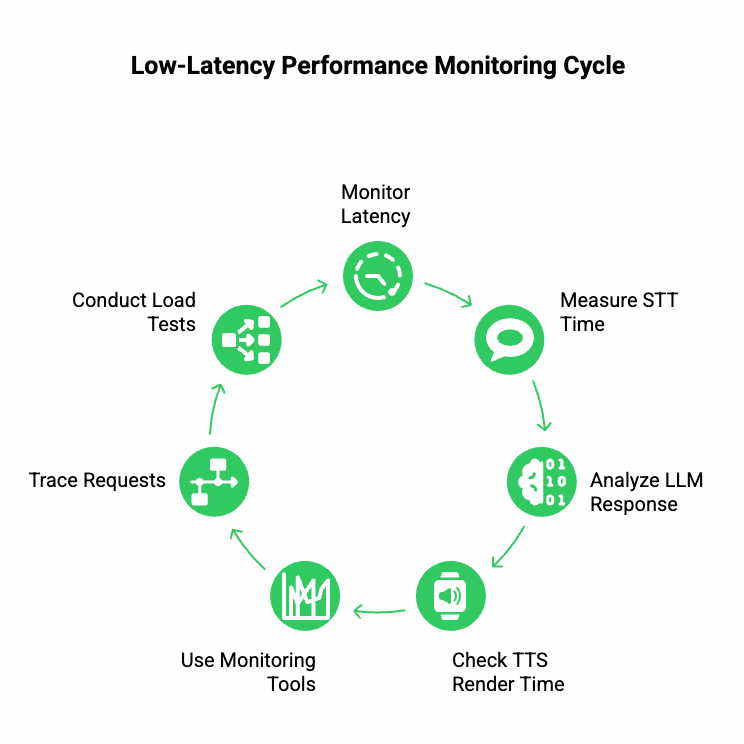
Building is only half the job; monitoring latency ensures consistent performance.
Key Metrics
- One-Way Latency: Should remain under 150 ms for interactive audio.
- STT Processing Time: Average < 200 ms per phrase.
- LLM Response Time: Monitor per token stream, not total response.
- TTS Render Time: Aim for < 100 ms for first audio chunk.
Tools and Dashboards
- Prometheus / Grafana for metrics.
- Jaeger or OpenTelemetry for tracing end-to-end requests.
- Synthetic Load Tests: Simulate 100 concurrent calls to observe pipeline timing.
How Does FreJun Teler Simplify Low-Latency Media Streaming for Developers?
When building AI-driven voice experiences, developers often face a tough challenge – integrating LLMs, STT, and TTS systems with low-latency streaming that feels natural. That’s where FreJun Teler comes in.
Teler acts as a programmable real-time communication layer that allows developers to easily build, test, and deploy voice agents using any large language model (LLM) and speech processing stack.
Instead of juggling multiple APIs and custom signaling logic, Teler simplifies this by providing:
- Programmable SIP and WebRTC endpoints for seamless connectivity.
- Real-time audio delivery with sub-200 ms performance benchmarks.
- Streaming protocols optimized for AI voice flows (STT → LLM → TTS).
- Scalable edge infrastructure to handle thousands of concurrent audio streams.
- Language and model agnostic integration, supporting OpenAI, Anthropic, or custom LLMs.
This flexibility means developers can plug any AI agent – from customer support bots to autonomous meeting assistants – directly into real-time telephony systems.
Example Architecture Using Teler
User Speech – Teler Audio Stream – STT Engine – LLM Agent – TTS Response – Teler Stream – User Playback
Here, Teler manages all the media flow and session signaling, ensuring that latency remains consistent while AI modules handle logic asynchronously. This clean separation helps engineering teams focus on intelligence rather than infrastructure.
Sign Up with FreJun Teler Today!
What Is the Optimal Flow for Implementing Low-Latency Media Streaming with Teler + LLMs?
To help developers design efficiently, here’s a recommended reference architecture for an AI-powered voice application built using Teler, any LLM, and your preferred TTS/STT stack.
Step-by-Step Flow
- Establish Call Session
- Initiate voice session via SIP or WebRTC using Teler’s programmable API.
- The media stream is captured and sent for live encoding (usually Opus).
- Initiate voice session via SIP or WebRTC using Teler’s programmable API.
- Audio Streaming to STT
- Teler streams audio in real time to your STT (e.g., Deepgram, Whisper, AssemblyAI).
- Transcription is chunked into partial and final text segments.
- Teler streams audio in real time to your STT (e.g., Deepgram, Whisper, AssemblyAI).
- Pass Context to LLM
- The LLM receives STT text and call metadata.
- It uses RAG or external tools for context (e.g., CRM, knowledge base).
- Response is token-streamed back to maintain continuity.
- The LLM receives STT text and call metadata.
- Stream Response to TTS
- TTS converts the LLM’s output into synthetic voice.
- The first audio chunk is streamed back immediately.
- TTS converts the LLM’s output into synthetic voice.
- Return Stream to Teler
- The generated audio is sent to Teler’s media relay, which routes it to the user.
- Total round-trip latency remains under 400 ms.
- The generated audio is sent to Teler’s media relay, which routes it to the user.
- Session Control
- Developers can manage mute, hold, or redirect events through Webhooks and WebSocket APIs.
- Call analytics and latency metrics are logged automatically.
- Developers can manage mute, hold, or redirect events through Webhooks and WebSocket APIs.
This architecture ensures that AI voice agents respond almost instantly, achieving near-human conversational timing.
What Common Latency Bottlenecks Should Developers Watch Out For?
Even the best system can experience latency spikes. Developers should identify and isolate issues quickly using structured diagnostics.
Typical Bottlenecks
| Source | Root Cause | Optimization |
| STT Lag | Large audio chunk size or slow inference | Send smaller 10–20 ms frames; use streaming STT APIs |
| TTS Delay | Synthesizing entire sentence before playback | Enable incremental TTS (chunk streaming) |
| Network Path | Route through distant servers | Deploy regional Teler nodes near users |
| Codec Mismatch | Transcoding between codecs | Standardize on Opus end-to-end |
| LLM Latency | Token generation too slow | Use smaller context windows or streaming LLM APIs |
Quick Troubleshooting Tips
- Always measure token-to-speech time – it shows how fast your AI can talk back.
- Implement parallel streaming (send next audio while TTS is processing).
- Cache TTS voices and LLM prompts to reduce initial setup delays.
- Continuously profile end-to-end round-trip latency using synthetic test calls.
What Streaming Protocol Choices Work Best for AI Voice Workflows?
Choosing the right streaming protocol for AI depends on the exact use case. For interactive voice agents, WebRTC is the preferred standard. However, developers often combine multiple protocols for flexibility.
| Protocol | Best Fit | Latency Range | Comments |
| WebRTC | Conversational agents, browser calls | 100–300 ms | Built-in jitter buffering, NAT traversal |
| WebSockets (RTP over TCP) | AI pipelines & custom routing | 150–400 ms | Easier to integrate with STT/TTS APIs |
| SRT (UDP) | Server-to-server real-time relay | 300–600 ms | Great for reliability across unstable networks |
| Programmable SIP (via Teler) | Telephony integration | 200–400 ms | Bridges PSTN + AI system efficiently |
Developers typically start with WebRTC + Teler programmable SIP as the foundation. It provides predictable latency, cross-network reliability, and simple scaling across global users.
How to Test, Benchmark, and Improve Latency Step-by-Step
Performance optimization isn’t a one-time setup – it’s a continuous engineering loop. Here’s a systematic way to test and tune your streaming stack.
1. Benchmark Each Component Separately
| Layer | Test Method | Target (ms) |
| Capture → Encoder | Measure mic-to-first-packet | < 30 |
| STT API | Send 10-sec sample | < 200 |
| LLM | Token streaming | < 300 |
| TTS | Time to first audio chunk | < 100 |
| Teler Round Trip | End-to-end playback | < 400 |
2. Conduct Real Call Simulations
- Run 50–100 concurrent sessions using realistic audio.
- Measure p95 latency and jitter variation.
- Validate consistency across regions.
3. Analyze Metrics in Real Time
Use Grafana dashboards to visualize:
- STT queue times
- LLM output speed
- TTS response delay
- Network packet loss
4. Iterate
Fix one bottleneck per iteration – codec optimization, regional routing, or frame tuning.
Even small 20–30 ms improvements per layer can compound to a noticeable difference in conversation fluidity.
What Are the Best Practices for Developers Building on Low-Latency Audio?
Here are practical engineering practices to achieve optimal real-time audio delivery.
Network Level
- Prefer UDP over TCP for audio streams.
- Use TURN only when necessary.
- Enable DSCP marking for Quality of Service (QoS).
- Keep jitter buffer adaptive and minimal.
Codec and Audio Handling
- Use Opus codec with 20 ms frame size.
- Normalize audio to -16 LUFS to maintain clarity.
- Enable FEC + PLC to mask dropouts.
- Disable echo cancellation when pipeline handles it already.
Application Logic
- Send STT results incrementally to reduce wait time.
- Use async processing – TTS starts before LLM completes full text.
- Implement backpressure control to avoid audio overflow.
- Store intermediate audio segments for replay or analytics.
Observability
- Log timestamps for each stage (STT, LLM, TTS).
- Monitor round-trip latency in milliseconds, not seconds.
- Trigger alerts when latency spikes > 400 ms.
Consistent adherence to these practices ensures that your AI voice application remains fast, reliable, and scalable.
What Are the Most Common Mistakes Developers Make (and How to Avoid Them)?
While working on real-time streaming systems, even small missteps can cause large delays.
| Mistake | Impact | Fix |
| Using full-sentence TTS | Perceived lag before playback | Switch to chunk-based streaming |
| Not optimizing STT frame size | Increased transcription delay | Use 10–20 ms audio chunks |
| Ignoring packet loss | Choppy or missing audio | Enable FEC & jitter buffers |
| Centralized servers only | High latency for global users | Deploy regional edge relays |
| Sequential LLM–TTS pipeline | Compound latency | Process both in parallel |
Developers should build with latency-first design – measure, test, and adjust continuously rather than post-deployment.
How to Future-Proof Low-Latency Systems for AI and Voice?
The next generation of AI voice infrastructure will demand even faster, context-aware, and adaptive streaming.
To stay ahead, engineering teams should prepare for:
- LLMs with built-in voice streaming interfaces.
- Edge-native inference (STT/TTS running locally).
- Dynamic bandwidth negotiation between devices.
- Hybrid transport models (WebRTC + QUIC).
- Unified telemetry standards across AI pipelines.
The ability to adapt streaming protocols, codecs, and data flow dynamically will define the next wave of innovation in voice systems.
Wrapping Up: Building a Future-Proof Voice Infrastructure
Low-latency media streaming isn’t just about faster responses – it’s about enabling natural, human-grade conversations between people and intelligent systems.
By integrating optimized transport, adaptive codecs, parallel AI pipelines (STT → LLM → TTS), and robust infrastructure platforms like FreJun Teler, developers can achieve consistent sub-400 ms voice delivery.
This translates to smoother agent interactions, faster customer resolutions, and higher user satisfaction – the benchmarks of next-gen conversational AI.
With Teler’s programmable SIP, WebRTC capabilities, and built-in scalability, your team can focus on innovation while Teler manages the media complexity.
Ready to build your own real-time AI voice experience?
Schedule a demo with the FreJun Teler team to explore what’s possible.
FAQs –
- What is low-latency media streaming?
It’s a real-time transmission of audio/video with under 400 ms delay, crucial for conversational AI and live interactions. - Why is latency critical in voice AI apps?
Latency affects how natural a conversation feels – anything above 300 ms disrupts human-like flow. - Which codec works best for real-time speech?
The Opus codec balances quality and speed with configurable frame sizes between 10–20 ms. - How can I measure latency accurately?
Use end-to-end metrics (RTP/RTCP or WebRTC Stats API) to monitor mouth-to-ear delay. - Does edge computing improve voice latency?
Yes. Deploying near users reduces RTT by tens to hundreds of milliseconds. - How do STT and TTS latency impact overall performance?
Each processing stage adds delay; streaming APIs help keep total latency under 400 ms. - What’s the role of Teler in this architecture?
Teler simplifies programmable SIP, media routing, and streaming to reduce integration overhead. - Can I use WebRTC for AI voice calling?
Absolutely. WebRTC provides real-time, encrypted transport ideal for conversational agents. - How do I handle jitter or packet loss?
Use jitter buffers, error correction, and prioritize UDP QoS settings for stability.
Is sub-400-ms latency achievable globally?
Yes, with optimized codecs, regional edge nodes, and adaptive streaming pipelines.