
AI-powered applications are moving beyond text and visuals. Today, real-time voice interactions are becoming the primary interface for customer support, sales, and automation. However, building AI systems that can listen, think, and respond over live calls requires more than just an LLM. Developers must integrate media streaming, connect AI models to telephony, and handle real-time audio reliably at scale.
This guide explains how developers can integrate media streaming into AI-powered applications using modern streaming architectures. It breaks down core components, explains architectural decisions, and shows how voice AI systems are practically built for production environments.
Why Is Media Streaming Essential For AI Powered Applications Today?
AI applications are no longer limited to chat windows and dashboards. Instead, users now expect AI to listen, respond, and interact in real time, especially through voice. Because of this shift, media streaming has become a core requirement rather than an optional feature.
At a high level, media streaming allows applications to process continuous data, such as live audio, instead of fixed payloads. As a result, AI systems can react immediately rather than waiting for a request to complete. This is critical for real-world use cases like AI voice assistants, customer support bots, and outbound calling agents.
Moreover, latency directly impacts trust. Even a short pause during a voice interaction breaks the flow. Therefore, AI-powered applications that rely on speech must handle audio as a live stream, not as a file upload.
In short, without media streaming:
- Conversations feel delayed
- Voice interactions feel robotic
- AI responses lose context
- Real-time decision-making becomes unreliable
That is why modern teams building AI products now treat media streaming as foundational infrastructure.
What Does Media Streaming Mean In The Context Of AI Systems?
Media streaming, in AI systems, refers to the real-time transport of audio or video data in small chunks across a network. Unlike REST APIs, which work on request–response cycles, streaming APIs stay open and active.
Because of this, media streaming supports:
- Continuous audio input
- Partial processing of speech
- Incremental AI responses
- Real-time playback
For example, when a user speaks during a voice call, their audio is captured as a sequence of small frames. These frames are streamed immediately to downstream systems instead of waiting for the speaker to finish.
From a developer perspective, media streaming typically involves:
- Persistent connections (WebSocket, gRPC, WebRTC)
- Audio codecs (Opus, PCM)
- Time-based packet delivery
- Backpressure and flow control
Therefore, when teams talk about “media streaming” in AI, they usually mean low-latency, bidirectional audio pipelines that connect users, AI models, and output channels.
How Do AI Voice Applications Actually Work Under The Hood?
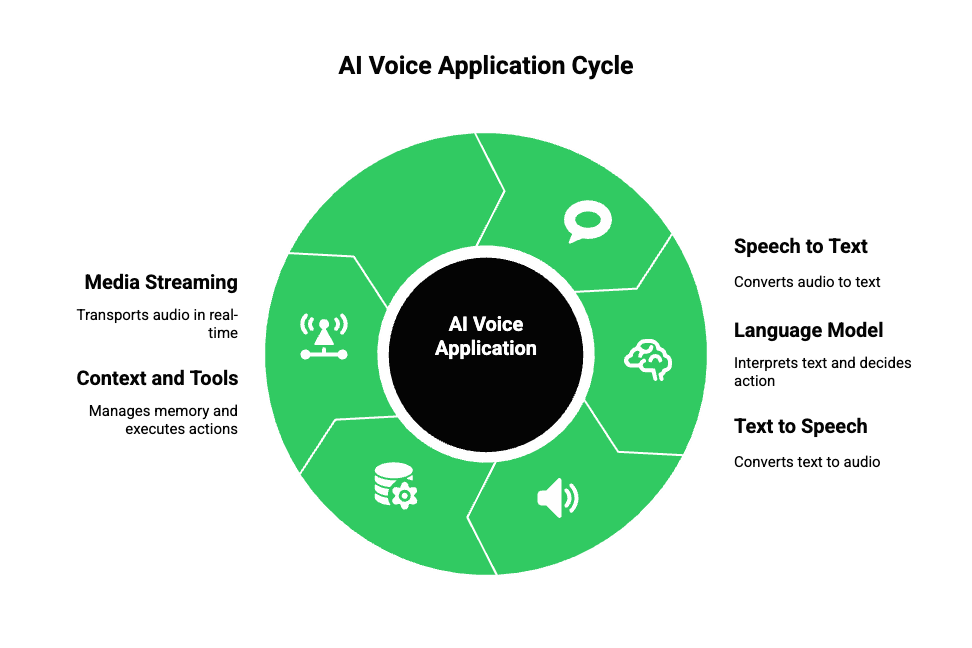
Before discussing how to build AI voice applications, it is important to understand what actually happens during a live voice interaction.
A standard AI voice system is not a single model. Instead, it is an orchestrated pipeline made of several independent components.
Core Building Blocks
Most production-grade voice agents contain:
- Speech To Text (STT): Converts incoming audio streams into text.
This often runs continuously and emits partial transcripts. - Large Language Model (LLM): Interprets text, maintains context, and decides what to say or do next.
- Text To Speech (TTS): Converts AI output back into audio frames suitable for playback.
- Context And Tools Layer: Handles memory, retrieval, databases, APIs, and action execution.
- Media Streaming Layer: Transports audio between the user and AI components in real time.
Because each part operates independently, orchestration becomes the real challenge. If even one component introduces delay, the entire conversation feels unnatural.
As a result, most failures in AI voice apps are not caused by the LLM. Instead, they come from poor media handling.
How Can Developers Integrate A Streaming API Into AI Applications?
Integrating a streaming API into an AI-powered application requires thinking in flows, not endpoints. Instead of asking “what request do I send,” developers must ask “what data moves continuously through the system.”
A Typical Streaming Flow
Most implementations follow this sequence:
- Capture live audio from the microphone or phone call
- Stream audio frames to the STT engine
- Receive partial or final transcripts
- Send text to an LLM
- Generate text responses incrementally
- Convert text to speech using TTS
- Stream audio output back to the user
Because this pipeline runs continuously, timing matters at every step.
Key Design Decisions
When integrating a streaming API, developers must decide:
- Frame size (10ms, 20ms, or 40ms audio chunks)
- Transport protocol (WebSocket, WebRTC, SIP)
- Whether to process partial transcripts
- How to interrupt or barge-in during speech
- How to handle silence and noise
Additionally, streaming APIs demand state management. Unlike REST calls, streaming sessions must track:
- Who is speaking
- Current conversation state
- Active audio direction (input or output)
- Error conditions and reconnections
Therefore, integrating a streaming API is primarily a systems design task, not just an API integration.
How Do You Connect An AI Model To Telephony Or Voice Networks?
Connecting an AI model to telephony introduces a new layer of complexity. Unlike browser audio, telephony systems rely on strict protocols and real-time guarantees.
Common Telephony Entry Points
AI voice applications usually interact with:
- PSTN phone calls
- SIP-based VoIP systems
- Cloud telephony platforms
- WebRTC gateways
Each of these has different expectations around codecs, latency, and session control.
Technical Challenges
Because telephony networks evolved long before AI, developers often face:
- Codec mismatches between STT and carriers
- One-way audio issues
- Echo and feedback loops
- Call drops during network transitions
- Difficulty scaling concurrent calls
Moreover, telephony traffic is regulated and time-sensitive. Dropped packets cannot be replayed, and delayed audio is often worse than lost audio.
As a result, connecting AI models directly to telephony systems without an abstraction layer often leads to fragile implementations.
What Architecture Patterns Work Best For Real Time AI Media Streaming?
Although there is no single correct architecture, some patterns work consistently better for AI-powered streaming applications.
Pattern 1: Centralized Orchestration
In this model:
- All audio streams go to a central backend
- STT, LLM, and TTS are controlled from one place
- Media streaming acts as a transport layer only
Best for:
- Complex logic
- Tool-heavy AI agents
- Regulated workflows
Pattern 2: Streaming First Architecture
Here:
- Audio drives the system
- Events trigger AI actions
- Partial transcripts influence decisions
Best for:
- Low-latency voice agents
- Real-time assistants
- Interactive sales agents
Pattern 3: Event Driven Voice Agents
In this setup:
- Voice events trigger tools
- Each step emits events
- State is externalized
Best for:
- Large scale systems
- Multi-agent workflows
- High concurrency
Each pattern has trade-offs. Therefore, architecture should match business goals before performance tuning begins.
How Do Developers Manage Low Latency In AI Streaming Pipelines?
Latency is the most critical metric in AI voice applications. Fortunately, it can be managed if approached methodically.
Where Latency Comes From
End-to-end delay usually comes from:
- Audio capture buffering
- Network transport
- STT inference time
- LLM token generation
- TTS synthesis
- Audio playback buffering
Because delays add up, teams must optimize each stage.
Design for human timing: conversational turn gaps are typically approx. 200 ms, so to preserve natural flow your end-to-end perceived latency budget must aim well below human gap thresholds or employ clever overlap/partial-response strategies.
Proven Optimization Techniques
To reduce perceived latency:
- Stream audio in small frames
- Use partial transcripts
- Start TTS before full sentences complete
- Overlap processing steps
- Reduce unnecessary transcoding
Most importantly, developers must measure latency using real calls, not internal benchmarks.
How Do Developers Scale AI Voice Applications To Production?
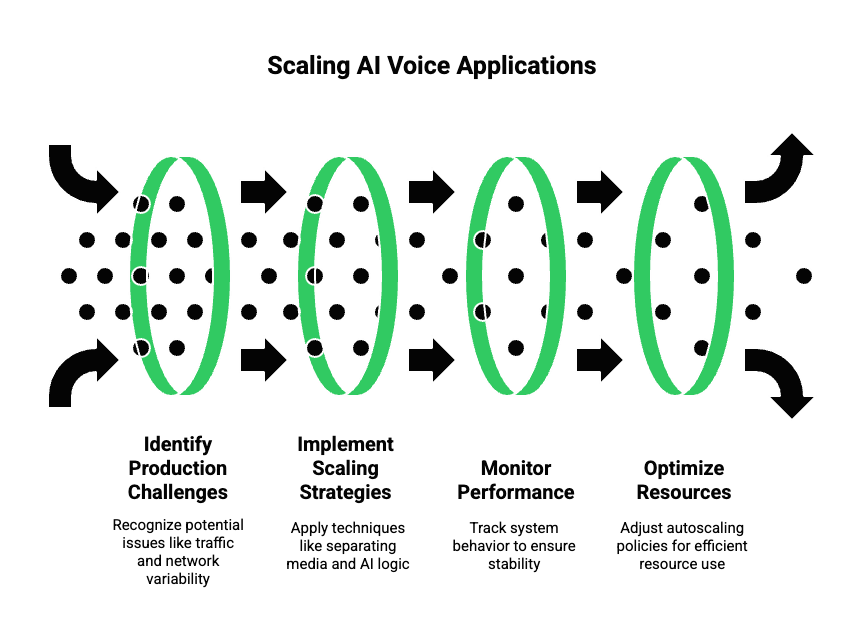
Once a streaming AI application works in a controlled environment, the real challenge begins. At production scale, systems must handle unpredictable traffic, network variability, and continuous conversations without breaking.
Therefore, developers must plan for scale early, even during proof-of-concept stages.
Key Production Challenges
In real deployments, teams usually face:
- Hundreds or thousands of concurrent audio streams
- Variable call durations
- Network jitter and packet loss
- Model rate limits and failures
- Cost spikes from inefficient streaming
Because of this, simple single-node pipelines quickly become bottlenecks.
Scaling Strategies That Work
To scale reliably:
- Separate media handling from AI logic
- Use stateless processing where possible
- Maintain session state externally
- Scale media workers independently from AI workers
In addition, autoscaling policies should react to audio stream count, not HTTP traffic. This distinction is important because voice traffic behaves very differently.
What Metrics Should Teams Monitor In AI Media Streaming Systems?
Monitoring voice AI is fundamentally different from monitoring traditional APIs. Instead of request times, teams must focus on user experience signals.
Critical Metrics To Track
Teams should always monitor:
- End-to-end latency (speech → response)
- Audio packet loss
- Jitter and buffering events
- STT accuracy drift
- Conversation completion rate
- Call drop frequency
At the same time, AI-specific metrics such as tool usage, hallucination rate, and fallback triggers should be correlated with media metrics.
As a result, product and engineering teams can identify whether issues come from AI logic or from streaming infrastructure.
How Do Cost And Performance Trade-Offs Impact Streaming AI Apps?
Voice AI costs do not scale linearly. Instead, they depend on conversation length, audio quality, and concurrency.
For example:
- Higher sample rates improve STT accuracy but increase bandwidth
- Larger audio chunks reduce overhead but increase latency
- Streaming TTS lowers response time but increases compute usage
Because of these trade-offs, teams should tune configurations per use case rather than applying a single global setup.
Practical Cost Optimization Tips
To control costs:
- Use lower sample rates where accuracy allows
- Stop streaming during silence
- Cache repeated TTS responses
- Offload non-critical calls to lower-cost models
- Route based on conversation intent
Over time, these optimizations significantly lower operating costs without harming user experience.
Where Does FreJun Teler Fit Into AI Media Streaming Architectures?
So far, we have focused on what needs to happen to build AI-powered streaming applications. Now, it is important to understand where infrastructure platforms fit in this pipeline.
FreJun Teler operates as the media streaming and telephony layer designed specifically for AI-driven voice systems.
What FreJun Teler Handles Technically
From a systems perspective, Teler abstracts away:
- Real-time audio capture from calls
- Streaming audio ingress and egress
- Telephony, VoIP, and SIP connectivity
- Codec handling and media normalization
- Session lifecycle management
As a result, developers do not need to build or maintain low-level voice infrastructure.
What Developers Still Control Fully
Just as importantly, Teler does not replace AI logic. Teams retain full control over:
- LLM selection and prompting
- STT and TTS providers
- Conversation state and memory
- Tool calling and RAG pipelines
- Business logic and workflows
Because Teler is model-agnostic, it integrates cleanly with any LLM, any STT, and any TTS. This makes it suitable for AI-first teams rather than call-center-first systems.
Why This Separation Matters
By separating concerns:
- Media streaming remains reliable and low latency
- AI logic remains flexible and evolvable
- Teams avoid vendor lock-in
- Systems scale independently
Therefore, Teler fits naturally into modern AI architectures as the transport layer that connects AI models to real-world voice networks.
Sign Up with FreJun Teler Today!
What Does An End To End AI Voice Agent Flow Look Like?
To make this concrete, let us walk through a complete example using media streaming and AI orchestration.
Step By Step Flow
- A user places a phone call
- Audio is captured and streamed in real time
- Audio frames are forwarded to STT
- Partial transcripts are generated
- Text is sent to an LLM with context
- The LLM decides on the next response or action
- Output text is streamed to TTS
- Generated audio is streamed back to the caller
Throughout this process, the media stream remains open. This allows interruptions, clarifications, and natural back-and-forth dialogue.
Where Streaming Makes The Difference
Without media streaming:
- AI responses arrive too late
- Interruptions cause failures
- Calls feel scripted
With streaming:
- Responses sound natural
- Users can interrupt and correct
- Conversations adapt in real time
This is what enables developers to build AI voice apps that behave like real agents rather than recordings.
Explore how a modern voice calling API simplifies cloud communication and supports real-time AI-driven calling workflows.
How Can This Approach Be Applied Across Use Cases?
Once this architecture is in place, it becomes reusable across many business scenarios.
Common Patterns
Teams commonly use the same pipeline for:
- AI customer support agents
- AI sales qualification calls
- Appointment reminders
- Payment follow-ups
- AI receptionists
- Voice-enabled internal tools
Because the system relies on media streaming and modular AI components, new use cases require minimal changes.
As a result, time to market drops significantly after the first deployment.
What Should Founders And Product Teams Plan Before Building?
Before implementation begins, alignment across teams is essential.
Strategic Planning Checklist
Founders and product leaders should clarify:
- Target latency and experience goals
- Initial use case scope
- Build vs buy decisions
- Ownership between infra and AI teams
- Compliance and data retention needs
Meanwhile, engineering leads should define:
- Streaming protocols
- Error handling strategies
- Observability requirements
- Scaling thresholds
When these decisions are made early, teams avoid costly rewrites later.
How Can Teams Get Started With Media Streaming For AI Today?
To move forward effectively:
- Start with one voice use case
- Choose a single LLM, STT, and TTS stack
- Build a streaming-first pipeline
- Measure latency from day one
- Abstract media handling early
Most importantly, treat media streaming as core infrastructure, not a wrapper around AI.
When media streaming is designed correctly, AI systems become faster, more natural, and more reliable.
Final Note
AI-powered voice applications are no longer experimental. With the right architecture, developers can confidently integrate media streaming, connect AI models to telephony, and deliver real-time voice experiences at scale. However, success depends on choosing infrastructure that supports low latency, continuous streaming, and conversational context end-to-end.
FreJun Teler fits naturally into this architecture by acting as the real-time voice transport layer between telephony networks and AI systems. Developers retain full control over LLMs, speech models, and business logic, while Teler manages streaming reliability and scalability.
If you are building AI voice agents for production use, a purpose-built voice infrastructure accelerates delivery while reducing operational risk.
Schedule a demo to see how Teler supports real-time AI voice applications.
FAQs –
- What is media streaming in AI applications?
Media streaming enables real-time audio flow between users, AI models, and telephony systems without delays. - Why are REST APIs not enough for voice AI?
REST APIs introduce latency and break conversational flow in real-time voice interactions. - How do AI voice agents work?
They combine STT, LLM reasoning, TTS output, context memory, and tool execution in one pipeline. - Can I use any LLM with voice applications?
Yes, as long as the infrastructure supports low-latency streaming and context handling. - What role does telephony play in AI voice apps?
Telephony connects AI agents to real phone users over SIP, PSTN, or VoIP networks. - Is streaming required for outbound AI calls?
Yes, outbound calls require streaming to handle interruptions and dynamic responses. - How is latency managed in voice AI systems?
Through real-time protocols, optimized buffers, and continuous audio streaming. - Do voice agents need conversation memory?
Yes, memory ensures context continuity and accurate responses. - Is media streaming secure for enterprise use?
With encrypted transport and infrastructure controls, it meets enterprise standards. - What makes production voice AI different from demos?
Reliability, latency control, telephony integration, and failure handling.