
Think about the last time you called a large airline or a bank. You likely heard a robotic voice list a menu of nine options. You pressed one. Then you heard another menu. You pressed three. Then the call dropped. Or worse you waited on hold for twenty minutes only to be transferred to the wrong department where you had to explain your problem all over again.
This is a broken workflow. It is rigid and frustrating. It treats every customer exactly the same regardless of who they are or why they are calling.
Now imagine a different experience. You call the airline. The system recognizes your phone number. It knows your flight from New York was just cancelled. Instead of a menu it answers “Hi Sam I see your flight was cancelled. Are you calling to rebook?” You say “Yes.” The system immediately finds the next flight and books you a seat.
This seamless experience is not magic. It is the result of voice workflow orchestration. It is built using code not old hardware. By leveraging voice API integration developers can design intelligent and dynamic paths for every call.
In this guide we will explore how to build these sophisticated programmable voice flows. We will look at the logic behind the scenes and how to connect disparate systems and how infrastructure providers like FreJun AI supply the reliable plumbing needed to execute these complex workflows at scale.
Table of contents
- What Is Voice Workflow Orchestration?
- Why Do Traditional Phone Systems Fail at This?
- How Does Voice API Integration Work?
- What Are the Key Components of a Workflow?
- Comparison: Static IVR vs. Orchestrated Workflow
- How Does FreJun AI Enable This?
- Real World Example: The Intelligent Appointment Booking
- How to Handle Errors and Edge Cases?
- Connecting External Systems
- What Is the Role of AI in Orchestration?
- Best Practices for Developer Success
- Conclusion
- Frequently Asked Questions (FAQs)
What Is Voice Workflow Orchestration?
Orchestration is a fancy word for coordination. In the context of voice it means managing the logic of a phone call from start to finish.
A simple phone call is Point A to Point B. One person calls another. But a business call is rarely that simple. It involves logic.
- Conditions: Is it after business hours? Is this a VIP customer?
- Actions: Play a message. Record the audio. Transfer to a specific department.
- Integrations: Look up data in a CRM. Send an SMS confirmation.
Voice workflow orchestration is the art of stringing these conditions and actions together to create a smooth journey for the caller. It turns a phone call into a software application.
Instead of a static tree where “Press 1” always goes to Sales you create a dynamic map. The path can change in real time based on data. This is the core of modern call automation.
Why Do Traditional Phone Systems Fail at This?
Old school phone systems (PBX) are hardware based. To change the menu you often have to call a technician to rewire something or update a complex configuration file. They are “hard coded.”
They lack data awareness. Your old office phone system does not know who is calling. It only sees a phone number. It cannot check your database to see if that caller owes you money or if they are a new lead.
This results in the “IVR Jail” experience where customers get stuck in loops.
According to a study by Vonage, 61% of consumers have abandoned a business transaction because of poor customer service in the past year often due to frustrating automated phone menus.
Voice API integration solves this by moving the logic to the cloud. The phone system becomes just a dumb pipe. Your code becomes the brain.
Also Read: Why Outbound Calls Still Matter in the Era of Digital Marketing
How Does Voice API Integration Work?
To orchestrate a workflow you need a way to control the call with code. This is what the API does. Here is the basic mechanism:
- The Trigger: A call comes into the FreJun platform.
- The Webhook: FreJun pauses the call and sends a request (a webhook) to your server asking “What should I do next?”
- The Logic: Your server runs its code. It might check a database or ask an AI model.
- The Command: Your server replies with a command like “Play this welcome message” or “Gather speech input.”
- The Execution: FreJun executes the command and then asks “What next?”
This back and forth continues until the call ends. It allows you to build programmable voice flows that are infinitely flexible.
What Are the Key Components of a Workflow?
When designing a voice workflow you are essentially drawing a flowchart. Every good flow has four main components.
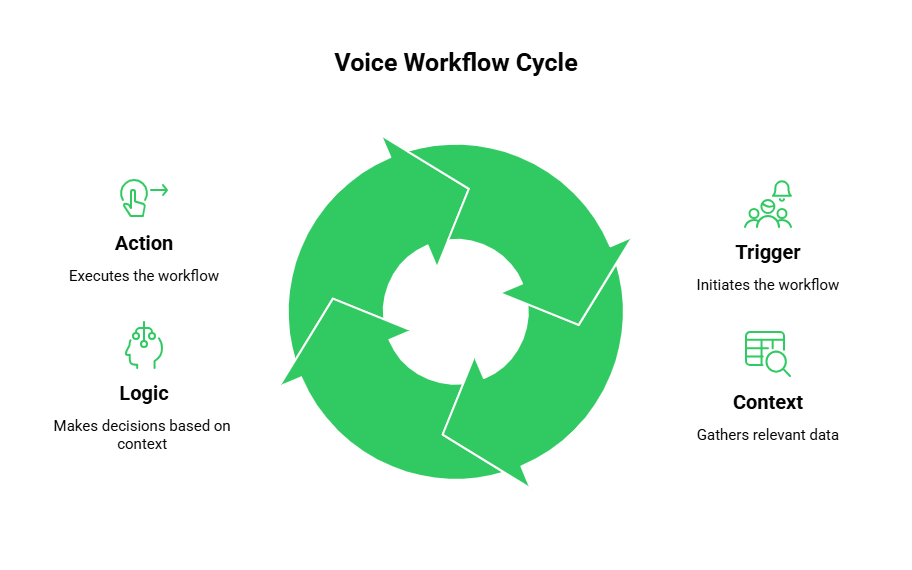
1. The Trigger
This is what starts the flow. It could be an inbound call from a customer. Or it could be an outbound trigger where your system decides to call a customer (e.g. an appointment reminder).
2. The Context
Data is the fuel of orchestration. Before you decide where to route the call you need context.
- Who is calling? (Caller ID)
- What time is it? (Business hours check)
- What is their history? (CRM lookup)
3. The Logic (The Brain)
This is your code. It uses the context to make decisions.
- If the caller is a VIP route to the priority queue.
- If the caller has an overdue bill route to billing.
- If the caller speaks Spanish switch the language to Spanish.
4. The Action
This is what the user experiences.
- Say: Text-to-Speech audio.
- Gather: Listening for speech or keypad digits.
- Dial: Connecting the call to a human agent or another phone number.
Comparison: Static IVR vs. Orchestrated Workflow
Here is a look at how a traditional setup compares to an API driven workflow.
| Feature | Static IVR System | Orchestrated Voice Workflow |
| Routing Logic | Fixed (Press 1 for Sales) | Dynamic (Routes based on account status) |
| Data Access | None (Blind routing) | Full Access (Reads CRM/Database) |
| Flexibility | Hard to change | Instant updates via code deployment |
| Scalability | Limited by hardware lines | Infinite scale via cloud APIs |
| Personalization | “Dear Customer” | “Hello Sarah” |
| Complexity | Linear trees only | Loops, conditions, and API calls |
How Does FreJun AI Enable This?
You can write the smartest workflow code in the world but if the phone line drops or the audio is laggy the experience fails.
FreJun AI provides the infrastructure layer that makes voice workflow orchestration reliable. We handle the complex voice infrastructure so you can focus on building your AI and logic.
- FreJun Teler: Our elastic SIP trunking allows your workflows to handle massive scale. If your marketing campaign works and 5,000 people call at once Teler scales up to ensure every workflow triggers correctly.
- Low Latency: When your workflow asks “What next?” FreJun delivers the instructions instantly. This reduces the “dead air” silence that often plagues bad bots.
- Model Agnostic: FreJun does not force you into a specific logic box. You can connect our voice stream to any AI model or any database or any legacy system you own.
Ready to start building your own intelligent voice workflows? Sign up for FreJun AI and get the API keys you need to orchestrate your first call.
Also Read: Virtual Property Tours via AI Voice Agents
Real World Example: The Intelligent Appointment Booking
Let us walk through how to build a specific programmable voice flow for a medical clinic.
The Goal: A patient calls to book an appointment. We want to automate this without a human receptionist.
The Workflow Steps:
- Inbound Call: The patient calls the clinic number managed by FreJun.
- Identity Check: Your server receives the webhook. It checks the phone number against the patient database.
- Match Found: “Welcome back, John.”
- No Match: “Welcome to Dr. Smith’s clinic. Please state your full name.”
- Intent Gathering: The system asks “How can we help you?”
- The patient says “I have a fever.”
- AI Analysis: FreJun streams this audio to an LLM (Large Language Model). The LLM determines the intent is “Sick Visit” and the urgency is “High.”
- Calendar Lookup: Your server queries the doctor’s calendar API for the next available slot.
- Proposal: The system says “Dr. Smith has an opening at 2:00 PM today. Do you want it?”
- Confirmation: The patient says “Yes.”
- Final Action: The system books the slot in the calendar, sends an SMS confirmation to John, and hangs up.
This entire complex interaction is handled via call automation APIs without a single human lifting a finger.
How to Handle Errors and Edge Cases?
In voice workflow orchestration, things go wrong. People mumble. Babies cry in the background. APIs time out.
A robust workflow must handle these errors gracefully.
The “No Input” Loop
If the system asks a question and hears silence do not just hang up. You must program a loop.
- Attempt 1: “I didn’t catch that. Can you say it again?”
- Attempt 2: “Sorry I am having trouble hearing you. Please use your keypad to enter your date of birth.”
The Fallback to Human
Sometimes the problem is too complex for the bot. Your workflow must always have an escape hatch. If the sentiment analysis detects anger or if the intent is unclear after three tries route the call to a human agent immediately.
FreJun’s infrastructure supports “warm transfers.” This means the bot can pass the call and the data (the transcript of what happened so far) to the human agent so the customer does not have to repeat themselves.
Connecting External Systems
The power of voice API integration lies in connectivity. Your voice flow should not live in isolation.
- CRM Integration: When a lead calls log the call activity in Salesforce or HubSpot automatically.
- Payment Gateways: If a user wants to pay a bill pause the recording (for security) and connect to a payment API like Stripe to process the credit card securely over the phone.
- Support Tickets: If a user reports a bug trigger a webhook to create a ticket in Jira or Zendesk while the call is still ongoing.
By orchestrating these connections you turn the phone channel into a fully integrated part of your digital stack.
What Is the Role of AI in Orchestration?
Traditional orchestration used DTMF (Dual Tone Multi Frequency). “Press 1 for Yes.”
Modern orchestration uses AI. Instead of rigid trees we use “Conversational State Machines.”
The AI tracks the state of the conversation. It knows that we are currently in the “Booking” stage. If the user suddenly says “Wait how much does it cost?” the AI detects a context switch. It pauses the booking flow answers the pricing question and then gently guides the user back: “The cost is $50. Shall we proceed with the 2:00 PM slot?”
This level of fluidity requires a high speed connection between the voice provider (FreJun) and the AI brain.
Best Practices for Developer Success
If you are building these flows here are some tips to keep in mind.
1. Keep It Short
Voice is a slow medium. Do not have your bot read three paragraphs of text. Keep responses concise.
2. Use Low Latency Infrastructure
We cannot repeat this enough. Lag kills the flow. Use a provider like FreJun that is optimized for real time media.
3. Test with Real Phones
Do not just test in your browser. Call from a cell phone. Call from a landline. Test how your flow handles background noise and weak signals.
4. Monitor Your Webhooks
Set up alerts. If your server starts returning “500 Errors” to FreJun’s webhooks your phone lines effectively go down. You need to know instantly if your logic layer is failing.
Also Read: Voice API for Real Estate CRM Integration
Conclusion
The days of static, frustrating phone menus are numbered. Today businesses are expected to deliver smart, personalized, and efficient voice experiences.
Voice workflow orchestration is the tool that makes this possible. By using voice API integration, developers can build systems that listen, think, and act in real time. They can connect the phone network to their databases and AI models creating a seamless web of data.
However a complex workflow is fragile. It relies on the fast and reliable transmission of data. If the infrastructure is weak the workflow breaks.
FreJun AI provides the solid foundation needed for these advanced flows. With FreJun Teler ensuring global connectivity and our developer-first APIs providing granular control we handle the heavy lifting of the voice layer. This allows you to focus on writing the brilliant logic that delights your customers.
Want to discuss your specific workflow needs? Schedule a demo with our team at FreJun Teler and let us help you map out the perfect caller journey.
Also Read: Cold Calling Techniques That Actually Work for Outbound Teams
Frequently Asked Questions (FAQs)
1. What is voice workflow orchestration?
Voice workflow orchestration is the process of designing and managing the logic of a phone call. It involves connecting various triggers, conditions, and actions to create a dynamic path for the caller rather than a static menu.
2. How is this different from a standard IVR?
A standard IVR is usually a static tree (Press 1, Press 2) stored on hardware. An orchestrated workflow using voice API integration is dynamic software. It can change its behavior in real time based on data from CRMs, time of day, or AI analysis.
3. Do I need to know how to code to build this?
Yes, typically. While there are some visual builders, robust orchestration usually requires a developer to write the logic that handles webhooks and API requests.
4. Can I integrate my CRM into the workflow?
Absolutely. This is one of the main benefits. You can write code that queries your CRM (like Salesforce) when a call comes in to identify the caller and route them to their dedicated account manager.
5. What happens if my server goes down?
If your server fails to respond to the webhook the call could drop. That is why it is critical to have fallback logic. FreJun allows you to set a “fallback URL” that can play a generic message like “We are experiencing technical difficulties” if your main logic fails.
6. What is the role of FreJun Teler?
FreJun Teler provides the elastic SIP trunking. It is the connection to the outside world. It ensures that whether you have one active workflow or ten thousand they all connect to the telephone network reliably.
7. Can I use AI to route calls?
Yes. You can stream the caller’s initial spoken request to an AI model. The AI classifies the intent (e.g., “Billing” vs. “Technical Support”) and tells FreJun where to route the call.
8. Is voice orchestration expensive?
It is generally more cost effective than legacy hardware. You pay for usage (minutes and API requests) rather than buying expensive servers. It also saves money by automating tasks that used to require human agents.
9. How do I handle multiple languages?
Your workflow logic can check the country code of the caller or ask them to select a language. Based on that variable you can instruct the Text-to-Speech engine to speak in Spanish, French, or Japanese.
10. Can I send SMS during a voice workflow?
Yes. Since you are controlling the flow with code you can easily trigger an SMS API to send a confirmation text or a link while the customer is still on the phone.