
Imagine a sales representative named John. He is smart and hardworking and spends his entire day on the phone talking to potential clients. He makes fifty calls a day. But after every single call John has to stop. John has to open his computer and log into his CRM to type in the phone number he just dialed. He has to type out a summary of what was said. He has to schedule the next follow up manually.
This process takes five minutes per call. That is over four hours of busywork every single day. That is four hours John is not selling. It is a massive waste of time and money.
Now imagine a different scenario. John makes a call. The moment he hangs up the call is automatically logged in the CRM. The recording is saved. The transcript is attached. The next task is created automatically based on the outcome of the call. John simply dials the next number.
This is the power of connecting your phone system to your customer database. This is achieved through voice API integration. By building a bridge between your voice infrastructure and your Customer Relationship Management (CRM) system you eliminate manual data entry and give your team superpowers.
In this guide we will explain exactly how to build this integration. We will look at how to sync data in real time and how to provide customer call context to your agents and how platforms like FreJun AI provide the essential infrastructure to make it all work seamlessly.
Table of contents
- What Is Voice API Integration with CRM?
- How Does the Data Flow Work?
- What Is the Role of FreJun AI?
- Comparison: Manual vs Integrated
- How to Build the Integration Step by Step
- How Do You Handle Real Time Context?
- Why Is Infrastructure Key to Reliable Sync?
- Real World Use Case: Sales vs Support
- Conclusion
- Frequently Asked Questions (FAQs)
What Is Voice API Integration with CRM?
To understand this we need to define the pieces. A CRM is your database of truth. It holds customer names and emails and purchase history. Examples include Salesforce or HubSpot or Zoho.
A voice API integration is a software connection that allows your application to control phone calls programmatically.
When you combine them you create CRM voice integration. This means your phone system and your database can talk to each other. They share information instantly.
When a call comes in the API asks the CRM “Who is this?” The CRM checks the number and replies “That is Sarah. She bought a laptop last week.” The API then shows this information to the agent before they even answer the phone.
How Does the Data Flow Work?
To build this you need to understand the flow of information. It involves three main parties. The Caller and the Voice Platform (like FreJun) and the CRM. Here is the typical lifecycle of a synced call:
- The Event Occurs: A customer dials your support number.
- The Webhook: The voice platform detects the call. It sends a “webhook” (a digital notification) to your server.
- The Query: Your server takes the caller’s phone number and asks the CRM API “Do we know this number?”
- The Context: The CRM sends back the customer profile. Your server sends this data to the agent’s screen. This is customer call context.
- The Conversation: The agent talks to the customer.
- The Sync: When the call ends the voice platform sends the recording and duration to your server. Your server updates the CRM record automatically.
This is often called call data sync. It ensures that the CRM is always up to date without a human ever touching a keyboard.
Also Read: How Can a Voice API for Developers Future-Proof Your Voice Applications?
What Is the Role of FreJun AI?
You might be wondering where FreJun fits into this. FreJun is not a CRM. We are the infrastructure provider.
We handle the complex voice infrastructure so you can focus on building your AI and integrations.
To build a reliable CRM integration you need a voice platform that is fast and developer friendly. FreJun provides:
- Real Time Webhooks: We notify your system instantly when a call starts or ends.
- High Quality Audio: We ensure the recording that goes into your CRM is crystal clear.
- Elastic Scale: Through FreJun Teler we offer elastic SIP trunking. This means you can handle five calls or five thousand calls and we will sync the data for all of them reliably.
Comparison: Manual vs Integrated
Here is a quick look at the difference between the old way and the integrated way.
| Feature | Manual Logging (Old Way) | Automated Integration (New Way) |
| Data Entry Time | 2 to 5 minutes per call | 0 minutes (Instant) |
| Accuracy | Low (Agents make typos) | 100% Accurate |
| Context | Agent asks “Who is this?” | Agent says “Hello [Name]” |
| Recording Storage | Lost or saved on local PC | Attached to CRM record |
| Follow Up Speed | Slow (Manual scheduling) | Fast (Automated triggers) |
| Agent Morale | Low (Bored by typing) | High (Focused on selling) |
How to Build the Integration Step by Step
If you are a developer tasked with building this here is your roadmap.
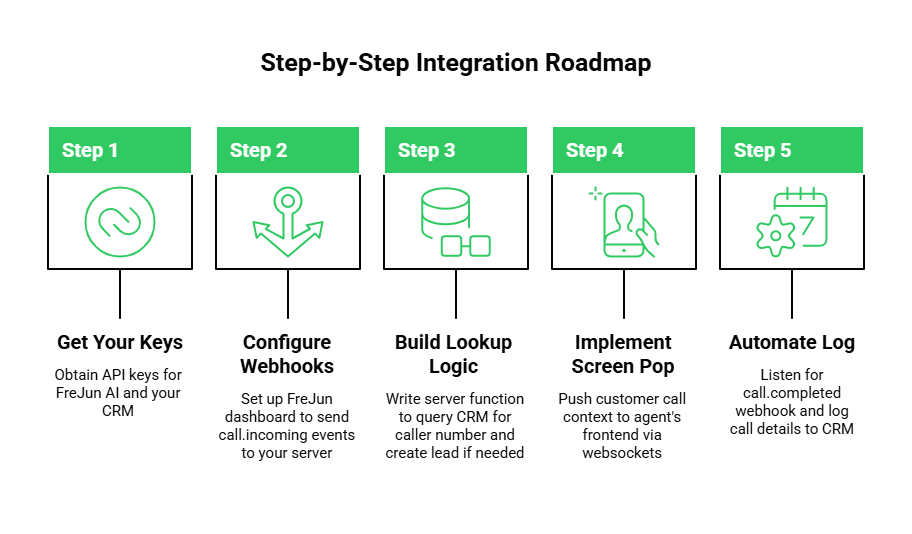
Step 1 Get Your Keys
First you need access. Sign up for a FreJun AI to get your API keys. You will also need API keys for your CRM (like the Salesforce API or HubSpot API).
Step 2 Configure Webhooks
In the FreJun dashboard you will set up a “webhook URL.” This is the address of your server.
- Event: call.incoming
- Action: Send a POST request to myserver.com/incoming-call
Step 3 Build the Lookup Logic
When your server receives that webhook write a function to query the CRM.
- Take From_Number from the webhook.
- Search CRM Contacts for that number.
- If found return the Name and ID.
- If not found create a new “Lead” automatically.
Step 4 Implement Screen Pop
This is the cool part. Push the data you found to the agent’s frontend. If you are building a custom dialer use websockets to push the customer call context to their browser instantly. They should see the caller’s name pop up before they click answer.
Step 5 Automate the Log
Listen for the call.completed webhook from FreJun. This payload contains the duration, recording_url, and status. Write a script to POST this data to the CRM Activities or Calls endpoint attached to the specific customer ID.
Also Read: How Can Voicebot Solutions Improve Lead Qualification Calls?
How Do You Handle Real Time Context?
One of the biggest advantages of voice API integration is speed. But speed depends on latency.
If your voice provider is slow the phone will ring three times before your server gets the webhook. By then the agent has already picked up and missed the context.
FreJun AI is built for low latency. Our infrastructure ensures that events are dispatched in milliseconds. This allows for true real time features.
- Screen Pop: Displaying account value and open tickets instantly.
- Smart Routing: If the CRM says this is a “VIP Client” routing the call to a senior agent immediately.
- Sentiment Analysis: Streaming the audio to an AI model to detect anger and updating the CRM with a “Risk of Churn” tag in real time.
Why Is Infrastructure Key to Reliable Sync?
Developers often focus on the code but forget the network. Call data sync is only as good as the connection.
If your internet flickers or your voice provider drops the webhook you lose data. You end up with “Ghost Calls” in your CRM where a call happened but there is no record of it.
FreJun’s infrastructure is designed for reliability.
- Retry Logic: If your server doesn’t respond we retry the webhook to ensure data delivery.
- Global Reach: With FreJun Teler we handle calls globally ensuring that international teams can sync data just as easily as local ones.
- Secure Transmission: We encrypt the data as it travels from our voice server to your CRM protecting sensitive customer info.
Real World Use Case: Sales vs Support
The way you integrate depends on your team.
The Sales Use Case
For sales speed is everything. The integration should focus on outbound dialing.
- Click to Call: The rep clicks a number in the CRM and FreJun initiates the call.
- Auto Logging: The system logs “Left Voicemail” or “Connected” automatically.
- LSI Keyword Application: The system ensures call data sync happens instantly so managers can see activity reports in real time.
The Support Use Case
For support context is everything.
- Inbound Context: The system looks up open tickets.
- Identity Verification: The system checks if the phone number matches the account owner reducing security questions.
- Voice Analytics: The recording is analyzed for product names and tagged in the CRM for the product team to review.
Also Read: Why Is Low Latency Essential for Modern Voice Bot Solutions?
Conclusion
Data is the lifeblood of modern business. But if your voice data is disconnected from your customer data you are operating with a blocked artery. You are wasting time on manual entry and you are frustrating your customers with repetitive questions.
Integrating your CRM via voice API integration solves this. It bridges the gap between the conversation and the database. It automates the boring work and empowers your agents with customer call context.
However this integration is only as reliable as the voice platform underneath it. You need a partner that guarantees low latency and high quality audio and reliable data delivery. FreJun AI provides the robust infrastructure you need to make your CRM and your phone system work as one.
With features like FreJun Teler for elastic scaling and developer friendly webhooks we make it easy to turn your voice data into business value.
Want to see how we can power your specific CRM integration? Schedule a demo with our team at FreJun Teler and let us help you build a smarter workflow.
Also Read: United Kingdom Country Code Explained
Frequently Asked Questions (FAQs)
Voice API integration is the process of using code to connect a voice platform to other software systems. It allows applications to make calls and receive calls and exchange call data automatically.
Yes. Because FreJun uses standard REST APIs and webhooks you can integrate it with any CRM that allows API access. This includes major platforms like Salesforce and HubSpot and Zoho as well as custom built databases.
Customer call context is the information about the caller that is displayed to the agent. It includes things like the caller’s name and recent purchases and previous support tickets. It helps the agent understand who they are talking to immediately.
Yes. FreJun sends webhooks the moment an event happens. If your server processes these webhooks quickly the CRM updates can happen while the call is still active.
Call data sync is the automated process of ensuring that call details like duration and recordings and timestamps are matched with the correct customer record in the database.
Yes. While some CRMs have pre built plugins a custom CRM voice integration using FreJun APIs requires a developer to write the logic that connects the two systems.
Absolutely. FreJun uses HTTPS for all API requests and webhooks. This means the data is encrypted as it travels between FreJun and your CRM ensuring customer privacy.
Yes. FreJun provides a URL for the call recording. You can save this URL into a text field in your CRM allowing you to listen to the call directly from the customer’s profile.
FreJun Teler provides elastic SIP trunking which ensures reliable connectivity. It guarantees that even during high call volumes the call data is captured and synced accurately without dropping connections.
Yes. You can program logic like “If the call lasts longer than 10 minutes send an email to the manager” or “If the user presses 1 create a new Urgent Ticket in the CRM.”