
Imagine trying to plug a brand new USB drive into a computer from 1995. It simply does not fit. You have the data and you have the device but the connection points are from two different eras.
This is the exact frustration developers face when trying to modernize business phone systems. Most companies still rely on legacy hardware known as PBX systems which communicate using a protocol called SIP (Session Initiation Protocol). However modern software and AI applications prefer to speak via HTTP and REST APIs.
When you try to force these two worlds together you often get friction. Calls drop. Audio goes silent one way. The quality sounds robotic. These are SIP compatibility issues and they can kill a project before it starts.
The solution is not to rip out all the old hardware. That is too expensive. The solution is better voice API integration. By using a smart infrastructure layer you can create a seamless bridge between the old telephone network and the new cloud applications.
In this guide we will explore why these compatibility issues happen and how to fix them using modern SIP and voice API integration techniques and how platforms like FreJun AI act as the universal translator to make sure every call connects perfectly.
Table of contents
- Why Do SIP and Modern APIs Clash?
- What Are Common SIP Compatibility Issues?
- How Does Voice API Integration Bridge the Gap?
- How Do You Handle Firewall and NAT Traversal?
- Why Is Media Transcoding Vital for Compatibility?
- What Role Does FreJun Teler Play in SIP Trunking?
- How to Test for SIP Compatibility?
- How to Secure the Connection (SIP over TLS)?
- Best Practices for Seamless Integration
- Real World Example: The Hybrid Hotel
- Conclusion
- Frequently Asked Questions (FAQs)
Why Do SIP and Modern APIs Clash?
To fix the problem you first need to understand the language barrier.
SIP was designed in the 1990s. It is a signaling protocol and it is like the handshake before the conversation. It says “Hello I want to call this IP address using this audio format” and relies heavily on a constant connection and specific network ports.
Modern APIs operate differently. They use the web standard of Request and Response. Your application sends a “POST” request saying “Make a call” and the server says “Okay.”
The clash happens because SIP is very sensitive to the network environment. It hates firewalls. It gets confused by private IP addresses. APIs are designed to work anywhere. When you try to control a sensitive SIP session with a flexible API things get lost in translation.
According to a report, the SIP trunking market is expected to exceed $32 billion by 2030. This means legacy SIP is not going away. Developers must learn to make it work with modern software.
What Are Common SIP Compatibility Issues?
If you have ever tried to build this you have likely seen these ghosts in the machine.
1. One Way Audio (The Silent Killer)
The call connects. You can hear the customer but they cannot hear you. Or vice versa. This is almost always a NAT (Network Address Translation) issue. The SIP signal made it through but the actual audio packets (RTP) got blocked by the router.
2. Codec Mismatches
Think of codecs as file formats for voice. Old phones speak G.711 which is uncompressed and heavy. Modern apps prefer Opus which is high definition and lightweight. If the two sides cannot agree on which format to use the call fails or sounds like static.
3. Dropped Calls on Transfer
You try to transfer a call from the AI agent to a human desk phone and the line goes dead. This is usually a signaling error where the “Refer” message in the SIP protocol was misunderstood by the API.
Also Read: Why Outbound Calls Still Matter in the Era of Digital Marketing
How Does Voice API Integration Bridge the Gap?
A robust voice API integration acts as a middleware layer. It sits between your code and the complex telephone network.
Instead of your application trying to talk directly to the SIP trunk you talk to the API. The API then talks to the SIP trunk.
Think of it like a diplomat. Your app speaks English. The phone system speaks French. The API is the translator in the middle ensuring that nothing gets lost.
FreJun AI specializes in this translation. We handle the complex voice infrastructure so you can focus on building your AI. Our platform ingests the SIP signaling from your legacy equipment and converts it into clean webhooks for your application. This eliminates the need for you to manage the messy handshake protocols yourself.
How Do You Handle Firewall and NAT Traversal?
The biggest enemy of SIP and voice API integration is the firewall.
Firewalls are designed to keep bad things out. Unfortunately they often think SIP traffic is bad because it uses random ports for audio. When a call tries to enter your network the firewall stops it to check credentials. By the time it releases the packet the audio is jittery or lost.
To improve compatibility you need a strategy for NAT Traversal.
The Standard Solution: STUN and TURN
STUN (Session Traversal Utilities for NAT) allows a device to discover its public IP address. TURN (Traversal Using Relays around NAT) is a relay server. If a direct connection fails the media is sent through the TURN server.
The Infrastructure Solution
Setting up TURN servers is hard work. A better approach is to use a cloud provider that handles this for you. FreJun Teler offers elastic SIP trunking with built in NAT traversal capabilities. Our infrastructure automatically detects the best path for the media to bypass strict firewalls ensuring the audio flows freely without you needing to configure router ports manually.
Why Is Media Transcoding Vital for Compatibility?
We mentioned codecs earlier. To ensure compatibility your system must be able to “transcode” or convert audio formats in real time.
If an inbound call comes from an old copper landline it is using the G.711 codec. If your AI voice agent is running on a modern server it likely outputs audio in a high quality web format.
Without transcoding the two cannot talk.
FreJun AI performs real time media transcoding. We accept the high definition audio from your AI model and instantly convert it down to the format required by the receiving phone network. This happens with ultra low latency so the user never notices the conversion is taking place.
Here is a comparison of how different setups handle media.
| Feature | Direct SIP Connection | Cloud Voice API Integration |
| Codec Support | Limited to device hardware | Universal (Transcoded in cloud) |
| Firewall Traversal | Difficult (Requires manual port forwarding) | Automatic (Handled by provider) |
| Scalability | Limited by physical lines | Elastic (Infinite channels) |
| Encryption | often unencrypted UDP | Secure TLS and SRTP |
| Setup Time | Weeks of configuration | Minutes via API keys |
What Role Does FreJun Teler Play in SIP Trunking?
Improving compatibility often starts with the trunk itself. A SIP trunk is the virtual wire that connects your business to the world.
Many cheap SIP providers use public internet routing which is unreliable. Packet loss is common.
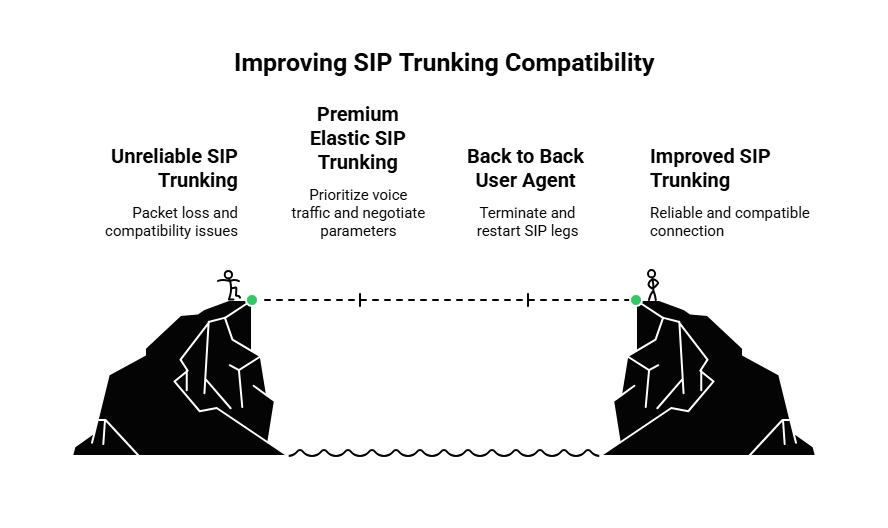
FreJun Teler provides premium elastic SIP trunking. We prioritize voice traffic. We negotiate the connection parameters automatically.
When you connect your legacy PBX to FreJun Teler we act as the “Back to Back User Agent” (B2BUA). This means we terminate the SIP leg from your phone system and start a fresh clean leg to your application. This isolates your app from the quirks and bugs of the old hardware dramatically improving compatibility.
Ready to fix your SIP headaches? Sign up for FreJun AI to start using our compatible infrastructure.
Also Read: Virtual Property Tours via AI Voice Agents
How to Test for SIP Compatibility?
Before you deploy your voice API integration you need to test it. Do not wait for a customer to complain about dropped calls.
1. The Packet Capture Test
Network engineers use a tool called Wireshark to look at the data packets. You want to see a clean flow.
- INVITE: The call starts.
- 200 OK: The other side answers.
- ACK: The connection is confirmed.
- BYE: The call ends.
If you see a lot of “Retransmissions” or “408 Request Timeout” errors you have a compatibility issue.
2. The Latency Test
Measure the Round Trip Time (RTT). High latency causes SIP timers to expire which drops the call. If your ping is higher you need to move your SIP termination point closer to your location.
FreJun helps here by offering a distributed network. We route your SIP traffic to the nearest Point of Presence (PoP) keeping latency low and preventing timeouts.
How to Secure the Connection (SIP over TLS)?
Another compatibility hurdle is security. Modern APIs use HTTPS which is encrypted. Old SIP often uses UDP which is plain text.
If your application requires strict security (like in healthcare or finance) you cannot send unencrypted voice.
You need to implement SIP over TLS (Transport Layer Security) and SRTP (Secure Real Time Protocol). This encrypts the signaling and the audio.
However configuring TLS certificates on old hardware is a nightmare. It often fails because of expired root certificates.
The best way to solve this is to let the cloud provider handle the security. Connect your PBX to FreJun. We handle the encryption. Your application talks to us via secure HTTPS webhooks. We bridge the gap ensuring compliance without the configuration headache.
Best Practices for Seamless Integration
To ensure your SIP and voice API integration runs smoothly follow these rules.
Use Keep Alives
SIP connections can “go stale” if no data flows for a while. Firewalls close the port. Configure your system to send “SIP OPTIONS” messages every 30 seconds. This is a heartbeat that tells the firewall “I am still here do not close the door.”
Standardize Phone Numbers
SIP systems are picky about number formats. Some want 10 digits. Some want 11 digits with a plus sign (E.164 format).
FreJun APIs standardize this automatically. We convert whatever format your carrier sends into a standard E.164 format for your code ensuring your database lookups always work.
Monitor Quality of Service (QoS)
Voice packets must have priority over Netflix or YouTube traffic on your office network. Configure your router to tag SIP traffic with high priority (DSCP tags). This prevents the audio from chopping up when someone downloads a large file.
Real World Example: The Hybrid Hotel
Let us look at a practical example. A historic hotel wants to add an AI concierge but they have phones from 2005 in every room.
The Problem: The old phones run on a legacy Mitel PBX. The new AI runs on a cloud server using OpenAI. They speak different languages.
The Solution:
- The hotel points their PBX SIP trunk to FreJun Teler.
- When a guest calls the front desk FreJun accepts the SIP call.
- FreJun transcodes the G.711 audio to a websocket stream.
- FreJun sends the stream to the AI.
- The AI responds.
- FreJun converts the response back to G.711 and sends it to the room phone.
The result is a seamless experience. The guest thinks they are talking to a smart system but the hardware in the room never changed.
Also Read: Voice API for Real Estate CRM Integration
Conclusion
Merging the old world of telephony with the new world of AI is not easy. It is filled with technical traps like codec mismatches and firewall blocks and signaling errors. SIP compatibility issues are the most common reason voice projects fail.
However you do not have to fight these battles alone. By using a specialized voice API integration layer you can smooth over these cracks.
Platforms like FreJun AI act as the ultimate bridge. We take the rigid and sensitive SIP protocol and wrap it in a flexible and robust API. We handle the transcoding and the security and the routing. This allows you to build modern voice experiences on top of any infrastructure no matter how old it is.
Do not let legacy hardware hold back your innovation. Schedule a demo with our team at FreJun Teler and let us show you how to make your systems talk to each other perfectly.
Also Read: Cold Calling Techniques That Actually Work for Outbound Teams
Frequently Asked Questions (FAQs)
1. What is SIP compatibility?
SIP compatibility refers to the ability of different communication devices and software to exchange voice and signaling data successfully using the Session Initiation Protocol without errors or drops.
2. Why does my voice API not work with my old office phones?
Old phones typically use legacy codecs and strict networking rules that do not match the flexible web based nature of modern APIs. You need a bridge or gateway to translate between them.
3. What is the difference between SIP and VoIP?
VoIP (Voice over IP) is the broad category of making calls over the internet. SIP is the specific protocol or language used to set up those calls. Think of VoIP as “Email” and SIP as “SMTP.”
4. How does FreJun Teler improve SIP compatibility?
FreJun Teler acts as an intermediary. It accepts connections from various SIP devices and normalizes the traffic ensuring it communicates correctly with your modern software application.
5. What is a codec mismatch?
This happens when the sending device compresses audio using one math formula (like G.711) and the receiving device expects a different one (like Opus). It results in silence or static.
6. Do I need a session border controller (SBC)?
For large enterprise networks yes. An SBC secures and manages SIP traffic. However if you use a cloud provider like FreJun we act as a cloud based SBC for you removing the need for expensive hardware.
7. Can I integrate SIP with a CRM?
Yes. Through voice API integration you can capture SIP call data (caller ID and duration) and send it instantly to your CRM via webhooks.
8. Why is one way audio so common?
It is almost always caused by NAT (Network Address Translation). The router allows the outbound request but blocks the inbound audio stream because it does not recognize the port.
9. What is elastic SIP trunking?
It is a modern version of a phone line that lives in the cloud. Unlike physical lines which have a fixed capacity elastic trunks can scale up or down automatically to handle any number of simultaneous calls.
10. Is SIP secure?
Standard SIP is not secure as it sends text in the open. To secure it you must use SIP over TLS (encryption) and SRTP. FreJun supports these secure standards to protect your calls.