
Imagine you are trying to enter a highly exclusive, high-speed racetrack. You have a fast car (your AI model) and a skilled driver (your application code). But before you can get on the track to race, you need to pass the security gate. You need a specific pass that tells the guard who you are, who is paying for the fuel, and allows you to enter the fast lane immediately without stopping.
In the world of software development, that pass is the AI Voice API Key.
It looks like a simple string of random letters and numbers. But this string is the most critical component in setting up a live, two-way voice conversation. It is the digital credential that authenticates your request, opens the data floodgates, and keeps the meter running for billing.
Without this key, there is no connection. There is no streaming. There is just a closed door.
For developers building voice bots, virtual assistants, or real-time translation tools, understanding how this key works is essential. It is not just about security; it is about performance. In this guide, we will explore the mechanics of how an API key initiates a live stream, how it manages usage-based voice billing, and how infrastructure platforms like FreJun AI use these keys to deliver ultra-low latency audio.
Table of contents
- What Is an AI Voice API Key Exactly?
- How Does the Handshake Work for Live Streaming?
- Why Is WebSocket Connection Better Than REST for Voice?
- How Does the Key Enable Usage-Based Voice Billing?
- How Can Developers Manage API Cost Control?
- How Do You Integrate the Key into Your Code?
- What Happens If the Key Is Leaked?
- How Does the Key Handle Concurrency?
- Why Is Infrastructure Key to Reliable Streaming?
- Conclusion
- Frequently Asked Questions (FAQs)
What Is an AI Voice API Key Exactly?
At its core, an API (Application Programming Interface) Key is a unique identifier. When you Sign up for FreJun AI, the system generates this long string of characters specifically for you.
Think of it as a digital passport. When your application tries to talk to the FreJun infrastructure, it presents this passport in the header of the message.
The key serves three main purposes:
- Authentication: It proves that the request is coming from you and not a hacker.
- Authorization: It tells the server what you are allowed to do (e.g., make calls, record audio, access logs).
- Accounting: It tracks how many minutes of audio you stream so you can be billed correctly.
For live audio streaming, the key is the “handshake” that upgrades a standard web request into a continuous flow of data.
How Does the Handshake Work for Live Streaming?
Live voice is different from sending a text message. A text message is a single packet of data. You send it, the server receives it, and the connection closes. This is like mailing a letter.
Voice is a stream. It is like turning on a faucet. The water (data) needs to flow continuously without stopping. If the connection closes every second, the audio cuts out.
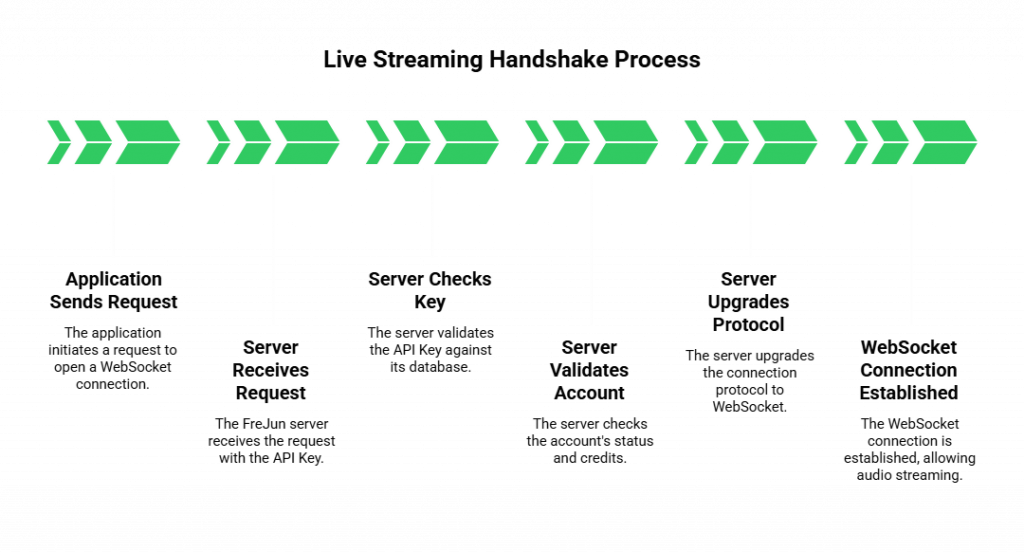
To achieve this, developers use a technology called WebSockets. Here is how the AI Voice API Key enables this connection:
- The Request: Your application sends a request to the FreJun server saying, “I want to open a WebSocket connection for a voice call.”
- The Check: Included in this request is your API Key. The FreJun server catches the request and checks the key against its database.
- The Validation: The server asks: Is this key valid? Is the account active? Does it have enough credits? This happens in milliseconds.
- The Upgrade: If the key is valid, the server accepts the connection. It “upgrades” the protocol from HTTP (one-way) to WebSocket (two-way).
- The Stream: Now the pipe is open. Audio packets flow back and forth freely.
FreJun AI is optimized to perform this validation at lightning speed. Because we focus on low latency, we ensure that the security check does not delay the start of the conversation.
Also Read: On-Device Ready Voice Recognition SDK for Faster Responses
Why Is WebSocket Connection Better Than REST for Voice?
You might wonder why we go through this complex “upgrade” process. Why not just use standard web requests (REST)?
The answer is latency. In a real-time conversation, speed is everything.
If you used REST, your app would have to send a new request with the API key for every single chunk of audio.
- Chunk 1: “Hello” -> Key Check -> Send.
- Chunk 2: “How are” -> Key Check -> Send.
- Chunk 3: “You?” -> Key Check -> Send.
This adds massive overhead. It is inefficient. It causes choppy audio.
With a WebSocket connection established via your AI Voice API Key, you perform the check once at the beginning. After that, the channel stays open. The audio flows without any further ID checks. This reduces the “overhead” and ensures that the voice data travels as fast as physics allows.
How Does the Key Enable Usage-Based Voice Billing?
This is where the business side meets the technical side. Most voice infrastructure operates on a model of usage-based voice billing. You pay for what you use.
The API key acts as the stopwatch.
- Start Time: When the WebSocket connection is successfully established (the handshake), the system starts a timer linked to your specific API key.
- Data Flow: As audio packets flow through FreJun Teler (our elastic SIP trunking layer), the system measures the volume and duration.
- End Time: When the call ends and the connection closes, the timer stops.
This creates metered AI calls. You are not paying a flat monthly fee for a channel you might not use. You are paying for the exact minutes and seconds that audio was streaming.
Here is a breakdown of how the billing logic flows:
| Stage | Action | API Key Role |
| Connection Request | App requests access | Verifies account balance |
| Stream Active | Audio flows | Tracks active duration (seconds) |
| Scaling | Volume spikes (100 calls) | Tracks 100 separate streams concurrently |
| Termination | Call ends | Logs final duration for invoicing |
| Reporting | End of month | Aggregates all logs for the bill |
How Can Developers Manage API Cost Control?
Since the billing is tied to usage, some developers worry about a “runaway script.” What if a bug causes the AI to stay on a call for 10 hours?
The AI Voice API Key is also your tool for API cost control.
Modern infrastructure platforms allow you to set limits on your keys.
- Rate Limiting: You can restrict a key to only allow 10 calls per minute.
- Quotas: You can set a monthly spend limit (e.g., $500). If the usage linked to that key hits $500, the key automatically stops authorizing new streams.
- Timeouts: You can configure the key to force-close connections that last longer than a specific duration (e.g., 60 minutes).
This gives developers peace of mind. You can experiment and scale without fear of an unexpected bill bankrupting your project.
Also Read: Voice API for Bulk Calling That Shapes Large-Scale Enterprise Communication
How Do You Integrate the Key into Your Code?
Integrating the key is usually the first step in using any SDK or API.
Typically, you do not put the key in the public code of your website (frontend). If you do, anyone can steal it and make calls on your dime. Instead, you keep the key on your secure backend server.
The flow looks like this:
- Your mobile app or website asks your backend server to start a call.
- Your backend server takes the request.
- Your backend server adds the AI Voice API Key to the authorization header.
- Your backend server connects to FreJun.
This creates a secure tunnel. The sensitive key never leaves your secure environment, but it still enables the metered AI calls to function correctly.
What Happens If the Key Is Leaked?
Security is paramount. If a hacker gets your key, they can use your usage-based voice billing account to make thousands of spam calls.
If you suspect a leak, the API key system allows for immediate remediation.
- Revocation: You can log into your dashboard and delete the compromised key instantly. This cuts off access immediately.
- Rotation: You can generate a new key and update your application.
FreJun Teler provides monitoring tools that alert you to unusual spikes in traffic. If your key suddenly starts making calls to a high-cost country at 3:00 AM, the system can flag it, allowing you to take action before the cost becomes unmanageable.
How Does the Key Handle Concurrency?
One of the strengths of AI is scalability. You might start with one call, but during a marketing campaign, you might have 1,000 simultaneous calls.
The API key handles this concurrency effortlessly. You do not need a separate key for every call. The single key acts as the master account.
As traffic scales up, FreJun Teler expands the SIP trunking capacity automatically. The key simply tracks the aggregate usage.
- Call 1 starts: Key tracks Stream A.
- Call 2 starts: Key tracks Stream B.
- Call 3 starts: Key tracks Stream C.
All three streams happen at the same time. The key ensures that all three are authorized and that the data processing voice layers are allocated correctly for each distinct conversation.
Why Is Infrastructure Key to Reliable Streaming?
An API key is only as good as the system it unlocks. You can have a valid key, but if the server behind it is overloaded, your stream will fail.
FreJun AI provides the robust infrastructure required for professional live audio streaming.
- Global Reach: We validate keys and stream media from servers around the world, ensuring users connect to the closest point of presence.
- Redundancy: If one authentication server goes down, another takes over instantly. Your key works seamlessly without interruption.
- Packet Loss Prevention: Our network is optimized for UDP (User Datagram Protocol) voice traffic, ensuring that once the key opens the door, the audio flows smoothly without the robotic jitter that plagues standard internet calls.
Also Read: Next Generation Voice Recognition SDK for AI Automation
Conclusion
The AI Voice API Key is much more than a password. It is the engine starter for your voice application. It handles the complex “handshake” that upgrades a simple web request into a high-speed, two-way audio stream.
Voice API key is also the accountant, tracking every second of your metered AI calls to ensure fair usage-based voice billing. It gives you the power to implement API cost control and secure your application against abuse.
However, the key needs a lock that opens quickly. The speed at which your infrastructure validates this key and establishes the connection defines the user experience.
FreJun AI provides that high-speed foundation. By handling the complex authentication and media transport layers, we allow you to focus on building intelligent conversations. Our infrastructure ensures that when your key knocks on the door, it opens instantly, every single time.
Ready to scale your voice application? Schedule a demo with our team at FreJun Teler to learn how our infrastructure supports high-volume streaming.
Also Read: How to Choose the Right Call Routing Software for Remote Teams
Frequently Asked Questions (FAQs)
It is a unique string of characters that authenticates your application to a voice platform. It acts as a security pass, allowing your software to initiate calls and stream audio.
It is similar, but it is used by software, not humans. While a password lets a person log in to a dashboard, an API key lets a computer program access server resources automatically.
This is a pricing model where you only pay for the minutes of audio you actually stream or the calls you make. The API key tracks this usage so you are billed accurately.
Never share it publicly. Do not commit it to public code repositories like GitHub. Always store it on your secure backend server and use environment variables to access it.
Technically yes, but it is better practice to generate separate keys for different apps (e.g., one for “Dev” and one for “Production”). This makes it easier to track costs and revoke access if one app is compromised.
Indirectly, yes. If the provider’s system takes too long to validate the key, it adds latency (delay) to the start of the call. FreJun AI validates keys instantly to ensure the call connects immediately.
These are calls where the cost is calculated based on duration. The “meter” starts running when the API key authorizes the connection and stops when the call hangs up.
Yes. Most modern platforms allow you to set quotas. For example, you can cap a key at $100 per month. Once the limit is reached, the key will stop allowing new calls until the next billing cycle.