
The world of artificial intelligence has learned to speak. Thanks to the power of Large Language Models (LLMs), the dream of having a fluid, intelligent, and open-ended conversation with a machine is no longer science fiction. But this brilliant AI “brain” is only one half of the equation.
To actually participate in a human conversation, it needs a “body”, a sophisticated nervous system that can translate the chaotic, analog world of a phone call into the clean, digital language of AI, and back again, all in a fraction of a second. This is the mission-critical role of the modern voice calling SDK.
For a developer, the task of building AI-powered voice calls is a journey into the world of real-time systems, a world where milliseconds matter and where the user experience is defined by the speed and clarity of the connection.
A voice calling SDK is the essential toolkit that abstracts away the immense underlying complexity of this world. It is the bridge that allows a developer, who is an expert in building AI logic, to seamlessly connect their creation to the global telephone network without having to become an expert in telecommunications.
This article will provide a developer-focused look at how this integration works and why the SDK is the indispensable foundation of any modern conversational AI infrastructure.
Table of contents
The Core Challenge: Bridging Two Asynchronous Worlds
To a developer, the fundamental challenge of integrating AI models with a voice SDK is about bridging two very different worlds.
The World of the AI “Brain” (Your Application)
This is the world of web services and APIs. It is largely asynchronous and stateless.
- Your application receives an input (a piece of text).
- It sends this input to a series of AI models (STT, LLM, TTS), each of which is an API call that takes a certain amount of time to complete.
- It eventually produces an output (an audio stream).
The World of the Voice Call (The SDK’s Domain)
This is the world of real-time, stateful, and persistent connections.
- A phone call is a continuous, bi-directional stream of audio packets that must be maintained with high reliability.
- The state of the call (Is it ringing? Is it connected? Is the user speaking?) is constantly changing.
The job of the developer is to use the voice calling SDK to make these two worlds dance together in perfect, real-time synchronization.
The Architectural Pattern: A Decoupled, Event-Driven Model
The most effective and scalable architecture for voice AI for developers is a decoupled, event-driven model. This is a design philosophy that separates the “voice” from the “brain.”
- The “Voice” (The Voice Calling SDK’s Platform): This is the high-performance, real-time media engine. Its job is to manage the phone call, stream the audio, and notify your application of events. A platform like FreJun AI’s Teler engine is an example of this.
- The “Brain” (Your Application/AgentKit): This is a standard web application. Its job is to house your AI’s logic and to react to the events sent by the voice platform.
The communication between these two components is a continuous, high-speed loop of events (from the SDK’s platform to your app) and commands (from your app to the SDK’s platform). This is the standard architectural pattern for any modern conversational AI infrastructure.
A recent survey of enterprise architects found that over 72% are now using or plan to use event-driven architectures to build more scalable and responsive applications.
Also Read: Voice AI in Fleet Dispatch Systems
How Developers Use the SDK? An Inbound Call Workflow
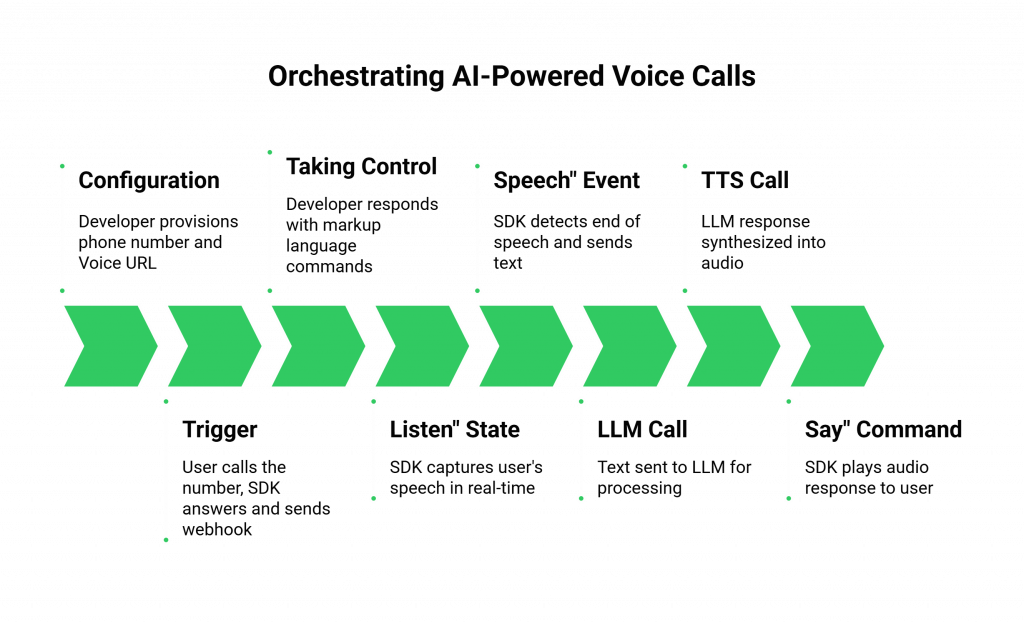
Let’s walk through the specific tools and functions a developer uses within a voice calling SDK to orchestrate an AI-powered voice call.
Step 1: Receiving the “Call” Event via a Webhook
The entire process starts with an event.
- Configuration: The developer provisions a phone number using the SDK’s platform and configures it with a “Voice URL.” This URL is an endpoint on their application server.
- The Trigger: When a user calls that number, the SDK’s platform answers the call and immediately sends an HTTP POST request (a webhook) to that Voice URL.
- The Payload: This webhook is not just a simple notification; it is a rich data payload. It contains a unique CallSid (the ID for this specific call), the From number, the To number, and other critical metadata. The developer’s application now knows that a new call has started and has all the initial information it needs.
Step 2: Taking Control of the Call with Markup Language
The developer’s application must now tell the SDK’s platform what to do next. This is typically done by responding to the webhook with a set of commands formatted in a simple markup language (like XML or JSON).
- The First Command: The developer’s code will generate a response that tells the platform to greet the user and start listening. A command like <Gather> is a powerful abstraction. It tells the platform to perform a complex sequence of actions: play an audio file (or synthesize text to speech) and then immediately start capturing the user’s speech.
Step 3: “Hearing” the User with Real-Time Media Streaming
This is the most critical part of integrating AI models with a voice SDK.
- The “Listen” State: The <Gather> command puts the call into a “listening” state.
- The Media Stream: As the user speaks, the SDK’s platform captures the audio. Modern SDKs provide a mechanism, often called “media forking” or “real-time streaming,” to send a live, low-latency stream of this audio directly to the developer’s application.
- The STT Integration: The developer’s application receives this audio stream and pipes it directly into their chosen Speech-to-Text (STT) engine. This is the AI’s “ear.”
Also Read: Managing Returns with AI Voice Support
Step 4: “Thinking” and “Speaking” with the LLM and TTS
- The “Speech” Event: Once the SDK’s platform detects that the user has stopped speaking, it sends another webhook to the developer’s application. This webhook contains the final, transcribed text from the STT engine.
- The LLM Call: The developer’s code takes this text and sends it to their LLM via an API call. The LLM processes the text and returns its response.
- The TTS Call: This text response is then sent to a Text-to-Speech (TTS) engine, which synthesizes it into a new audio file or stream.
- The “Say” Command: The developer’s application responds to the “speech” webhook with a new command, <Say>, which tells the SDK’s platform to play this new audio back to the user.
This “Listen -> Think -> Respond” loop is the fundamental rhythm of an AI-powered voice call.
This table provides a summary of the developer’s actions and the SDK’s role.
| Developer’s Goal | Developer’s Action Using the SDK | The SDK Platform’s Responsibility |
| Be Notified of a New Call | Configure a webhook URL for a phone number. | Answer the call and send a detailed webhook to that URL. |
| Control the Live Call | Respond to webhooks with simple markup commands (e.g., <Gather>, <Say>). | Interpret the commands and execute them on the live call (e.g., play audio, listen for speech). |
| “Hear” the User’s Voice | Configure and handle a real-time media stream. | Capture the live audio and stream it with low latency to the developer’s application. |
| Handle Call Completion | Listen for the “completed” webhook event. | Detect when the call is hung up and send a final webhook with call duration and other stats. |
Ready to start building the “brain” for your own AI agent and connect it to a powerful “voice”? Sign up for FreJun AI!
The FreJun AI Difference: An SDK for Serious Developers
At FreJun AI, we have built our voice calling SDK and our entire Teler platform with the needs of the professional voice AI for developers community in mind.
- A Focus on Low Latency: Our globally distributed, edge-native architecture is obsessively optimized to reduce the round-trip time of the conversational loop, which is essential for a natural-sounding AI.
- Unmatched Flexibility: Our platform is model-agnostic. We believe the developer should have the freedom to choose the best STT, LLM, and TTS models for their specific use case. Our SDK is the flexible bridge that can connect to any of them.
- Deep Observability: We provide the rich, detailed logs, real-time quality metrics, and comprehensive webhook events that developers need to effectively debug and monitor their production applications. The importance of this is paramount; studies have shown that poor monitoring and observability can increase the time to resolve production incidents by over 50%.
Also Read: Real-Time Driver Support via AI Voice
Conclusion
The voice calling SDK is the indispensable toolkit for the modern AI developer. It is the crucial layer of abstraction that transforms the chaotic, complex world of global telecommunications into a simple, programmable, and powerful set of building blocks.
By mastering the event-driven architecture that a modern SDK enables, developers can successfully bridge the gap between their intelligent AI “brain” and the real-time world of a human conversation.
This is more than just a technical integration; it is the process of giving your AI a voice and, in doing so, unlocking a new frontier of automated, intelligent, and truly AI-powered voice calls.
Want a personalized, hands-on walkthrough of our SDK and see how you can connect your AI models to a live call in minutes? Schedule a demo with our team at FreJun Teler.
Also Read: UK Mobile Code Guide for International Callers
Frequently Asked Questions (FAQs)
The first step is typically signing up on the provider’s platform to get an API key and a secret. This credential pair is what authenticates your application’s requests to the SDK’s backend services.
The biggest advantage is the separation of concerns. It allows the developer to focus entirely on the application’s logic (the “brain”) using standard web technologies, while the SDK’s platform handles the highly specialized, real-time work of voice and media processing (the “voice”).
Media forking is a feature where the voice platform creates a real-time copy of the call’s audio stream and sends it to your application. It is the essential mechanism that allows your AI’s Speech-to-Text engine to “hear” what the user is saying on a live call.
The application communicates its instructions by responding to webhook events with a specific set of commands, often formatted in a simple markup language like XML or JSON. This tells the platform what action to take next (e.g., speak some text, listen for a response, hang up).
A common mistake is underestimating the impact of latency. A developer might choose an LLM that is very powerful but slow to respond. In a voice context, speed is often more important than verbosity, so choosing AI models that are optimized for a fast response is critical.
This is handled within the developer’s application logic. They would integrate with an STT engine that supports the desired languages and accents. The voice calling SDK‘s role is to be the high-quality pipe that delivers the audio to that specialized STT engine.
A CallSid is a unique alphanumeric string that is generated by the voice platform for every single phone call. It acts as the primary identifier for that call, and it is the key that a developer uses to look up logs and analytics related to a specific interaction.
A good voice calling SDK provider will offer a comprehensive logging and debugging dashboard. A developer can use the CallSid to view a detailed, step-by-step log of every webhook sent and every command received for that call, allowing them to pinpoint where the logic failed.
An API (Application Programming Interface) is the set of rules and definitions for how two systems communicate. An SDK (Software Development Kit) is a set of tools, libraries, and documentation that makes it easier for a developer to use an API. The SDK is the “toolkit” that helps you work with the API “blueprint.”
Our approach is ideal because our voice calling SDK is built on a globally distributed, low-latency network (our Teler engine). This provides the high-speed, reliable foundation that a conversational AI infrastructure requires. Our model-agnostic philosophy also gives developers the freedom to build with the best AI tools on the market.