
Testing voice API integration before production is not a checklist exercise – it is a system-level validation of real-time conversations. Unlike traditional APIs, voice systems operate continuously, across networks, audio streams, and AI components that must stay in sync under unpredictable conditions. A small delay, a dropped audio packet, or an incorrect transcription can break the entire experience.
This guide walks founders, product managers, and engineering leads through a structured, technical approach to voice API testing – covering correctness, latency, failure handling, and scale. The goal is simple: ensure your voice agents behave reliably in real-world conditions, not just controlled demos.
Why Is Testing Voice API Integration More Complex Than Testing Regular APIs?
Voice API integration is fundamentally different from standard API integration. While REST or GraphQL APIs work on request–response cycles, voice APIs operate on continuous, real-time media streams. Because of this difference, traditional API testing methods alone are not enough.
First, voice systems must process audio without noticeable delay. Even a few hundred milliseconds of latency can break the user experience. In addition, voice APIs rely on multiple moving parts working together at the same time. If any one of them fails, the entire conversation can collapse.
Moreover, voice interactions are unforgiving. Unlike web or mobile apps, users cannot “retry” a sentence easily. Therefore, bugs in production feel more severe and more personal.
Because of these reasons, pre-production voice testing must be deeper, broader, and more realistic than standard API testing.
What Exactly Are You Testing In A Voice API Integration?
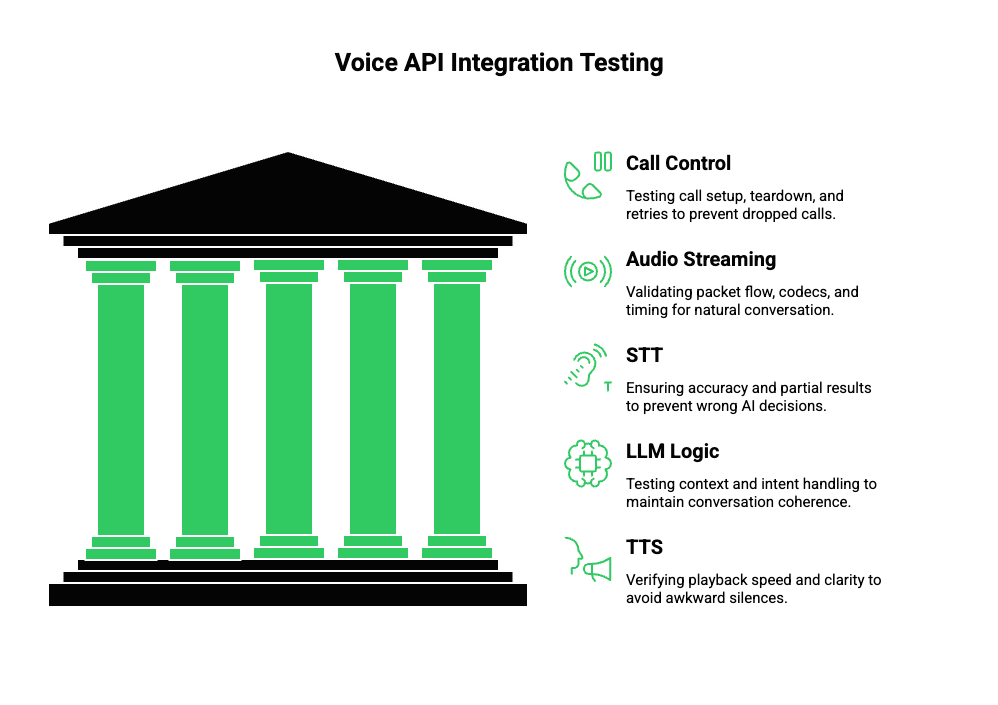
Before writing test cases, it is critical to understand what a voice API integration actually includes. Voice systems are not a single API call. Instead, they are distributed, event-driven pipelines.
At a high level, a production voice agent includes:
- Telephony or VoIP call control
- Real-time audio streaming
- Speech-to-Text (STT) processing
- LLM or AI agent logic
- Retrieval or tool execution
- Text-to-Speech (TTS) synthesis
- Audio playback back to the caller
Because of this, QA for voice must test the system as a whole, not just individual endpoints.
Core Areas That Require Testing
| Layer | What Needs To Be Validated | Why It Matters |
| Call Control | Call setup, teardown, retries | Prevents dropped or stuck calls |
| Audio Streaming | Packet flow, codecs, timing | Ensures natural conversation |
| STT | Accuracy, partial results | Prevents wrong AI decisions |
| LLM Logic | Context, intent handling | Keeps conversation coherent |
| TTS | Playback speed, clarity | Avoids awkward silences |
Therefore, voice API testing is not about checking responses. Instead, it is about validating conversation continuity.
How Should You Prepare For Voice API Testing Before Writing Test Cases?
Preparation is where most teams fail. Many jump directly into testing calls without defining what “correct” actually means. As a result, they discover issues too late.
To avoid this, preparation should follow a structured process.
Step 1: Map The Full Call Lifecycle
Start by documenting the complete call flow:
- Call initiated (inbound or outbound)
- Media stream starts
- Speech captured and streamed
- STT produces partial and final text
- AI agent processes context
- TTS generates audio
- Audio streamed back to caller
- Call ends or transfers
Because each step depends on the previous one, failures cascade quickly.
Step 2: Define Quality Thresholds Early
Next, define measurable thresholds:
- Maximum acceptable response latency
- Minimum STT confidence scores
- Maximum silence duration
- Audio buffer limits
Without these benchmarks, testing becomes subjective.
Step 3: Create Realistic Test Personas
Voice behaves differently depending on who is speaking. Therefore, your test data must include:
- Different accents
- Background noise
- Fast and slow speech
- Ambiguous phrases
- Long pauses
This step is critical for effective voice API integration testing.
How Do You Unit Test Individual Components In A Voice AI Stack?
Unit testing voice systems does not mean testing voice end-to-end. Instead, it means isolating each component as much as possible.
Although you cannot fully isolate real-time audio, you can still reduce complexity.
Testing Call Control Logic
At this layer, focus on:
- Call initiation success and failure
- Timeout handling
- Retry behavior
- Webhook event ordering
These tests ensure your system behaves correctly even before audio flows.
Testing Audio Streaming Separately
Audio streaming introduces unique challenges. Therefore, test:
- Supported codecs (PCM, Opus, etc.)
- Packet sizes and timing
- Stream start and stop events
- Backpressure handling
Even small mistakes here can lead to clipped or delayed speech.
Mocking STT, LLM, And TTS
To isolate logic, mock downstream services:
- Return deterministic STT transcripts
- Simulate LLM responses
- Inject artificial TTS delays
However, avoid over-mocking. Real audio tests are still required later.
How Do You Perform End-To-End Voice API Integration Testing?
Once unit tests are stable, end-to-end testing becomes the priority. This stage validates whether the system works as a conversation, not just as a pipeline.
Controlled benchmarks demonstrate systematic WER increases as signal-to-noise ratio drops, so include SNR buckets (e.g., 20 dB, 10 dB, 0 dB) in your test matrix.
Real Calls vs Synthetic Audio
There are two main approaches:
- Synthetic audio playback: Controlled, repeatable, automated
- Live phone calls: Realistic, unpredictable, human-driven
Both are necessary. Synthetic tests catch regressions. Live tests reveal real-world issues.
What To Validate During End-To-End Tests
During each call, verify:
- Speech is captured without delay
- STT results match spoken intent
- AI responses stay within context
- TTS playback starts quickly
- Interruptions are handled correctly
Because voice is sequential, even small timing issues become visible.
How Do You Test Latency And Audio Quality In Real Time?
Latency is the most common reason voice systems fail user acceptance tests. Therefore, it deserves focused attention.
Break Down Latency Sources
Instead of measuring only total latency, break it down:
| Latency Source | Typical Risk |
| Network | Geographic routing delays |
| STT | Long audio buffering |
| LLM | Slow inference |
| TTS | Audio chunk generation |
By measuring each segment, root causes become clear.
Test Long Conversations, Not Short Demos
Short calls often pass. Long calls reveal:
- Memory leaks
- Context loss
- Audio drift
- Session timeout bugs
Because production calls vary, long-duration testing is essential for pre-production voice testing.
How Should Failure Scenarios Be Tested In Voice Systems?
Voice systems must fail gracefully. Otherwise, users experience silence or abrupt disconnections.
Test scenarios should include:
- Network interruptions mid-sentence
- STT returning low confidence
- LLM errors or tool failures
- TTS audio not generated
- Partial webhook delivery
In each case, verify that:
- The system responds audibly
- The call does not hang
- Recovery logic activates correctly
This approach defines strong QA for voice systems.
How Do You Test Voice APIs At Scale Before Production Launch?
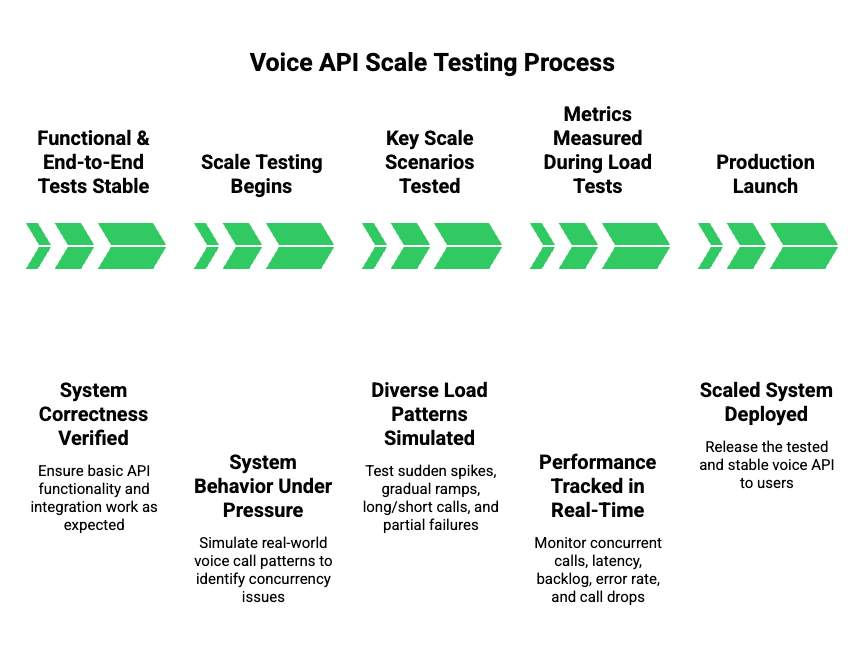
Once functional and end-to-end tests are stable, the next step is scale testing. At this stage, the goal is not correctness but system behavior under pressure. Many voice systems fail here because concurrency exposes issues that never appear in single-call testing.
First, it is important to understand that voice load is different from API load. Voice calls are long-lived, stateful, and resource-heavy. Therefore, traditional HTTP load testing tools alone are insufficient.
Key Scale Scenarios To Test
You should simulate multiple real-world patterns:
- Sudden spikes in concurrent calls
- Gradual ramp-up during peak hours
- Long-running calls mixed with short calls
- Partial failures during high load
Each scenario stresses different parts of the system.
What To Measure During Load Tests
| Metric | Why It Matters |
| Concurrent active calls | Validates capacity planning |
| Audio latency drift | Detects buffer saturation |
| STT/TTS backlog | Reveals processing bottlenecks |
| Error rate per minute | Signals instability |
| Call drop percentage | Direct user impact |
Because voice APIs consume CPU, memory, and network continuously, these metrics must be tracked together, not in isolation.
How Do You Validate Reliability And Failover In Voice API Integration?
After scale, reliability becomes the focus. Production voice systems must assume failure as normal behavior.
Instead of asking “Will this fail?”, teams should ask “How does this fail?”
Failure Scenarios That Must Be Tested
- Temporary network outages
- Partial media stream loss
- STT provider slowdowns
- LLM timeouts
- TTS generation errors
In each case, the system should:
- Detect failure quickly
- Respond audibly to the caller
- Recover or exit cleanly
Silent failures are unacceptable in voice applications.
Failover Testing Strategy
Introduce controlled faults:
- Inject artificial latency
- Drop audio packets
- Return malformed STT responses
- Delay webhook delivery
Because these issues happen in real networks, testing them before launch is critical for pre-production voice testing.
How Do Logging And Observability Improve QA For Voice Systems?
Even the best testing strategy fails without observability. Voice systems generate large volumes of events, and without structure, debugging becomes guesswork.
Therefore, logging and monitoring should be designed alongside testing, not after.
What To Log In A Voice API System
At minimum, capture:
- Call session identifiers
- Audio stream start and stop times
- STT partial and final transcripts
- LLM decision timestamps
- TTS generation and playback events
Each log entry must be correlated to a single call session.
Observability Best Practices For Voice APIs
| Practice | Benefit |
| Session-based tracing | Enables full call replay |
| Timestamp alignment | Identifies latency sources |
| Structured logs | Simplifies debugging |
| Real-time alerts | Prevents silent failures |
Because voice issues are often timing-related, timestamps are more valuable than raw messages.
What Should A Production-Ready Voice API Testing Checklist Include?
At this point, testing efforts must be consolidated into a repeatable checklist. This checklist becomes the final gate before launch.
Voice API Testing Checklist
| Category | Validation Items |
| Call Lifecycle | Start, end, retry, timeout |
| Audio Streaming | Codec support, packet timing |
| STT | Accuracy, partial results |
| LLM Logic | Context retention, intent handling |
| TTS | Playback latency, clarity |
| Load Testing | Peak concurrency handling |
| Failure Handling | Graceful recovery |
| Monitoring | Logs, metrics, alerts |
This checklist ensures that voice API integration testing is systematic rather than ad hoc.
How Does FreJun Teler Simplify Voice API Testing For AI Agents?
At this stage, infrastructure decisions begin to matter. This is where FreJun Teler plays a critical role.
Rather than being an AI platform, Teler acts as a dedicated voice transport and telephony layer. This separation is important because it allows teams to test voice behavior independently from AI logic.
Why This Matters For Testing
When voice infrastructure and AI logic are tightly coupled, debugging becomes difficult. Teler removes this coupling by handling:
- Real-time call connectivity
- Media streaming reliability
- Call lifecycle management
As a result, teams can focus on testing:
- LLM reasoning
- STT and TTS quality
- Conversation design
without worrying about low-level telephony behavior.
Technical Advantages During Testing
- Stable session identifiers for correlation
- Consistent media streams for repeatable tests
- Clear separation between voice transport and AI logic
This structure significantly reduces uncertainty during QA for voice systems.
How Can Teams Validate Launch Readiness For Voice APIs?
Before production launch, teams should shift from testing features to validating readiness.
This phase answers a simple question: “Are we confident this system will behave correctly at scale, under failure, and with real users?”
Launch Readiness Signals
You are ready to launch when:
- Load tests pass consistently
- Latency stays within defined thresholds
- Failure scenarios are handled audibly
- Monitoring alerts are actionable
- Rollback procedures are tested
Skipping this step often leads to production incidents that are hard to recover from.
What Are The Most Common Mistakes In Pre-Production Voice Testing?
Finally, it is important to highlight common mistakes so teams can avoid them.
Frequent Errors Teams Make
- Treating voice APIs like standard HTTP APIs
- Testing short demo calls only
- Ignoring real-world audio conditions
- Shipping without observability
- Relying on manual testing alone
Each of these mistakes increases risk significantly.
Final Thoughts: Testing Voice APIs Is Testing Conversations
Testing voice API integration before production is ultimately about validating conversations, not endpoints. Teams that succeed treat voice as a real-time system—measuring latency, monitoring audio quality, testing failure paths, and validating behavior at scale. By following a structured testing approach, you reduce production risk, protect user trust, and shorten incident response time after launch.
Equally important, separating voice infrastructure from AI logic makes testing clearer and more repeatable. FreJun Teler helps teams do exactly that by handling call connectivity and real-time media transport, so engineering teams can focus on STT accuracy, LLM behavior, and conversation design.
If you’re preparing to launch production voice agents, schedule a demo to see how Teler simplifies testing and deployment.
FAQs –
- What is voice API integration?
Voice API integration connects telephony, real-time audio streaming, and AI components to enable automated voice conversations. - Why is voice API testing different from API testing?
Because voice systems use continuous audio streams, timing, latency, and quality must be tested – not just responses. - What should I test first in a voice system?
Start with call lifecycle, audio streaming stability, and latency before testing AI behavior. - How do I test STT accuracy properly?
Use real audio with noise, accents, and varied speech speeds instead of clean, scripted recordings. - How much latency is acceptable for voice agents?
Generally, a sub-150-ms one-way latency is ideal for natural conversational flow. - Do I need load testing for voice APIs?
Yes. Voice calls are long-lived and resource-heavy, so concurrency issues appear only at scale. - How do I test failure scenarios in voice systems?
Simulate network drops, STT delays, and AI errors to verify graceful recovery and audible feedback. - What logs are most important for voice QA?
Session-based logs with timestamps across audio, STT, AI, and TTS are critical. - Can I mock everything during voice testing?
Mocks help early, but real calls are required to catch timing and audio-quality issues. - When is a voice system ready for production?
When latency, failure handling, scale, and monitoring meet defined thresholds consistently.