
Imagine a sales representative named Sarah. She is talented and persuasive and spends her entire day on the phone talking to potential clients. Sarah makes fifty calls a day. But after every single call Sarah has to stop. She has to open her computer and log into her Customer Relationship Management (CRM) system.
Sarah has to type in the phone number she just dialed. She has to type out a summary of what was said. She has to manually schedule the next follow up task.
This process takes five to ten minutes per call. That is over four hours of busywork every single day. That is four hours Sarah is not selling. It is a massive waste of time and money.
Now imagine a different scenario. Sarah uses an intelligent voice assistant to make the call. Or perhaps an AI agent handles the initial qualification call for her. The moment the call ends the conversation is automatically logged in the CRM. The recording is saved. A text summary is generated by AI and attached to the client record. The next task is created automatically based on the outcome of the call.
This is the power of connecting your voice infrastructure to your customer database. This is achieved through an AI voice agent API. By building a digital bridge between your AI agents and your CRM you eliminate manual data entry and give your team superpowers.
In this guide we will explain exactly how to build this integration. We will look at how to use customer context AI to make conversations smarter and how to automate call data sync and how platforms like FreJun AI provide the essential infrastructure to make it all work seamlessly.
Table of contents
- What Is an AI Voice Agent API?
- Why Is CRM AI Voice Integration Essential?
- How Does the Integration Work?
- What Is the Role of Customer Context AI?
- How Does FreJun AI Support This Architecture?
- Comparison: Manual vs Integrated Workflow
- How to Build the Integration Step by Step?
- Why Is Low Latency Critical for CRM Lookups?
- Real World Use Cases for Integrated Agents
- How Does FreJun Teler Help with Scale?
- Conclusion
- Frequently Asked Questions (FAQs)
What Is an AI Voice Agent API?
To understand the integration we first need to define the tool. An API (Application Programming Interface) is a set of rules that allows two pieces of software to talk to each other.
An AI voice agent API is a specific type of connection that allows developers to control programmable voice agents. It allows you to send commands like “make a call” or “listen to this stream” or “send this audio to the Large Language Model.”
When we talk about integrating this with a CRM we are talking about creating a loop.
- The CRM tells the API who to call.
- The API handles the voice conversation.
- The API sends the results back to the CRM.
This creates a seamless flow of data known as CRM AI voice integration. It ensures that your voice data is not stuck in a silo but is actually useful to your business.
Why Is CRM AI Voice Integration Essential?
You might think that keeping your phone system and your database separate is safer or easier. It is not. Keeping them separate creates blind spots.
1. Eliminating the “Data Entry Tax”
We mentioned Sarah earlier. Her struggle is real. A huge chunk of their day is lost to administrative tasks like manual data entry. Automating this frees up their time to do what they do best which is closing deals.
2. Immediate Personalization
When a customer calls they hate repeating themselves. If they spoke to an agent yesterday they expect the company to know that today. With integration the AI agent can “read” the CRM before it even says hello. It can see the customer’s name and recent purchases. This allows the AI to say “Hi John are you calling about the laptop repair?” instead of a generic greeting.
3. Better Data Accuracy
Humans make mistakes. They make typos. They forget to log calls. An AI never forgets. By automating the logging process you ensure that your data is 100% accurate and complete.
Also Read: Cold Calling Techniques That Actually Work for Outbound Teams
How Does the Integration Work?
To build this you need to understand the flow of information. It involves three main parties. The Caller and the Voice Infrastructure (like FreJun) and the CRM Database.
Here is the typical lifecycle of a fully integrated call:
- The Trigger: A customer dials your support number.
- The Webhook: The voice platform detects the call. It sends a “webhook” (a digital notification) to your application server.
- The Lookup: Your server takes the caller’s phone number and queries the CRM API.
- The Context: The CRM returns the customer context AI data (Name: John, Status: VIP).
- The Conversation: Your AI agent uses this context to have a personalized conversation.
- The Sync: When the call ends the voice platform sends the transcript and summary to your server. Your server updates the CRM record automatically.
This process is often called call data sync. It ensures that the CRM is always the single source of truth.
What Is the Role of Customer Context AI?
The difference between a “dumb” bot and a “smart” agent is context.
A standard IVR system (Press 1 for Sales) has no context. It treats every caller the same. Customer context AI changes this. It allows the agent to adapt its personality and its options based on who is calling.
For example:
- Scenario A: The CRM shows the caller has an overdue invoice. The AI agent automatically routes the call to the billing department or proactively asks “Are you calling to make a payment?”
- Scenario B: The CRM shows the caller is a new lead. The AI agent enters “Sales Mode” and focuses on qualification questions.
This context must be fetched in real time. This means the infrastructure supporting the call must be incredibly fast. If the AI takes five seconds to look up the CRM data the caller will hang up.
How Does FreJun AI Support This Architecture?
You might be wondering where FreJun fits into this. FreJun is not a CRM. We are the infrastructure provider and are the plumbing that carries the voice data.
We handle the complex voice infrastructure so you can focus on building your AI.
To build a reliable CRM AI voice integration you need a voice platform that is fast and developer friendly. FreJun provides:
- Low Latency Streaming: We stream the audio to your AI model instantly. This allows the AI to respond quickly even while fetching data from the CRM.
- Real Time Events: We provide webhooks for every stage of the call (Ringing, Answered, Completed). This allows you to trigger CRM updates at the exact right moment.
- Elastic Scale: Through FreJun Teler we offer elastic SIP trunking. This means you can handle five calls or five thousand calls and we will ensure the connection remains stable for all of them.
Comparison: Manual vs Integrated Workflow
Here is a quick look at the difference between the old way and the integrated way.
| Feature | Manual Logging (Old Way) | AI Integrated (New Way) |
| Data Entry Time | 5 to 10 minutes per call | 0 minutes (Instant) |
| Accuracy | Low (Typos and skipped logs) | 100% Accurate |
| Context | Agent asks “Who is this?” | AI says “Hello [Name]” |
| Recording Storage | Often lost or on local drive | Attached to CRM record |
| Follow Up Speed | Slow (Manual scheduling) | Fast (Automated triggers) |
| Scalability | Limited by human staff | Infinite with AI agents |
Also Read: The Future of Elastic SIP Trunking in an AI-Powered Voice World
How to Build the Integration Step by Step?
If you are a developer tasked with building this here is your roadmap.
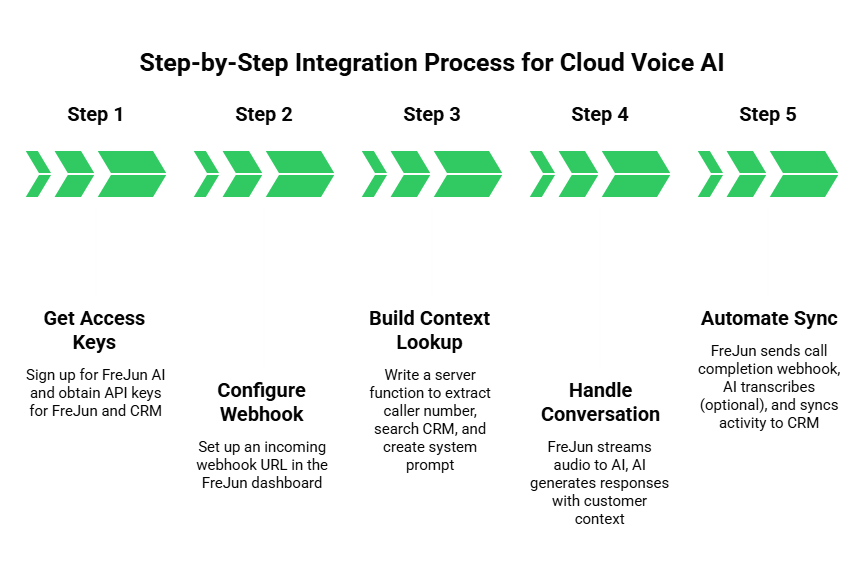
Step 1 Get Your Access Keys
First you need access to the networks. Sign up for a FreJun AI to get your API keys. You will also need API keys for your CRM (like Salesforce, HubSpot, or Zoho).
Step 2 Configure the Incoming Webhook
In the FreJun dashboard you will set up a webhook URL. This is the address of your server. When a call comes in FreJun will send a POST request to this URL containing the caller’s phone number.
Step 3 Build the Context Lookup
Write a function on your server that listens for that webhook.
- Extract the From_Number.
- Send a request to your CRM to search for a Contact with that number.
- If found retrieve the First_Name and Account_Status.
- Pass this data to your Large Language Model (LLM) as the “System Prompt.”
For example the system prompt might look like: “You are a helpful assistant speaking to John. He is a VIP customer. Be polite and ask about his recent order.”
Step 4 Handle the Conversation
FreJun will stream the audio to your AI. Your AI will generate responses based on the prompt you created. This is where the magic of customer context AI happens.
Step 5 Automate the Sync
When the call ends FreJun sends a call.completed webhook. This payload contains the duration and the recording URL.
- Take the recording URL.
- (Optional) Send it to a transcription service to get text.
- Send a POST request to your CRM to create a new “Activity” or “Note” attached to John’s profile.
- Include the summary and the recording link.
Why Is Low Latency Critical for CRM Lookups?
Speed is everything in voice. If you call someone and they don’t answer for three seconds it feels awkward.
When you integrate a CRM you are adding a step to the process. The call comes in -> Lookup CRM -> Answer. That lookup step takes time.
If your voice infrastructure is slow adding the CRM lookup will make the delay unbearable. This is why you need a high performance platform like FreJun.
FreJun is engineered for ultra low latency. We optimize the network path to ensure that the voice data arrives instantly. This gives your server those precious extra milliseconds it needs to query the CRM and load the context without the user noticing a delay.
Real World Use Cases for Integrated Agents
So who actually uses this? It is not just tech companies.
1. Inbound Customer Support
A customer calls a bank. The AI voice agent API triggers a lookup. The AI sees that the customer’s credit card was declined yesterday.
- Without Context: “How can I help you?”
- With Context: “I see you had a transaction declined yesterday. Are you calling to resolve that?”
This proactive service saves time and delights customers.
2. Outbound Lead Qualification
A real estate agency uploads 1,000 leads to their CRM. The AI agent starts dialing.
- It calls a lead.
- It qualifies them (budget, timeline).
- It updates the CRM field from “New Lead” to “Qualified Prospect.”
- It schedules a meeting for the human agent.
All of this happens without a human lifting a finger.
3. Appointment Reminders
A dentist’s office uses an AI agent to confirm appointments.
- The CRM triggers the call 24 hours before the visit.
- The AI calls and says “Hi Sarah, confirming your cleaning tomorrow at 2 PM.”
- If Sarah says “I need to reschedule,” the AI checks the CRM calendar, finds a new slot, and updates the database in real time.
According to a study by McKinsey, 71% of consumers expect companies to deliver personalized interactions. Integrating your voice agent with your CRM is the only scalable way to meet this expectation.
How Does FreJun Teler Help with Scale?
If you are running a large campaign you might have hundreds of concurrent calls. You need to ensure that your call data sync works for call #1 and call #1,000.
FreJun Teler provides elastic SIP trunking. This technology allows your voice capacity to expand and contract automatically.
- Reliability: We ensure that the connection to the telephone network is stable.
- Global Reach: We allow you to connect with customers all over the world.
- Data Integrity: We ensure that the metadata (who called whom) is preserved accurately so your CRM sync never fails.
Also Read: Elastic SIP Trunking for Startups: Scale Your Voice Infrastructure Without Complexity
Conclusion
Data is the fuel of modern business. But for a long time voice data was lost. It evaporated the moment the phone was hung up.
By integrating your CRM with an AI voice agent API you capture that value. You turn every conversation into structured data and empower your agents with customer context AI allowing them to have smarter and faster and more helpful conversations. You automate the boring work of call data sync freeing your team to focus on high value tasks.
However this integration relies on a strong foundation. You need infrastructure that is fast enough to handle real time lookups and reliable enough to handle enterprise scale. FreJun AI provides that foundation. By handling the complex telephony and media streaming layers we enable developers to build deep and powerful integrations that transform how businesses interact with their customers.
Want to see how our infrastructure can power your specific CRM integration? Schedule a demo with our team at FreJun Teler and let us help you build a smarter voice workflow.
Also Read: How Businesses Use Outbound Calls for Lead Generation & Pipeline Growth
Frequently Asked Questions (FAQs)
An AI voice agent API is a tool that allows developers to programmatically control voice conversations. It connects the telephone network to artificial intelligence allowing for automated and intelligent interactions.
Yes. FreJun uses standard webhooks and REST APIs. This means you can connect it to any CRM that allows API access including Salesforce and HubSpot and Zoho and custom databases.
Customer context AI refers to the ability of an AI agent to access information about the user (like name or history) during the conversation. This allows the AI to personalize its responses rather than using a generic script.
Yes. FreJun sends events (webhooks) the moment they happen. If your server is set up correctly the CRM data can be fetched and displayed to the AI agent while the phone is still ringing.
Call data sync is the automated process of ensuring that call details (like duration, recording link, and summary) are saved into the CRM immediately after the call ends.
No. FreJun is the voice infrastructure platform. We provide the “pipe” that connects the phone call to your CRM and your AI models. We handle the transport while you handle the data storage.
Yes. While some platforms offer “no-code” connectors a robust CRM AI voice integration typically requires a developer to write the logic that connects FreJun’s API to your CRM’s API.
Yes. FreJun uses enterprise grade security protocols. We encrypt data in transit ensuring that your customer information remains private as it moves between the voice network and your CRM.
Absolutely. You can use the API to trigger outbound calls from your CRM. For example you can build a “Click-to-Call” button inside Salesforce that uses FreJun to dial the customer.
FreJun Teler offers elastic SIP trunking. This ensures that your integration can scale. Whether you have ten calls a day or ten thousand FreJun Teler ensures the connectivity is reliable and the data sync is accurate.