
Have you ever talked to a robot on the phone and felt like you were waiting forever for a reply? You ask a simple question like “What is my account balance?” and then there is silence. One second. Two seconds. Three seconds. Finally the robot answers.
That silence is awkward. In a real conversation with a human people reply almost instantly. They might even start talking before you finish your sentence. That speed is what makes a conversation feel real.
The reason for the delay with most robots is how they process information. Old systems wait for the computer to think of the whole sentence before they start speaking. It is like a waiter waiting for the entire table’s food to be cooked before bringing out a single plate.
But there is a better way. It is called streaming. By using voice API integration to stream data you can make your AI start talking the moment it has the first word ready. It brings out the appetizers while the main course is still cooking.
In this guide we will explore how AI voice streaming works. We will look at how to connect the different pieces of the puzzle and how to use voice API integration to build lightning fast bots and how infrastructure platforms like FreJun AI make this instant communication possible.
Table of contents
- Why Do Traditional AI Voicebots Feel Slow?
- What Is Voice API Integration in the Context of Streaming?
- How Does Streaming Actually Work?
- Why Is Low Latency Crucial for Voice?
- How Does FreJun AI Enable Seamless Streaming?
- What Are the Steps to Build a Streaming Voice Agent?
- Comparison: Buffered vs. Streaming
- How Do Large Language Models Handle Voice Output?
- What Are the Challenges of AI Voice Streaming?
- Why Is Infrastructure the Key to Success?
- Future of Real Time AI Responses
- Conclusion
- Frequently Asked Questions (FAQs)
Why Do Traditional AI Voicebots Feel Slow?
To understand the solution we first need to look at the problem. Traditional voicebots work in a step by step process often called a waterfall.
Here is what happens in a slow system:
- Listen: The bot records your voice until you stop speaking.
- Transcribe: It sends the audio to a server to turn it into text.
- Think: It sends that text to an AI brain (LLM). The brain thinks and generates a full paragraph answer.
- Synthesize: It sends that full paragraph to a voice engine (TTS) to create an audio file.
- Play: Finally it plays the audio file back to you.
The problem is step 3 and step 4. Large Language Models (LLMs) can take several seconds to generate a long answer. If you wait for the whole answer the user sits in silence.
Real time AI responses solve this by breaking the chain. Instead of waiting for the whole paragraph the system handles the data in tiny chunks. The moment the AI thinks of the word “Hello” it sends it to the voice engine which turns it into sound and plays it immediately.
What Is Voice API Integration in the Context of Streaming?
Voice API integration is the code that connects your application to the telephone network. It is the bridge between the internet and the phone in your pocket.
In the past APIs were designed to handle files. You would upload an MP3 file and tell the API to play it. But for streaming you need an API that handles a continuous flow of data.
Modern voice APIs allow you to open a two way connection usually using a technology called WebSockets. This allows audio to flow in and out simultaneously. You do not send a file. You send a stream of bytes.
This is where FreJun AI shines. We provide the robust infrastructure needed to handle these streams. We do not generate the AI response ourselves. Instead we provide the high speed pipe that carries the response from your AI to the customer’s ear without delay.
How Does Streaming Actually Work?
It might sound like magic but it is actually just efficient engineering. Let us break down the flow of AI voice streaming.
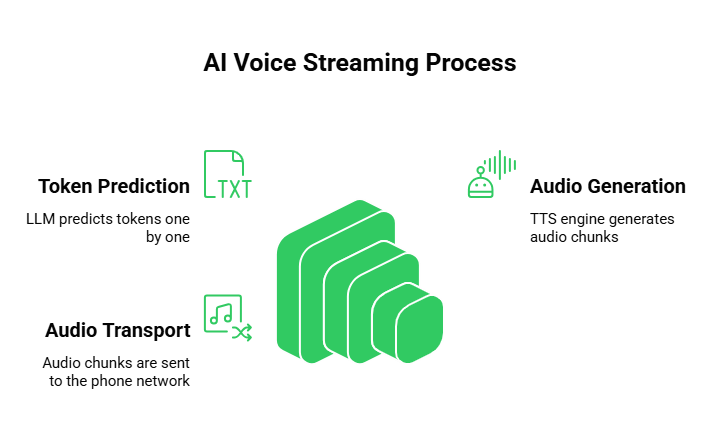
1. The Token Stream
When you ask an LLM a question it does not write the answer all at once. It predicts the next word (or token) one by one.
- Old way: Wait for tokens 1 through 50 to be ready.
- New way: Grab token 1 immediately.
2. The Audio Stream
As soon as the LLM voice output generates a few words those words are sent to the Text to Speech (TTS) engine. The TTS engine does not create a whole file. It creates a tiny chunk of raw audio.
3. The Transport Stream
This is the critical part. That tiny chunk of audio needs to get to the phone network instantly. FreJun AI receives this chunk via the voice API integration and pushes it directly to the active phone call.
Because this happens millisecond by millisecond the user hears the AI start talking almost immediately after they finish asking their question.
Also Read: What Makes Voicebot Solutions Suitable for Multilingual Customers?
Why Is Low Latency Crucial for Voice?
Latency is the time delay between a cause and an effect. In voice interfaces latency is the enemy of user experience.
If you are chatting via text message a five second delay is fine. On a voice call a five second delay is a disaster. It leads to people talking over each other.
A delay of more than 200 milliseconds is noticeable to the human ear. If the delay exceeds 500 milliseconds the conversation starts to feel unnatural.
By using streaming you can reduce the “Time to First Byte” (TTFB). This is the time it takes for the first sound to be heard. With a good setup you can get this down to under 1 second which feels instant to the user.
How Does FreJun AI Enable Seamless Streaming?
Building this from scratch is hard. You have to manage network packets and handle jitter and ensure the audio is encoded correctly for the telephone network (PSTN).
FreJun AI handles this complexity for you. We provide the “plumbing” for real time AI responses.
The Media Plane
FreJun uses a high performance media plane. This is a fancy way of saying we handle the heavy lifting of audio processing. When you send audio chunks to our API we optimize them for the phone network and deliver them instantly.
Elastic SIP Trunking
Through FreJun Teler we provide elastic SIP trunking. This ensures that the connection to the phone network is stable and scalable. Whether you have one active stream or ten thousand our infrastructure scales to meet the demand.
Model Agnostic Design
We do not force you to use a specific AI model. You can use OpenAI or Anthropic or a custom model you built yourself. You simply plug your model’s output into our stream and we handle the rest.
What Are the Steps to Build a Streaming Voice Agent?
If you are a developer ready to build here is the step by step process to implement voice API integration for streaming.
Step 1: Set Up the Call
First you need to accept an incoming call or make an outbound call. You do this using FreJun’s SDK.
- Sign up for a FreJun AI to get your API credentials.
- Use the SDK to answer the call and open a media stream.
Step 2: Transcribe the Input
The user speaks. FreJun streams this raw audio to a transcription service (like Deepgram). You get text back in real time.
Step 3: Connect to the LLM
Send that text to your LLM (like GPT-4). Important: You must set the “stream” parameter to “true” in your API request to the LLM. This tells the LLM to send back tokens one by one.
Step 4: Synthesize Audio
As the tokens arrive forward them to a streaming TTS provider (like ElevenLabs). They will return chunks of audio data.
Step 5: Stream to FreJun
Take those audio chunks and send them to the FreJun active call object. FreJun plays them to the user.
Comparison: Buffered vs. Streaming
To clearly see the difference let us look at the timeline of a “Buffered” (Old Way) response versus a “Streaming” (New Way) response.
| Feature | Buffered (Traditional) | Streaming (Modern) |
| Logic | Wait for full answer | Process answer piece by piece |
| First Audio Heard | 3 to 5 seconds delay | 0.5 to 1 second delay |
| User Feeling | “Is it broken?” | “It’s listening to me.” |
| Interruption | Hard to stop once started | Can stop instantly (barge in) |
| Infrastructure | Simple HTTP requests | Requires persistent WebSockets |
| Complexity | Low | Medium (requires sync) |
Also Read: How Can Voice bot Solution Scale Across Global Voice Operations?
How Do Large Language Models Handle Voice Output?
The brain of your agent is the LLM. Using an LLM for LLM voice output is different than using it for a chatbot.
In a text chatbot you can go back and edit the message. In voice once you say a word you cannot unsay it.
This means your voice API integration needs to be smart. You need to handle sentence boundaries and should not send half a word to the TTS engine. You usually buffer the tokens just enough to form a complete word or a short phrase before sending it to be turned into audio. This ensures the voice sounds smooth and not jerky.
What Are the Challenges of AI Voice Streaming?
While streaming is better it does introduce new challenges that developers need to solve.
The “Barge In” Problem
This is the most critical challenge. “Barge in” is when the user interrupts the AI.
- Scenario: The AI is streaming a long explanation. The user says “Okay stop I get it.”
- The Fix: Your system needs to listen while it is speaking. If FreJun detects user speech (Voice Activity Detection) it sends an event to your server. Your server must immediately send a command to clear the audio buffer and stop the AI voice streaming.
FreJun’s low latency infrastructure makes this possible. Because the delay is short the AI stops talking almost instantly when the user interrupts which feels very natural.
Ordering of Packets
The internet is not perfect. Sometimes data packets arrive out of order. If packet B arrives before packet A your AI will sound like it is stuttering.
- The Fix: A robust voice API integration handles jitter buffers. FreJun manages the media stream to ensure that audio packets play in the correct order even if the network is slightly unstable.
Why Is Infrastructure the Key to Success?
You can have the smartest AI model and the most realistic voice skin but if the transport layer is slow the experience will fail.
The “plumbing” matters. This is why businesses choose dedicated voice infrastructure platforms instead of trying to build it themselves over raw VoIP protocols.
FreJun AI ensures that the connection between the telephone network and your AI cloud is rock solid. We handle the codecs and the protocols and the carrier connections via FreJun Teler. This allows you to treat the phone call like just another data stream.
Future of Real Time AI Responses
We are moving toward a world where AI agents will sound indistinguishable from humans. LLM voice output is getting faster and more emotional.
As models get smaller and faster the latency will drop even further. We will soon see “duplex” conversations where the AI and the human can laugh and talk over each other naturally.
To be ready for this future you need an infrastructure that supports high speed streaming today. You cannot build the future on old “request and response” architecture. You need a streaming pipeline.
Also Read: How Do Voice Bot Solutions Deliver Human-Like Voice Interactions?
Conclusion
The era of the robotic “please wait” voicebot is ending. Customers demand instant answers. They want to talk to machines the same way they talk to friends.
Streaming is the technology that makes this possible. By utilizing voice API integration to stream text and audio you can eliminate the awkward pauses that kill engagement.
However streaming requires a strong foundation. You need an infrastructure provider that understands real time media. FreJun AI provides the low latency rails that your data travels on. Whether you are building a support agent or a sales bot or a personal assistant our platform ensures your AI is heard clearly and instantly.
By shifting from a buffered model to a streaming model you are not just making your bot faster. You are making it feel alive.
Want to see how fast your AI can talk? Schedule a demo with our team at FreJun Teler and let us show you the power of streaming.
Also Read: UK Mobile Code Guide for International Callers
Frequently Asked Questions (FAQs)
A standard API typically waits for a request to be fully finished before sending a response (like sending an email). A streaming API sends data continuously in small chunks as it becomes available (like watching a live video).
Streaming eliminates the long delay between the user asking a question and the AI answering. It allows the AI to start speaking while it is still thinking of the rest of the answer.
No. FreJun AI is the infrastructure layer. We transport the voice. You use third party tools (like ElevenLabs or OpenAI) to generate the audio and FreJun streams that audio to the phone call.
TTFB is the amount of time it takes from the moment the user stops speaking to the moment they hear the first sound from the AI. Lower is better. Streaming significantly reduces TTFB.
Yes. This is called “barge in.” FreJun supports full duplex communication meaning we listen while we play audio. If the user speaks we can signal your app to stop the audio stream immediately.
It is slightly more complex because you have to handle events and data chunks rather than just one file. However FreJun’s SDKs simplify much of this logic for developers.
Yes. FreJun’s infrastructure is optimized for low bandwidth environments including 4G and 5G mobile networks ensuring stable calls even if the user is moving.
A WebSocket is a technology that opens a persistent communication channel between a client and a server. It is the standard method used for voice API integration when streaming real time audio.
Yes. FreJun Teler utilizes elastic SIP trunking which automatically scales to handle high call volumes. Each call gets its own dedicated stream.
Most modern AI voice providers (like OpenAI, Deepgram, Azure, and ElevenLabs) support streaming. Older legacy systems might only support file based generation.