
Have you ever tried to talk to a virtual assistant while standing on a busy street corner? It is very frustrating when the computer gets every single word wrong because a bus drove past you. This happens because machines find it hard to separate your voice from the sounds of the world around you.
To solve this problem, developers and businesses use a voice recognition software API. This smart tool helps computers turn human speech into text, even when there is a lot of extra sound in the room. Handling noise is one of the biggest challenges in the world of artificial intelligence today.
In this article, we will explain how to make your voice agents smarter so they can hear clearly in any situation.
Table of contents
- Why is Background Noise a Problem for AI?
- How Do Modern Tools Use Background Noise Filtering?
- What is Noisy Environment Speech Recognition?
- How Does Your Voice Recognition Software API Process Sound?
- What are the Best Techniques for Handling Noise?
- Why is Low Latency Crucial for Noise Management?
- How to Choose the Right API for Your Industry?
- What are the Practical Benefits for Your Business?
- Conclusion
- Frequently Asked Questions (FAQs)
Why is Background Noise a Problem for AI?
When you speak, you create sound waves that travel through the air. A microphone picks up these waves and turns them into electrical signals. However, the microphone does not just hear you. It hears the hum of the air conditioner, the barking of a neighbor’s dog, and the clinking of dishes in a kitchen. For a computer, all these sounds look like one big jumbled mess of data.
If the background noise is too loud, the computer cannot find the “shape” of your words. This leads to mistakes. According to research from Venture Beat, AI speech recognition now reaches an error rate of about 5% in quiet rooms, but this error rate can jump significantly when background noise is added.
This is why a voice recognition software API must be very advanced to work in the real world. Without good noise management, a voice agent becomes useless as soon as the user leaves a quiet office.
How Do Modern Tools Use Background Noise Filtering?
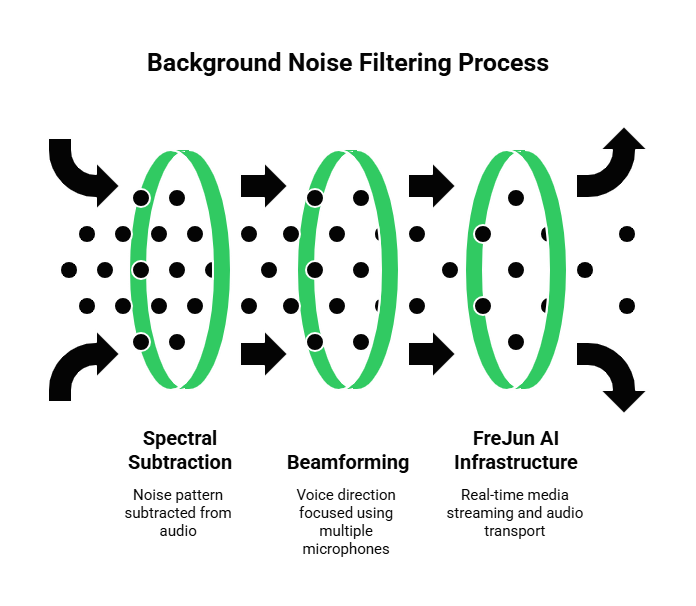
To help the AI focus, developers use a process called background noise filtering. Think of this like a pair of noise canceling headphones for a computer. The goal is to strip away the sounds that do not belong to the speaker. There are several ways that a voice recognition software API can do this.
One common method is called spectral subtraction. The computer listens to the “silence” before you start talking to understand what the background noise sounds like. Then, it subtracts that noise pattern from the audio once you start speaking.
Another method involves using multiple microphones to figure out which direction the voice is coming from. This is called beamforming. By focusing only on the sound coming from directly in front of the microphone, the system can ignore sounds coming from the sides or the back.
FreJun AI makes this whole process easier for developers. FreJun acts as the voice infrastructure platform that handles real time media streaming. It captures high quality raw audio from the call and sends it directly to your chosen AI model.
We handle the complex voice infrastructure so you can focus on building your AI. Because FreJun provides clear and stable audio transport, the background noise filtering in your API can work much more effectively.
Also Read: AI Voicebots for Hotel Reservations Made Easy
What is Noisy Environment Speech Recognition?
Noisy environment speech recognition is a specific type of technology designed for the toughest conditions. It is used in places like construction sites, busy call centers, or drive thru windows at fast food restaurants. In these places, the noise never stops, so the AI has to be extra tough.
A study found that 71% of people prefer to use voice search rather than typing, but background noise remains the top reason why these users get frustrated with the technology. To keep these users happy, the voice recognition software API must use deep learning. This means the computer has been trained on thousands of hours of audio that includes wind, rain, and traffic.
By “practicing” with noisy audio, the AI learns to recognize the patterns of human speech even when they are buried under other sounds.
The Role of Voice Infrastructure
For this technology to work, the audio must be transmitted without losing any detail. If the phone connection is bad, the audio becomes “choppy,” which makes noise filtering impossible. FreJun AI provides the “plumbing” that ensures the voice stream is perfect. Its architecture is built for speed and clarity. By using FreJun AI, you ensure that your noisy environment speech recognition has the best possible data to analyze.
How Does Your Voice Recognition Software API Process Sound?
When you integrate a voice recognition software API into your app, the audio goes through a very fast journey. It starts at the user’s microphone and ends up as text on a screen. Every millisecond counts during this journey. If the processing takes too long, there will be a delay in the conversation.
| Stage of Processing | What Happens? | Why it Matters? |
| Audio Capture | The system records the user’s voice and background sounds. | High quality capture prevents data loss. |
| Noise Reduction | Algorithms remove steady hums and sudden loud pops. | Makes the voice clearer for the AI to “read.” |
| Feature Extraction | The AI breaks the voice into small mathematical pieces. | Allows the computer to compare sounds to known words. |
| Decoding | The API matches the sounds to a dictionary of text. | This is where the actual “understanding” happens. |
| Context Check | The AI looks at the whole sentence to fix small errors. | Ensures “eye” and “I” are used correctly based on context. |
By using a model agnostic platform like FreJun AI, you can choose the best voice recognition software API for each step of this table. You are not locked into one single provider. You can switch to a better noise filtering tool as soon as it becomes available without changing your entire voice infrastructure.
Ready to see how easy it is to build your own voice agents? Sign up for FreJun AI developer account and get your API keys to start building today.
What are the Best Techniques for Handling Noise?
If you are building a voice application, you need to think about noise from the start. You cannot just hope the room will be quiet. Here are some of the best techniques used by experts today.
1. Acoustic Echo Cancellation
If the user is on a speakerphone, the AI’s own voice might come back into the microphone. This creates a loop that confuses the voice recognition software API. Acoustic echo cancellation identifies the sound coming out of the speaker and removes it from the microphone’s input. This allows the user to talk over the AI without causing any errors.
2. Automatic Gain Control
Sometimes people whisper, and sometimes they shout. If the audio is too quiet, the noise will drown it out. If it is too loud, the audio will “clip” and become distorted. Automatic gain control adjusts the volume of the microphone in real time so the voice recognition software API always receives a consistent signal.
3. Using VAD (Voice Activity Detection)
A smart system should know when a human is talking and when the room is just noisy. VAD tells the voice recognition software API to start “listening” only when it hears human speech patterns. This saves computer power and prevents the AI from trying to turn a barking dog into a sentence. FreJun AI helps with this by providing raw audio capture, allowing your VAD algorithms to see every detail of the sound wave.
Why is Low Latency Crucial for Noise Management?
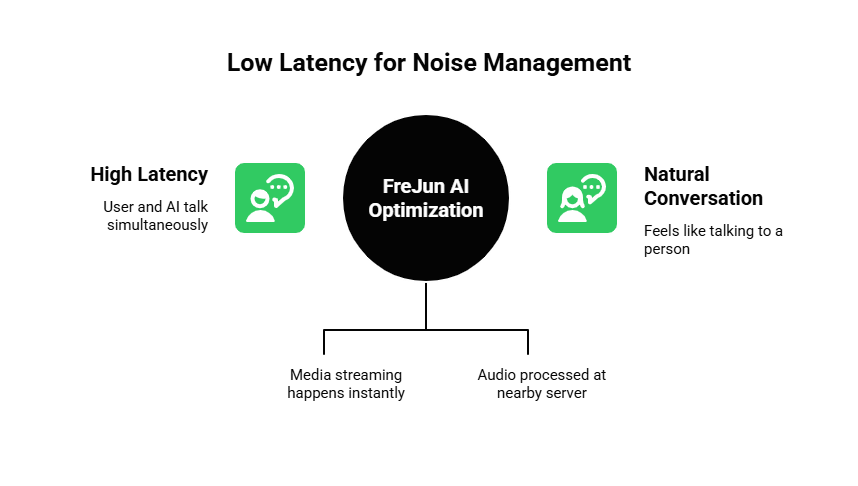
Latency is the delay between when a user speaks and when the system responds. In a noisy environment, latency is even more dangerous. If the system takes too long to filter out the noise, the user might think the AI did not hear them and start talking again. This creates a mess where the user and the AI are talking at the same time.
FreJun AI is optimized for low latency. It ensures that the media streaming happens almost instantly. This allows your voice recognition software API to process the sound and give an answer while the user is still thinking about their next sentence. By reducing the delay, you create a more natural conversation that feels like talking to a real person.
FreJun also uses a distributed infrastructure. This means the audio is processed at a server close to the user. This “short cut” through the internet is vital for maintaining high quality audio in noisy places. Whether your users are in a quiet house or a loud train station, the connection remains fast and stable.
Also Read: How Startups Can Launch Voicebots Fast?
How to Choose the Right API for Your Industry?
Not every voice recognition software API is the same. Some are better at handling specific types of noise. If you are building an app for a hospital, you need an API that can ignore the beeping of medical machines. If you are building a tool for truck drivers, the API must be able to filter out the deep rumble of an engine.
Because FreJun AI is model agnostic, you have the power to experiment. You can connect your FreJun infrastructure to three different APIs to see which one handles your specific noise the best. This “bring your own AI” approach is perfect for enterprise companies that need the highest level of accuracy. You retain full control of your AI logic while FreJun ensures the voice layer runs smoothly.
What are the Practical Benefits for Your Business?
Using an voice recognition software API that handles noise well can save your business a lot of money. Think about a customer service call center. If the AI can understand a customer even when they are calling from a noisy car, the call finishes faster. This means you can help more people in less time.
Furthermore, it improves the customer experience. No one likes to repeat themselves five times. When your voice agent understands the customer on the first try, the customer feels happy and respected. This builds brand loyalty and trust.
FreJun AI provides the developer first toolkit you need to reach this level of quality. With comprehensive SDKs for both client side and server side development, you can embed these voice features into your web or mobile apps with ease.
Also Read: How Travel Firms Use Inbound Call Handling?
Conclusion
Handling noise is the secret to building a voice agent that people actually like to use. By combining a powerful voice recognition software API with a reliable voice infrastructure like FreJun AI, you can create conversations that are clear and natural. We have seen how background noise filtering and noisy environment speech recognition are essential for real world success.
We also discussed how low latency and high quality audio capture are the “plumbing” that makes these features work. As technology improves, the line between human and machine conversation will continue to fade.
Businesses that invest in noise resistant voice technology today will be the ones that lead their industries tomorrow. With the right tools and a focus on clarity, you can ensure that your voice agents are heard loud and clear, no matter how noisy the world gets.
Want to discuss your specific use case for noise resistant voice AI? Schedule a demo with our team at FreJun Teler.
Also Read: Scaling Customer Communication in Iran with a Centralized WhatsApp Business Interface
Frequently Asked Questions (FAQs)
The most common way is through digital signal processing or spectral subtraction. The API identifies the steady frequencies of background noise like a fan or an engine and removes them from the audio stream before the AI tries to understand the speech.
FreJun AI focuses on the voice transport layer and raw audio capture. It ensures that the audio is delivered clearly and with low latency to your chosen AI model. While FreJun provides the high quality stream, the actual noise filtering is typically handled by the voice recognition software API you choose to connect.
Model agnostic means that FreJun AI works with any AI service. You are not forced to use one specific brand of speech to text. This matters because it allows you to pick the best noise handling API for your specific needs and switch it easily if a better one is released.
Background noise can cause the AI to miss words or misinterpret them. For example, if there is a loud hum, the AI might think a person is saying “mmm” when they are actually saying a word like “room.” Good filtering is needed to prevent these errors.
No, it is designed to be developer first. FreJun provides SDKs for both web and mobile apps. This makes it easy to add real time voice features into your existing software without having to build a telephony system from scratch.
Quiet environment recognition is built for offices and homes where there is very little interference. Noisy environment recognition is much more robust and is trained on audio that includes “distractors” like traffic, wind, and multiple people talking at once.
Advanced noise filtering does require some computer power, which can add a tiny bit of delay. However, by using a low latency infrastructure like FreJun AI, you can keep the total response time very fast so the user does not notice any pause.
Elastic SIP trunking is a feature of FreJun Teler that allows your phone connections to grow or shrink based on demand. It means you can handle as many simultaneous calls as you need without worrying about your system crashing during busy times.
Yes, you can. Many businesses use an voice recognition software API for outbound lead qualification or appointment reminders. Handling noise is important here too, as the person receiving the call might be outside or in a car.
Security is a top priority for FreJun AI. The platform uses robust protocols and is geographically distributed to ensure that all audio data is protected and kept confidential throughout the entire call journey.