
Real-time voice automation is becoming a core part of modern product experiences. Whether you are building an intelligent voice bot, a customer service agent, or outbound calling automation, the foundation is the same: media streaming in telephony systems.
However, even though audio streaming feels simple from the outside, engineering teams know that sustaining a stable voice session is extremely complex. Telephony systems must exchange audio packets across diverse networks, changing bandwidth, variable codecs, and unpredictable last-mile connectivity – usually while keeping latency under 200 ms to sound natural.
This blog breaks down the five biggest challenges of media streaming in telephony, explains why they occur, and provides practical engineering approaches to solve them. As you scale your voice workflows or plan LLM-powered agents, these fundamentals will help you design systems that stay reliable under load.
Why Is Low-Latency Streaming So Hard in Telephony Systems?
Even small delays in voice transmission can break the natural flow of a conversation. Unlike video streaming or asynchronous media, telephony has strict real-time constraints. Every audio frame travels through multiple hops before reaching the listener.
What makes achieving low latency so difficult?
Several factors contribute to delays:
- Network traversal time across ISPs and carrier networks
- Codec processing time for compressing and decompressing audio
- Packet serialization/deserialization inside SIP or RTP layers
- Media relay routing through session border controllers
- CPU load on the sender or receiver’s device
- Geographical distance between endpoints
- Traffic congestion in last-mile mobile or broadband networks
Because each step adds milliseconds, latency compounds quickly. For example:
| Component | Typical Delay |
| Codec encode/decode | 5–30 ms |
| Network jitter buffers | 20–50 ms |
| RTP packetization | 20 ms |
| Geographic round trip | 30–120 ms |
This makes it clear why solving latency in calls is both a technical and architectural challenge.
How to reduce latency in telephony streaming
Although latency can’t be eliminated, it can be minimized with the right principles:
- Choose low-complexity codecs like Opus (low delay mode) or G.711 when bandwidth allows
- Use adaptive jitter buffers so systems adjust dynamically based on real-time conditions
- Localize media relays to keep audio packets within closer geographic zones
- Avoid unnecessary transcoding, since each conversion adds 10–30 ms
- Implement real-time monitoring of jitter, packet loss, and round-trip time
- Prioritize Voice RTP traffic using QoS rules when possible
Moreover, teams should test their applications under varying network conditions, including 3G, 4G, Wi-Fi drops, and high packet loss scenarios.
With these measures, most applications can keep interactive latency under 150–200 ms, which is acceptable for human conversation and real-time AI agents.
How Does Media Jitter Impact Call Quality, and Why Does It Occur?
Jitter is one of the most common and damaging issues in real-time telephony. Even if bandwidth is sufficient, jitter can cause periodic gaps, robotic audio, and inconsistent quality.
What exactly is media jitter?
Media jitter in telephony refers to the variation in packet arrival times.
Instead of packets arriving at regular intervals, they arrive randomly due to:
- congestion
- routing variations
- mobile signal fluctuations
- unstable Wi-Fi
- fluctuating CPU load
- competing applications
When jitter exceeds the buffer capacity, packets are dropped entirely.
Why jitter hurts conversational systems
Telephony streaming expects consistent packet flow. Because of this, high jitter can lead to:
- choppy, broken audio
- missing syllables
- robotic or metallic sound
- unexpected pauses
- STT errors
- TTS interruptions
In voice agents, jitter also causes STT models to mishear, leading to incorrect responses, repeated questions, or unnatural pauses in the conversation. Standards bodies recommend keeping one-way jitter at 30 to 50 ms and packet loss below a few percent; therefore implement adaptive jitter buffers, FEC, and RTCP/XR monitoring so STT receives stable audio with predictable quality.
Engineering steps to reduce jitter
To manage jitter effectively, teams can implement:
- Adaptive jitter buffers that adjust sizes based on real-time network metrics
- Packet prioritization using DSCP QoS marking where supported
- Media relay redundancy to avoid congested paths
- Codec selection that gracefully handles packet variability (e.g., Opus)
- Edge routing optimizations to shorten packet travel paths
- Cross-regional failover if jitter spikes in a single geography
Also, monitoring tools should provide alerts for jitter thresholds above 30–40 ms, helping teams react quickly.
Why Does Packet Loss Still Happen in 2025 – and What Can You Do About It?
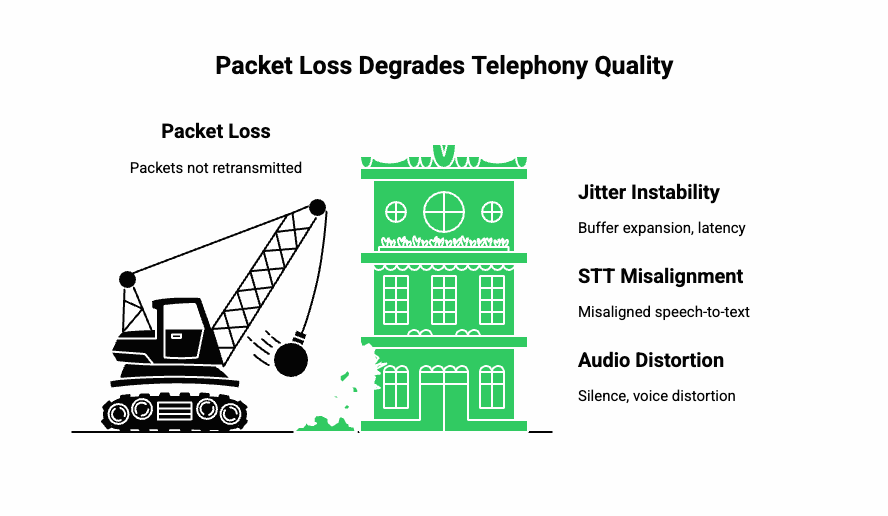
Even with advanced carrier networks, packet loss remains a persistent issue. Telephony streaming relies on RTP packets sent over UDP. Because UDP prioritizes speed over reliability, lost packets are never retransmitted.
What causes packet loss?
Packet loss often occurs due to:
- congested last-mile networks
- noisy Wi-Fi or interference
- mobile handovers between cell towers
- overloaded routers or switches
- sudden bandwidth drops
- routing anomalies
Even 1–2% packet loss can degrade call quality noticeably. At 5–10%, audio becomes unintelligible.
How packet loss affects real-time telephony
Because packets are not retransmitted, loss can lead to:
- temporary silence
- distorted voice
- misaligned STT input
- dropped words
- jitter buffer instability
Additionally, packet loss can break the timing synchronization of RTP streams, forcing jitter buffers to expand and raising latency.
Engineering strategies to mitigate packet loss
Packet loss can be minimized by combining network and application techniques:
- Use forward error correction (FEC) when low-latency and bandwidth conditions allow
- Introduce redundancy frames for critical audio segments
- Deploy intelligent packet reconstruction using waveform interpolation
- Route calls through stable, low-loss carrier paths
- Use codecs that degrade gracefully, rather than producing harsh artifacts
- Monitor packet loss in real time and trigger relay fallback when thresholds exceed acceptable limits
Because packet loss is common in mobile networks, voice systems need mechanisms to continuously adapt based on changing conditions.
What Makes Cross-Network Compatibility So Difficult?
Telephony systems must work across:
- VoIP networks
- PSTN lines
- SIP carriers
- Mobile networks
- High-jitter broadband
- Enterprise firewalls
- NATed networks
The combination creates unpredictable behavior because each network handles SIP, RTP, codecs, jitter buffers, and QoS differently.
Common compatibility challenges
- Codec mismatches requiring transcoding
- SIP header interpretation differences between carriers
- Firewall restrictions blocking RTP or SIP signaling
- Asymmetric NAT behavior breaking bidirectional audio
- Different maximum transmission unit (MTU) sizes creating fragmentation
- Variable packet pacing policies across ISPs
These inconsistencies force engineering teams to build complex compatibility layers to stabilize the media path.
Engineering strategies to improve compatibility
Teams can reduce complexity by focusing on:
- SIP normalization to standardize headers across carriers
- Universal codec support for G.711, G.729, Opus, and AMR
- ICE/STUN/TURN frameworks to stabilize media through NAT
- RTP port range management to avoid firewall conflicts
- Dynamic transcoding when carriers cannot match codecs
- Automated interop testing for carrier-to-carrier routing
Together, these measures create predictable performance across diverse telephony networks.
Why Is Maintaining Streaming Reliability at Scale So Difficult?
As systems scale, reliability challenges multiply. Because telephony streaming occurs in real time, even momentary disruptions can break a conversation.
Sources of reliability challenges
- sudden load spikes
- carrier outages
- relay server failures
- inconsistent upstream bandwidth
- jitter variations during peak hours
- regional telecom congestion
- inefficient scaling of media servers
High-scale products often hit reliability issues only after reaching wider traffic distribution across regions.
Engineering approaches to maintain reliability
- Geo-distributed media relays so calls stay in-region
- Health-checked routing that automatically shifts traffic away from degraded carriers
- Load-based session distribution to avoid overloaded relays
- Real-time failover for dropping and re-establishing media paths gracefully
- Continuous monitoring of jitter, packet loss, and latency
- Predictive scaling based on traffic patterns, not static thresholds
Reliability is never a single solution – it’s a combination of routing intelligence, monitoring, and resilient architecture.
How Do LLM-Powered Voice Agents Amplify These Media Streaming Challenges?
Although traditional telephony systems have always dealt with jitter, packet loss, and latency, modern voice agents introduce a new set of timing constraints. In typical deployments, a voice agent pipeline looks like:
- User speaks
- Audio frames travel over SIP/RTP
- STT processes the waveform
- LLM generates the response
- TTS converts text to audio
- Audio is streamed back into the call
Each of these steps must occur in near-real time. Even an extra 200–300 ms delay breaks the natural flow.
Learn how Elastic SIP Trunking and real-time media APIs reduce streaming delays and improve call stability when building high-performance voice agents.
Where latency compounds in AI-based voice systems
- STT processing time (50–300 ms)
- LLM generation time (100–800 ms depending on prompt complexity)
- TTS rendering delays (20–200 ms)
- Telephony transmission delays (50–150 ms)
This means an agent must sustain the entire round trip within 500–1000 ms to preserve conversational fluidity.
Why this matters for product and engineering teams
As soon as the LLM or STT pipeline slows down, media jitter increases on the return path because RTP packets cannot be sent at consistent intervals. This leads to:
- pauses that sound unnatural
- clipped TTS output
- overlapping speech
- misaligned buffer timing
- frame accumulation
- interruptions in turn-taking
Therefore, product teams must design both the telephony streaming layer and the AI pipeline together, ensuring they synchronize correctly.
How Does FreJun Teler Solve These Media Streaming Challenges for AI Voice Systems?
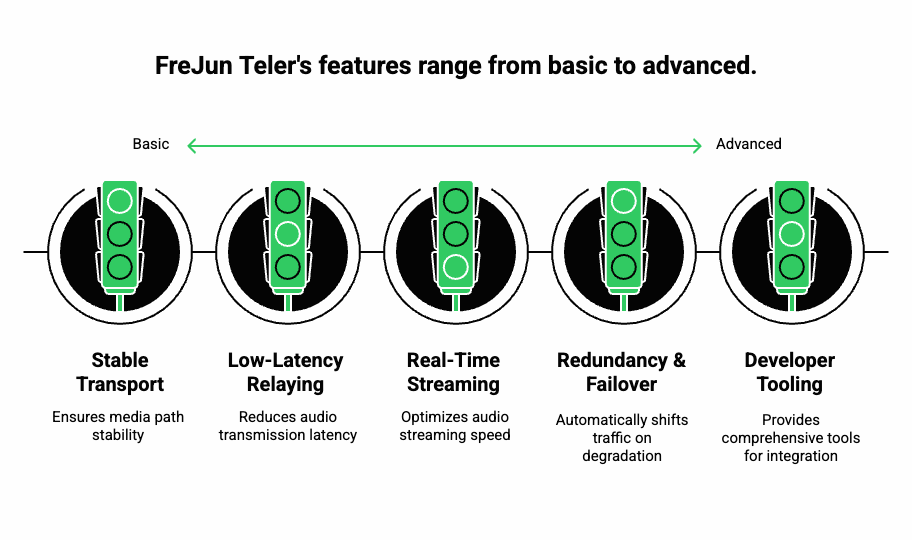
FreJun Teler is engineered specifically for real-time voice applications that depend on LLMs, STT, TTS, and agent-based workflows. Unlike platforms that focus solely on carrier connectivity, Teler is built as a global voice infrastructure layer for AI agents, emphasizing reliability, low latency, and streaming precision.
Below is how Teler addresses each challenge technically:
Built-in Low-Latency Media Relaying
Teler uses:
- Geo-distributed media relays
- SDN-based routing
- Dynamic path selection
- Optimized RTP packet pacing
This reduces round-trip audio transmission and helps teams maintain consistent conversational latency under 200 ms even during peak traffic.
Real-Time Media Streaming With Sub-150 ms End-to-End Delay
Teler’s streaming stack is optimized for:
- rapid RTP serialization
- minimized transcoding overhead
- low-latency codec handling
- fast-jitter-buffer adaptation
Because of this, developers can reliably stream audio to their STT engine and receive TTS output without delays piling up.
Stable Transport Layer for AI Agents
Teler treats the AI model as the “brain”, while managing the full “voice interface” layer. Your application retains full control of:
- dialogue state
- memory
- RAG context
- STT/LLM/TTS selection
- agent logic
Teler simply ensures that the media path stays stable, regardless of carrier or network variability.
Redundancy and Failover Built into the Media Path
Teler continuously measures:
- jitter
- packet loss
- one-way latency
- relay health
- congestion levels
If a route degrades, Teler automatically shifts traffic without interrupting the session.
End-to-End Developer Tooling
Engineering teams gain access to:
- server-side SDKs for managing call logic
- client-side libraries for embedding real-time audio
- webhooks for STT/LLM control
- complete event logs for debugging
- waveform-level streaming APIs
Because the integration is model-agnostic, developers can plug in:
- any STT system
- any TTS system
- any LLM (OpenAI, Anthropic, Meta, Mistral, custom)
- any RAG or tool-calling layer
This reduces engineering overhead significantly when building production-grade voice agents.
What Architecture Should You Use to Build Reliable Voice Agents?
A practical blueprint for teams.
Below is a simple reference architecture that avoids the most common pitfalls:
Recommended Architecture for Low-Latency Voice Agents
| Stage | Recommended Approach | Why It Matters |
| Audio Input | RTP stream captured via telephony API | Ensures consistent frame timing |
| Media Relay | Geo-local, jitter-managed RTP routing | Reduces jitter and packet loss |
| STT Engine | Streaming STT (not batch) | Lowers transcription delay |
| LLM | Token-by-token streaming | Prevents long pauses |
| TTS | Real-time synthesis | Aligns with media timing |
| Output Stream | RTP frames paced via telephony API | Maintains conversational rhythm |
Additional engineering principles
- Always use Opus for AI agents when high bandwidth is available
- Maintain LLM response windows under 500 ms
- Pre-load prompts and RAG documents into memory
- Use short TTS chunk sizes (200–300 ms)
- Monitor jitter buffers in real time
- Use incremental STT partials to reduce agent wait time
With these measures, most teams can achieve natural conversational flow within a telephony environment.
How Can Engineering Teams Monitor Media Streaming in Real Time?
Monitoring is a critical part of call quality optimization. Without active metrics, diagnosing issues becomes guesswork.
Key telephony streaming metrics to track
| Metric | Description | Threshold |
| Latency | Round-trip audio delay | < 200 ms |
| Jitter | Variation in packet arrival | < 30 ms |
| Packet Loss | Dropped RTP frames | < 1% |
| MOS Score | Predicted voice quality rating | > 4.0 |
| STT Delay | Time until STT output stabilizes | < 250 ms |
| TTS Delay | Time for synthesis to start | < 200 ms |
Tools and techniques for monitoring
- RTP trace logs
- WebRTC monitoring dashboards (if supporting WebRTC endpoints)
- SIP ladder diagrams
- Carrier-level jitter reports
- Real-time alerting for threshold spikes
- Synthetic call testing at regular intervals
When these systems run continuously, issues like regional congestion or relay instability can be identified before customers notice.
Final Recommendations for Teams Building Voice AI Systems
As you integrate telephony, STT, LLMs, and TTS into a unified pipeline, remember that your media streaming layer is the foundation. Without a stable audio stream, even the best AI will sound broken or slow.
Key takeaways
- Optimize latency at every hop
- Use jitter buffers wisely
- Monitor packet loss continuously
- Choose codecs based on real-world network conditions
- Use geo-distributed relays for global users
- Keep LLM and TTS processing windows tight
- Test across unreliable network scenarios
When these principles guide your architecture, your voice agent will feel natural, responsive, and production-ready.
Ready to Build Fast, Reliable AI Voice Agents?
Real-time media streaming in telephony systems has always been complex, but AI-driven voice applications push it further. Latency, jitter, packet loss, codec behavior, and transport reliability shape how your voice agent performs in the real world. If these layers fail, even the most advanced LLM cannot deliver a smooth experience. With the right architecture, predictive jitter control, optimized RTP handling, codec alignment, and resilient failover, the entire system becomes stable enough to run production-grade voice interactions.
If you want a low-latency telephony streaming layer that works with any STT, TTS, or LLM, FreJun Teler provides the infrastructure, APIs, and reliability needed to deploy real-time AI voice systems at scale.
Schedule a demo.
FAQs –
- Why does media jitter occur in telephony?
Media jitter occurs when RTP packets arrive at uneven intervals due to congestion, weak routing, or unstable network paths. - How can I reduce latency in AI voice calls?
Lower RTT, optimize RTP routing, use closer PoPs, and reduce internal compute delays from STT and LLM processing. - Does codec choice affect call quality?
Yes. Wrong codecs increase transcoding delays, degrade clarity, and introduce artifacts during real-time telephony streaming. - Why do AI voice agents sound delayed on calls?
High end-to-end delay from STT, LLM compute, TTS generation, and media transport buffering causes audible lag. - How do I maintain consistency during long calls?
Use stable RTP relay, jitter buffering, periodic context resets, and predictable transport paths to keep audio synchronized. - Can packet loss be fully prevented?
No, but redundancy, FEC, QoS, and optimized failover significantly reduce audible distortions. - Why do some calls drop during media streaming?
Network instability, SIP signaling timeouts, or RTP relay failures break the media stream and cause call drops. - How do I track call quality issues in real time?
Use metrics like jitter, RTT, MOS, packet loss, and codec-level performance to diagnose problems continuously. - Why does STT accuracy drop in noisy calls?
Low SNR, distorted audio, and jitter introduce artifacts that reduce recognition accuracy.
10. How does Teler improve call reliability?
Teler’s distributed media relays, optimized RTP paths, and low-latency transport ensure stable real-time voice streaming for AI agents.