
The modern voice calling SDK is a marvel of abstraction. It takes the dizzyingly complex world of global telecommunications, a world of arcane protocols, carrier negotiations, and complex hardware, and hides it behind a clean, elegant, and developer-friendly set of APIs.
This has empowered a generation of developers to build sophisticated, real-time communication experiences that would have been unimaginable just a decade ago. But with this great power comes the potential for new and subtle kinds of errors.
While the SDK handles the heavy lifting, the developer is still the architect of the application’s logic. Building a robust, production-grade voice application is not just about making the initial API call work; it is about anticipating the messy, unpredictable nature of real-world communication.
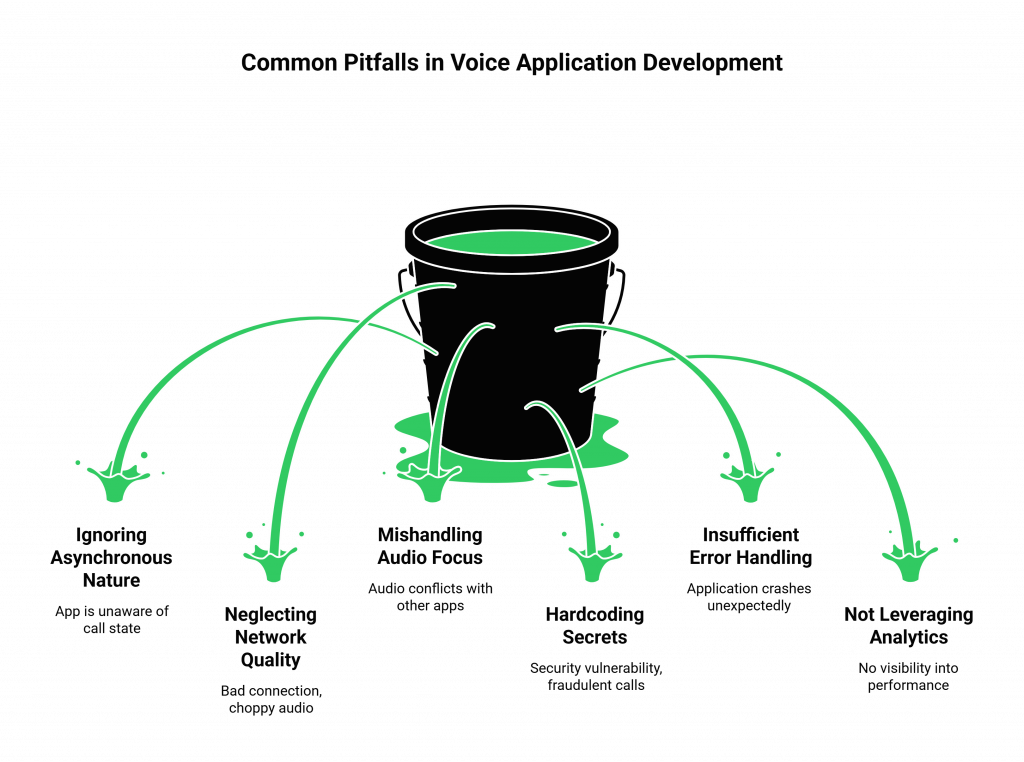
From mishandling network errors to ignoring the nuances of audio quality, there are a handful of common API mistakes that can turn a brilliant prototype into a frustrating and unreliable production application. This guide will explore the five most common voice SDK errors and provide a clear set of SDK best practices for avoiding them.
Table of contents
- Mistake #1: Ignoring the Asynchronous, Event-Driven Nature of Voice
- Mistake #2: Neglecting Network Quality and Latency on the Client-Side
- Mistake #3: Mishandling Audio Focus and Device Management
- Mistake #4: Hardcoding Secrets and Insufficient Error Handling
- Mistake #5: Not Leveraging the Full Power of the Platform’s Analytics
- Conclusion
- Frequently Asked Questions (FAQs)
Mistake #1: Ignoring the Asynchronous, Event-Driven Nature of Voice
This is, by far, the most common conceptual error for developers new to real-time communications. A voice call is not like a simple, synchronous REST API call where you make a request and get an immediate response. A voice call is a long-lived, asynchronous, and event-driven process.
The Flaw of “Fire and Forget”
A common anti-pattern is to make an API call to initiate a call and then just assume everything will work.
- The Mistake: A developer makes a single API call to CreateCall and their code’s involvement ends there. They do not have a robust system for listening to the subsequent events of the call’s lifecycle.
- The Problem: What happens if the person you called does not answer? What if the line is busy? What if the call is answered by a voicemail machine? Without a proper event-handling mechanism (like webhooks), your application is flying blind. It has no idea about the actual state of the call.
- The Best Practice: Embrace the event-driven model. Your application should be designed around a central webhook endpoint that is built to receive and process a stream of real-time events from the voice platform (e.g., ringing, answered, completed). This is the only way to build a stateful, intelligent application that can react to what is actually happening on the call. This is a core principle in modern application design, with one study showing that event-driven architectures can improve developer productivity by over 20%.
Mistake #2: Neglecting Network Quality and Latency on the Client-Side
The voice platform provider is responsible for the quality of their global network, but you are responsible for the “last mile”, the connection between your user’s device and the provider’s nearest edge server.
Assuming a Perfect Connection
Developers often build and test their applications on a high-speed, low-latency office network. In the real world, your users will be on spotty Wi-Fi, congested mobile networks, and everything in between.
- The Mistake: The application’s UI does not provide any feedback to the user about their network quality, nor does the application have any logic to handle a poor connection.
- The Problem: When a user with a bad connection experiences choppy audio or dropped calls, they will blame your application, not their network. This leads to poor reviews and customer churn.
- The Best Practice: A high-quality voice calling SDK will provide client-side tools to proactively measure network quality. Your application should:
- Run a Pre-Call Test: Before initiating a call, use the SDK’s tools to test the user’s bandwidth, latency, and jitter.
- Provide Real-Time Feedback: If the network quality is poor, warn the user before the call starts (“Your connection is unstable, call quality may be affected”).
- Display In-Call Quality Indicators: Show a “network quality” icon during the call so the user is aware of the issue.
Also Read: How Developers Can Use Elastic SIP Trunking to Scale Voice AI Systems?
Mistake #3: Mishandling Audio Focus and Device Management
This is a subtle but incredibly common source of bugs in mobile applications that use a voice calling SDK. The operating system (iOS or Android) is the ultimate gatekeeper of the device’s audio resources (the microphone and the speaker).
Forgetting You’re a Guest in the Audio System
Your application is not the only thing on the user’s phone that wants to make sound. A phone call, a music app, or a video playing in another app can all compete for the audio hardware.
- The Mistake: The application does not correctly request and manage “audio focus” from the operating system.
- The Problem: A user is on a call in your app, and a regular cellular call comes in. Your app’s audio is suddenly cut off, but your app does not know it, leading to a confusing state. Or, a user is listening to music, and when they start a call in your app, the music keeps playing in the background, making the call impossible to hear.
- The Best Practice: This is a key area for troubleshooting voice integrations. Use the SDK’s built-in audio management features. A well-designed voice calling SDK will handle the complex native platform interactions for requesting audio focus, managing audio routes (e.g., switching between the earpiece and the speakerphone), and gracefully handling interruptions from other applications.
This table summarizes these common mistakes and their corresponding best practices.
| The Mistake | The Consequence | The SDK Best Practice |
| Ignoring the Asynchronous, Event-Driven Nature | Your app is “flying blind,” unaware of the call’s true state (e.g., busy, unanswered). | Build your application around a central webhook endpoint to process real-time call events. |
| Neglecting Client-Side Network Quality | Users on poor networks have a bad experience and blame your app. | Use the SDK’s tools to run pre-call tests and provide real-time network quality feedback. |
| Mishandling Audio Focus and Device Management | Audio conflicts with other apps, leading to a confusing and buggy user experience. | Leverage the SDK’s built-in audio management features to correctly handle interruptions and audio routing. |
Ready to build with an SDK that is designed to help you avoid these common pitfalls? Sign up for FreJun AI.
Mistake #4: Hardcoding Secrets and Insufficient Error Handling
These are general software development mistakes, but they are particularly dangerous in a real-time communication context.
The Security Risk of Hardcoded Credentials
- The Mistake: A developer embeds their API keys and authentication tokens directly into their client-side (mobile or web) application’s code.
- The Problem: This is a massive security vulnerability. A malicious actor can decompile the application, extract your secret keys, and then use your account to make fraudulent calls, potentially costing you thousands of dollars.
- The Best Practice: Never, ever store your primary API keys on the client-side. The client-side application should always authenticate with your own backend server. Your backend server should then be responsible for generating a short-lived, limited-permission access token that it passes to the client to authorize a specific call session.
The Instability of Optimistic Code
- The Mistake: The code is written with the “happy path” in mind. It assumes every API call will succeed and every network request will complete.
- The Problem: In the real world, networks fail, APIs can return errors, and services can have temporary outages. Without proper error handling, your application will simply crash or enter an unknown state when one of these inevitable issues occurs.
- The Best Practice: Wrap every single interaction with the voice calling SDK in robust error-handling logic. Check the response codes for every API call. Have a clear try…catch block for every function. Have a defined fallback behavior for when a critical service (like token generation) fails.
Also Read: The Role of Elastic SIP Trunking in Building Real-Time Voice Applications
Mistake #5: Not Leveraging the Full Power of the Platform’s Analytics
A modern voice platform is not just an engine for making calls; it is a rich source of data and insights.
Flying Blind on Performance
- The Mistake: A developer launches their application and then has no visibility into how the voice component is actually performing in the real world.
- The Problem: When users start complaining about poor quality or dropped calls, you have no data to diagnose the problem. You cannot tell if it is a specific user’s network, a problem in a certain geographic region, or an issue with your own application’s logic. This is a major challenge, as one report notes that only 38% of companies feel they have the right tools to effectively measure their customer experience.
- The Best Practice: Make the provider’s analytics and observability tools a core part of your operational workflow. A platform like FreJun AI provides:
- Detailed Call Detail Records (CDRs): Use the API to pull this data into your own monitoring systems.
- Real-Time Quality Metrics: Monitor metrics like jitter, packet loss, and Mean Opinion Score (MOS) to proactively identify quality issues.
- Webhook Events for Failures: Set up alerts for critical failure events so you are notified of problems instantly.
Also Read: Why a Unified Voice API Matters for Scalable Business Communication?
Conclusion
The modern voice calling SDK is an incredibly powerful tool that has democratized the world of real-time communication. It allows any developer to build the kind of sophisticated, global voice applications that were once the exclusive domain of telecom giants. But like any powerful tool, it requires a certain level of skill and a commitment to best practices to be used effectively and safely.
By avoiding these five common mistakes, by adopting the event-driven model, by obsessing over the end-user’s network, by respecting the device’s audio system, by writing secure and resilient code, and by leveraging the power of data, you can move beyond a simple prototype and build a truly production-grade voice application that is reliable, scalable, and a delight for your users.
Want to do a deep dive into our SDK’s best practices and get a hands-on look at our developer tools? Schedule a demo with our team at FreJun Teler.
Also Read: UK Mobile Code Guide for International Callers
Frequently Asked Questions (FAQs)
A voice calling SDK (Software Development Kit) is a set of software libraries and tools that allows a developer to easily integrate voice calling features like making and receiving phone calls and managing live conversations, directly into their own web or mobile applications.
The most common conceptual error is failing to design the application with an asynchronous, event-driven architecture. Developers often treat a voice call like a simple, synchronous API request, which leads to an application that is not aware of the call’s true, real-time state.
Webhooks are real-time notifications that the voice platform sends to your application. They are essential for troubleshooting voice integrations because they provide a live feed of what is happening on the call (e.g., “ringing,” “answered,” “failed”), which is critical for understanding and debugging the call flow.
One of the most important SDK best practices for mobile is to correctly manage the device’s audio resources. This means using the SDK’s features to handle “audio focus” to prevent conflicts with other apps (like a music player or an incoming cellular call).
One of the most dangerous common API mistakes is hardcoding your secret API keys and authentication tokens directly into your client-side (web or mobile) application. This is a major security risk that can lead to account takeover and fraud.
A high-quality voice calling SDK will include a pre-call testing feature. This allows your application to run a quick test of the user’s internet connection to measure key metrics like bandwidth, latency, and jitter, and then warn the user if their connection is not suitable for a high-quality call.
“Audio focus” is a concept in mobile operating systems (iOS and Android) that manages which application has control of the audio output (the speaker) and input (the microphone) at any given time. Proper management is essential to prevent multiple apps from trying to play audio at once.
Your primary, secret API keys should only ever be stored on your secure backend server. Your server should use these keys to generate short-lived, temporary access tokens that are then passed to your client application to authorize a specific session.
MOS is a standard industry metric for measuring the perceived quality of a voice call. It is a score from 1 (bad) to 5 (excellent). A good voice platform will provide MOS scores for your calls in its analytics, which is a key tool for monitoring quality.
The FreJun AI platform is designed with these best practices in mind. Our voice calling SDK has built-in features for network quality testing and audio management. Our architecture is fundamentally event-driven, and our documentation and developer support are focused on guiding developers toward building secure, resilient, and scalable applications.