
You have done the creative work. You have used a powerful voice calling SDK to weave real-time communication into the fabric of your application. The code looks clean, the logic is sound, and on your development machine, the test calls sound perfect.
But the journey from a working prototype to a production-ready, globally scalable voice application is paved with the harsh realities of the real world: unpredictable networks, diverse devices, and the chaotic nature of human conversation.
This is where a rigorous, systematic approach to testing and debugging becomes not just a best practice, but the absolute key to a successful launch.
For a developer working on a voice integration, the challenges are unique. You are not just debugging a piece of code; you are debugging a complex, real-time, and often ephemeral interaction.
A bug is not just an error message in a log file; it is a dropped call, a garbled sentence, or a moment of frustrating silence for your user. This SDK testing guide will provide a comprehensive framework of SDK best practices for testing and troubleshooting voice integrations, ensuring that your application is not just functional, but truly resilient.
Table of contents
Why is Testing a Voice Integration So Different?
Testing a voice application is fundamentally different from testing a standard web or mobile application. The environment is far more dynamic and has many more moving parts. The key differences include:
- The Real-Time, Stateful Nature: A voice call is a long-lived, stateful session. The success of one action is dependent on the state of the previous one. A simple, stateless API test is not sufficient.
- The “Black Box” of the Network: The public internet and the global telephone network, which sit between your user and your application, are a “black box” that you do not control. You must build an application that is resilient to the inherent unpredictability of this network (e.g., latency, jitter, packet loss).
- The Diversity of the Client Environment: Your application will be used on thousands of different combinations of devices, operating systems, and browsers, each with its own unique quirks in how it handles audio hardware and permissions.
- The Subjectivity of “Quality”: Unlike a simple pass/fail test, the quality of a voice call is often subjective. What sounds “good enough” on one network might be completely unintelligible on another.
A Layered Approach to Voice Integration Testing
A robust voice integration testing strategy is not a single phase; it is a multi-layered approach that covers everything from the core API logic to the real-world user experience. A comprehensive study on software testing found that fixing a bug during the testing phase can be up to 15 times cheaper than fixing it after the product has been released, a principle that is doubly true for complex voice applications.
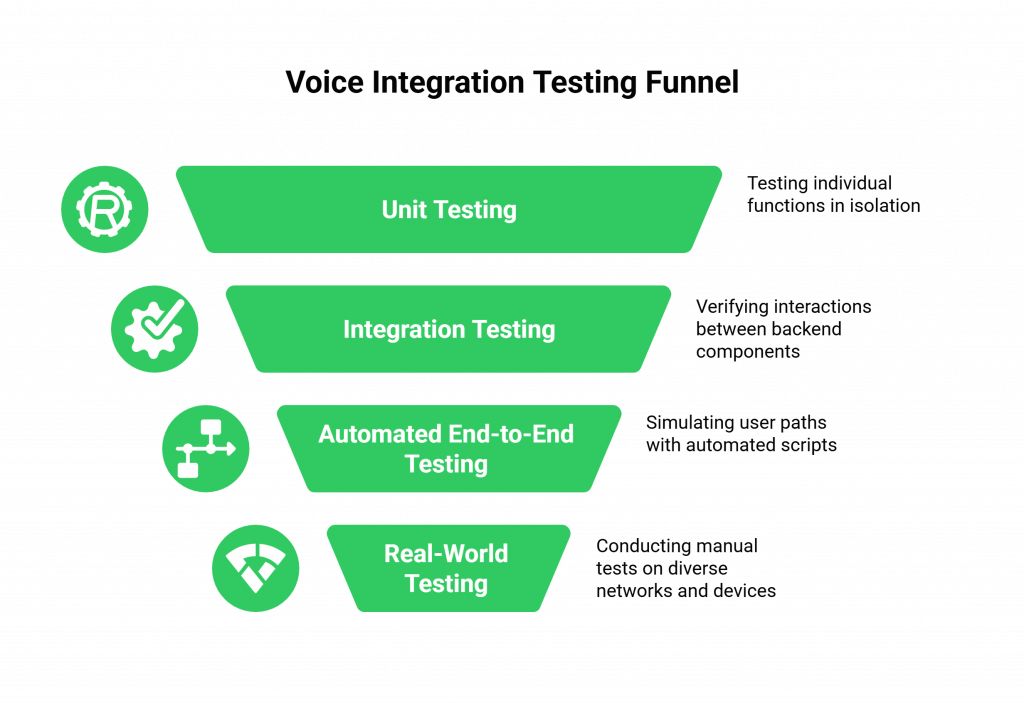
Layer 1: Unit and Integration Testing for Your Backend Logic
This is the foundation of your testing strategy. Before you even think about making a real phone call, you must ensure that the core logic of your application’s backend is solid.
- Unit Tests: Write unit tests for every individual function that interacts with the voice calling SDK. For example, test the function that generates the access token or the function that builds the FML/XML response for a specific command.
- Mock the API: You do not need to make a real API call to the voice platform for every test. Use a mocking library to simulate the responses from the SDK’s API. This allows you to test your application’s logic in isolation, including how it handles various error responses (e.g., what happens if the API returns a 401 Unauthorized or a 503 Service Unavailable?).
- Integration Tests: Write tests that verify the interaction between the different parts of your backend. For example, when your webhook endpoint receives a “new call” event, does it correctly call your “generate token” function and then your “build FML” function?
Also Read: From Chatbots to Callbots: How the Best Voice APIs Are Redefining Business Communication
Layer 2: Automated End-to-End “Golden Path” Testing
Once your backend logic is solid, it is time to make some real calls, but in an automated way.
- The “Golden Path”: Identify the most common, critical path that a user will take in your application (e.g., a customer calls in, the AI asks a question, the user responds, the AI gives an answer, the call ends).
- Build an Automated Test Agent: Create a script that uses the voice calling SDK‘s API to make an outbound call to your application’s phone number. This test agent can be programmed to play pre-recorded audio (to simulate a user’s response) and to use the SDK’s real-time media streaming capabilities to “listen” for and validate the audio that your application plays back.
- Run It Continuously: This automated, end-to-end test should be a core part of your Continuous Integration/Continuous Deployment (CI/CD) pipeline. It should run every time you deploy a new version of your application, acting as a “smoke test” to ensure that you have not broken the core functionality.
Layer 3: Real-World, Manual, and Exploratory Testing
Automated tests are essential, but they can never fully replicate the chaotic reality of the real world. This is where manual testing is irreplaceable.
- Test on Real, Diverse Networks: Do not just test on your pristine office Wi-Fi. Test your application on a congested public Wi-Fi network, on a 4G mobile network with only a few bars of signal, and on a home network that is also streaming a 4K movie. This is the only way to find the real-world quality issues.
- Test on a Wide Range of Devices: Test on a variety of iOS and Android devices, as well as different web browsers (Chrome, Firefox, Safari). Pay close attention to how your application requests microphone permissions and handles audio routing on each one.
- Be an Unpredictable User: Try to break things. Talk over the AI. Stay silent when you are supposed to talk. Put the call on hold and then resume it. This kind of exploratory testing is fantastic for finding the subtle bugs that your automated tests will miss.
This table provides a summary of this layered testing approach.
| Testing Layer | What It Tests | Key Tools and Techniques |
| Unit & Integration | The core backend logic of your application in isolation. | Unit testing frameworks (e.g., Jest, PyTest); API mocking libraries. |
| Automated End-to-End | The “golden path” of a live, but automated, call. | Your voice calling SDK‘s own API; CI/CD pipelines (e.g., Jenkins, GitHub Actions). |
| Manual & Exploratory | The real-world user experience on diverse networks and devices. | Real mobile devices; network condition simulators; a creative testing mindset. |
How Do You Effectively Debug a Live Voice Integration?
When a problem does occur in a live call, troubleshooting voice integrations can be a challenge because the event is ephemeral. You cannot just “replay” the bug easily. To effectively debug voice call API issues, you need to rely on the observability tools provided by your platform.
The Power of Rich, Structured Logs
This is your single most important debugging tool. A modern voice calling SDK provider like FreJun AI provides incredibly rich, structured logs for every single call. These are not just simple call records; they are a detailed, step-by-step diary of the entire interaction.
- The API and Webhook Log: This is your first stop. Look at the log of every API request your application made and every webhook the platform sent. Does the timestamp of the webhook match when your application received it? Did your application respond with the correct FML? Did the platform return an error code for one of your API calls?
- The Call Quality Metrics: For an audio quality issue, dive into the detailed metrics. The logs should provide a granular breakdown of the jitter, packet loss, and Mean Opinion Score (MOS) for the entire call. If you see high packet loss on the “uplink” (from the user to the platform), you know the issue was with the user’s local network.
- The Call Recording: Being able to listen to a recording of the call is invaluable for understanding what the user actually experienced.
Ready to build on a platform that provides the deep observability you need to test and debug with confidence? Sign up for FreJun AI.
Also Read: Best Voice API for Global Business Communication: What to Look for Before You Build
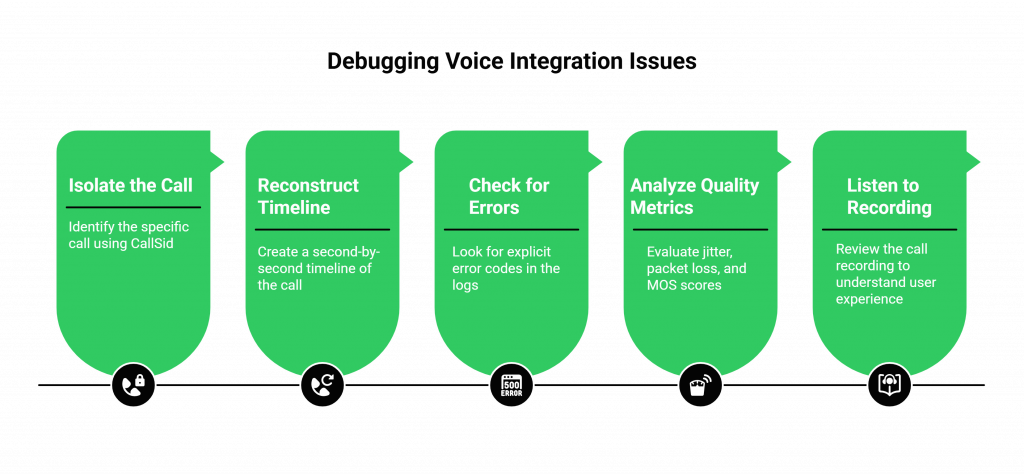
A Systematic Debugging Workflow
- Isolate the Call: Start with the unique CallSid of the problematic call. This is your primary key for looking up all the related logs.
- Reconstruct the Timeline: Use the timestamps in the API and webhook logs to reconstruct a precise, second-by-second timeline of the entire call.
- Check for Errors: Look for any explicit error codes in the logs.
- Analyze the Quality Metrics: If it is an audio issue, analyze the jitter, packet loss, and MOS scores.
- Listen to the Recording: Finally, listen to what the user and the AI actually said. Does it match what you see in the logs?
This systematic approach will allow you to pinpoint the source of almost any issue, whether it is a bug in your code, a network problem, or a configuration issue. A recent study on software reliability found that organizations with mature monitoring and debugging practices are able to resolve production incidents 60% faster, a critical advantage in the real-time world of voice.
Also Read: LLMs + Voice APIs: The Perfect Duo for Next-Gen Business Communication
Conclusion
Building a production-grade voice application is a journey that extends far beyond the initial “hello world.” It requires a deep commitment to a rigorous, multi-layered testing strategy and a systematic approach to debugging.
The ephemeral and complex nature of real-time communication presents unique challenges, but by leveraging the powerful observability tools of a modern voice calling SDK and by following a clear set of SDK best practices, developers can navigate this complexity with confidence.
By embracing this discipline of testing and debugging, you can ensure that the voice experience you deliver to your users is not just functional, but truly reliable, scalable, and exceptional.
Want a personalized walkthrough of our debugging tools and a deep dive into our SDK’s best practices? Schedule a one-on-one demo for FreJun Teler.
Also Read: UK Phone Number Formats for UAE Businesses
Frequently Asked Questions (FAQs)
A voice calling SDK (Software Development Kit) is a set of software libraries and tools that allows a developer to easily integrate voice calling features, like making and receiving phone calls and managing live conversations, directly into their own web or mobile applications.
The most important part is having a multi-layered approach. You need to combine backend unit and integration tests, automated end-to-end tests for the “golden path,” and real-world manual testing on diverse networks and devices.
A webhook is a real-time notification that the voice platform sends to your application to inform it of a call event. It is critical for debugging because it provides a precise, timestamped log of everything that is happening on the call, which is essential for troubleshooting voice integrations.
Some key SDK best practices include designing your application with an event-driven architecture, never hardcoding your secret API keys in your client-side code, implementing robust error handling for all API calls, and actively monitoring call quality analytics.
To debug voice call API issues, you need to use the logging and analytics tools provided by your platform. Start with the unique CallSid of the problematic call, and then use the detailed logs to reconstruct the timeline of events, look for error codes, and analyze the quality metrics.
MOS is a standard industry metric for measuring the perceived quality of a voice call, typically on a scale from 1 (bad) to 5 (excellent). It is a key metric to monitor for identifying audio quality problems.
Your office Wi-Fi is likely a high-quality, low-latency network. Your real-world users will be on a wide variety of much less reliable networks. You must test on these “bad” networks to understand the true user experience and to build a resilient application.
Your primary, secret API keys should only ever be stored on your secure backend server. Your backend should then generate short-lived, temporary access tokens that are passed to your client application (web or mobile) to authorize a specific call session.
The FreJun AI platform provides a rich set of observability tools. This includes detailed, structured call logs, real-time quality metrics, a comprehensive event webhook system, and call recordings. Our voice calling SDK is designed to give you the deep visibility you need to effectively test and debug your application.
A great first step is to create an automated “smoke test” that covers your application’s “golden path.” This is a script that uses the voice calling SDK‘s API to make a real call to your application and validates that the most basic, critical functionality is working. This test should be run as part of your CI/CD pipeline.