
Voice recognition APIs are redefining how applications interact with users. As speech-to-text engines and real-time voice processing improve, product teams can now build voice-driven systems that understand natural language, context, and intent – not just words. Whether for customer support, automation, or intelligent voice agents, modern APIs combine precision with low latency.
This blog explores how Voice Recognition APIs are enabling smarter, faster, and more human-like voice-based applications – and how developers, founders, and engineering leaders can leverage these APIs to create scalable, context-aware voice solutions that blend accuracy with real-time adaptability.
What is a voice recognition API, and why should you care?
In very simple terms, a voice recognition API is a set of programming interfaces that turns spoken audio into text, and then lets you act on that text. For founders, product managers and engineering leads building voice-based experiences, this API is the key entry point into a voice command system and thus into conversational interaction.
Adoption is already mainstream: recent industry overviews show approximately. 20–22% of internet users engaging voice search/assistants and billions of assistant instances in use globally, a clear signal that voice should be a first-class channel for product teams.”
When you layer the right AI logic and a speech-to-text engine behind the scenes, you unlock a user experience where people speak and get meaningful responses. That shift matters because:
- More users expect natural, hands-free interaction.
- Real-time voice processing lets apps respond faster, feeling more human-like.
- A well-designed voice interface differentiates your product and lowers friction.
Thus, the voice recognition API is not just a backend gadget-it is the core interface between human and machine in many next-gen applications.
How does a speech recognition API actually work under the hood?
To build a great voice-based application, you must understand how the speech recognition API works end-to-end. That enables you to design for latency, reliability, accuracy, and context. Here’s a breakdown:
1. Audio capture & preprocessing
- Audio is captured from a microphone or call system (often in 8 kHz or 16 kHz sampling for telephony/web).
- Preprocessing may involve noise reduction, silence trimming, gain control.
- Good devices and correct audio format reduce error rates significantly.
2. Speech-to-text engine (STT)
- The engine converts audio frames into text. It could support real-time voice processing (streaming mode) or batch processing (upload an audio file).
- For example, a major cloud STT supports streaming and asynchronous modes.
- Key factors include: audio encoding (LINEAR16, FLAC, Opus) sample rate, model type (telephony vs wideband).
- Also: support for domain vocabularies, speech hints, diarization (speaker separation).
3. Natural language processing (NLP) and intent extraction
- Once you have raw text, the system applies natural language processing to interpret meaning rather than just words.
- That might include: intent classification, entity recognition, sentiment analysis, and context tracking.
- At this stage you are forming a voice command system that can act – e.g., route a call, book an appointment, answer a question.
4. Response generation & playback
- After the logic layer decides on the action/response, you need to give audio back to the user. That means using a text-to-speech (TTS) system.
- The audio is then streamed back to the user or played over a call.
- Throughout this loop, latency (delay) must be low so the conversation feels natural.
5. Transport, media, and session management
- Especially for voice in real time, you must handle streaming protocols (WebRTC, RTP, SIP/VoIP), packetization, jitter buffers, and network issues.
- If you are integrating with telephony (PSTN), you face codec conversion (8 kHz G.711, 16 kHz Opus), carrier delays, and connection stability.
When you design your system with these blocks in mind, you move from just “speech-to-text” to a full conversational voice agent.
What are the core components you need for a modern voice-enabled app?
If you are building a product that uses voice, you need to think about four major modules. These modules work together, so you need to architect them cleanly and treat them as pluggable.
| Component | Role in system | Key technical considerations |
| STT / speech-to-text engine | Convert voice to text | Streaming vs batch; sampling rate; vocab hints; latency |
| NLP / intent + context management | Interpret text + maintain session | Context store, dialog state, entity extraction |
| TTS (text-to-speech) | Generate audible replies | Streaming playback; audio format; naturalness |
| Media transport layer | Handle actual audio streaming/calls | Codec support; jitter/loss; telephony integration |
In addition, you will need a context store for managing conversation history, tool-calling logic (e.g., “bookMeetingAPI”), and a fallback/human-handoff strategy for when the system cannot handle the request.
This combination forms a sophisticated voice agent stack, not just a speech-to-text engine or a simple voice command system. You must treat each module with care if you want a seamless experience.
Where are companies deploying voice recognition APIs today?

Understanding real-world use cases helps you map your own product strategy. Here are some common areas:
- Customer service automation & IVR: Deploy a voice agent that answers inbound calls, handles queries and routes to human agents only when needed.
- Voice-enabled mobile/IoT apps: Apps that allow users to speak commands (“book a ride”, “find a recipe”, “order groceries”) rather than tapping screens.
- Healthcare documentation: Physicians dictate notes which are transcribed in real time and structured into records.
- Outbound voice campaigns: Automated reminder calls, lead qualification, feedback collection – using personalized voice scripts and responses.
- Voice search and accessibility: Using voice recognition APIs to enable search by voice, transcription of meetings, and accessibility for users unable to type.
The shift toward real-time voice processing is especially important for these scenarios. Users expect minimal delay and human-like interaction when they speak.
Discover how Teler enhances AgentKit’s intelligent agents with seamless voice integration, making real-time voice automation smarter and faster.
What technical barriers do you face when building voice-based applications?
When you are leading a product or engineering team, you need to know the risks up front. Here are key challenges:
- Latency and responsiveness – If the user speaks and the system takes too long, the experience feels broken.
- Accuracy in noisy or telephony environments – A speech-to-text engine optimized for 16 kHz studio audio may fall short on an 8 kHz phone line.
- Accent, dialect and vocabulary support – Standard models may not recognise industry-specific terms or regional voices.
- Integration complexity between telephony, web/mobile, and AI logic – You might need to bridge SIP/PSTN networks, WebRTC clients and back-end AI.
- Scalability and cost – High-volume voice calls amplify costs and require auto-scaling of streaming bots.
- Security, data privacy and compliance – Voice data often carries personal information; you need encryption, regional data-residency, audit logs.
- Context management over time – Ensuring the conversation remembers what happened earlier so the agent doesn’t repeat or misunderstand.
Addressing these issues is not optional. If you ignore them, you risk your voice application failing to meet user expectations and business ROI.
Sign Up with FreJun Teler Today!
How can you integrate a media + telephony infrastructure layer so you can focus on the AI logic?
Now, let’s introduce a key part of your stack. When you build voice-based applications, you don’t want to reinvent the media transport, telephony connectivity, session management and streaming layers. That’s where a platform like FreJun Teler comes in.
What it provides
- It acts as a voice infrastructure layer that handles real-time, low-latency audio streaming for inbound and outbound calls (whether WebRTC, VoIP or PSTN).
- It abstracts away the complexity of codecs, packetization, jitter, telephony network interfaces, SBCs (session border controllers) and call routing.
- It lets your team plug in any speech recognition API (STT engine), any text-to-speech system, and any conversational AI model or logic. You retain full control over your dialogue, tool-calls, context and AI choice.
- It supports developer-first SDKs (client and server), enabling you to embed the voice layer into mobile/web apps or backend call-logic with minimal effort.
- It is built for enterprise scale: security, compliance, global reach, high availability.
Why this matters
By delegating the media/telephony layer to a dedicated platform, your product team can focus on building the voice agent logic – the NLP, context flows, tool integration and user experience. Meanwhile, your engineering lead does not need to build low-level audio transport or carrier connectivity.
In short: you plug in the voice recognition API, the speech-to-text engine, the conversational logic and the TTS output, while the infrastructure is managed. This keeps your architecture lean, modular and future-proof.
What do you need to get started with voice recognition and voice commands?
Here is a streamlined starter checklist for teams ready to build a voice-based application:
- Select your streaming speech-to-text engine (look for low-latency mode, vocab support, and telephony model).
- Capture audio at an appropriate format (8 kHz if phone, 16 kHz+ if wideband) and ensure preprocessing (noise reduction).
- Set up your voice command system pipeline: audio – STT – NLP/intent – response decision.
- Choose or build your text-to-speech engine for replies (ensure voice quality and streaming support).
- Choose the transport layer or adopt a platform like FreJun Teler to handle media/telephony.
- Implement context management: store dialogue state, track user history, and manage turn-taking.
- Test for latency, error rates, voice clarity, accent variation and network jitter.
- Plan your fallback strategy: when recognition fails or the user is frustrated, route to a human or an alternative channel.
- Secure data: encrypt voice streams, log transcripts securely, and ensure compliance with privacy regulations.
- Monitor metrics: word error rate (WER), round-trip latency, session success/fail rates, and user satisfaction.
How do you integrate a voice recognition API with your existing application stack?
Implementing a voice recognition API isn’t just about adding transcription. It’s about building a stable, low-latency data flow between your user interface, backend logic, and media layer. Let’s see how to structure that.
Step-by-step integration flow
- Capture and stream audio in real time
- The client (mobile, web, or telephony endpoint) captures the user’s microphone input.
- Audio is chunked into small frames and streamed to your backend via WebSocket or WebRTC for real-time voice processing.
- The client (mobile, web, or telephony endpoint) captures the user’s microphone input.
- Feed audio to the speech-to-text engine (STT)
- Your backend sends the audio to a speech recognition API such as Google Speech-to-Text or Deepgram.
- Choose streaming mode if you want instant partial transcriptions; this is critical for conversational use cases.
- Your backend sends the audio to a speech recognition API such as Google Speech-to-Text or Deepgram.
- Process the transcribed text through NLP and intent logic
- Apply natural language processing to detect user intent, extract parameters, and maintain conversation context.
- Use your preferred logic layer or large language model (LLM) to generate a response or trigger a tool/action.
- Apply natural language processing to detect user intent, extract parameters, and maintain conversation context.
- Generate voice output using text-to-speech (TTS)
- Convert the AI’s response into audio with a TTS engine (for example, ElevenLabs, Azure TTS, or Amazon Polly).
- Stream this back to the user immediately to maintain conversational flow.
- Convert the AI’s response into audio with a TTS engine (for example, ElevenLabs, Azure TTS, or Amazon Polly).
- Manage the media and call session
- The media infrastructure keeps the connection stable, handles jitter, encodes/decodes packets, and ensures minimal delay.
- The media infrastructure keeps the connection stable, handles jitter, encodes/decodes packets, and ensures minimal delay.
Each of these steps must work seamlessly in low-latency conditions. Even a delay of a few hundred milliseconds can make your system feel robotic rather than conversational.
What does the architecture of a scalable voice agent look like?
To visualize this, consider the simplified diagram below (textual form):
User → Microphone → Audio Stream → Speech Recognition API → NLP / Intent Logic
→ LLM or Business Logic → Response Text → Text-to-Speech Engine → Audio Stream → User
But the real-world system has additional layers for reliability and scaling.
| Layer | Description | Typical Technologies |
| Client Layer | Captures user audio and plays back the response. | WebRTC, mobile SDKs |
| Media Gateway | Manages audio transport and encoding. | SIP, RTP, FreJun Teler voice infrastructure |
| Speech Layer | Handles speech recognition and synthesis. | STT + TTS engines |
| Logic Layer | Interprets meaning, manages context, triggers actions. | LLMs, NLP frameworks, tool-calling APIs |
| Data Layer | Stores call logs, transcripts, and user data. | Databases, vector stores |
| Analytics Layer | Monitors performance and voice metrics. | Prometheus, custom dashboards |
When you scale to thousands of concurrent calls or sessions, this layered architecture ensures fault tolerance, observability, and performance tuning at each step.
What role does real-time voice processing play in improving user experience?
Real-time voice processing isn’t a luxury-it’s a necessity for any product claiming to be conversational.
Here’s why:
- Instant feedback keeps users engaged and builds trust.
- Interruption handling allows the system to stop playback when the user speaks again.
- Low latency (<300 ms) mimics natural dialogue timing.
How to achieve it
- Use a streaming speech-to-text engine that returns interim transcripts.
- Keep audio buffers small (typically 100–200 ms).
- Choose a transport platform (like FreJun Teler) optimized for low jitter and packet loss.
- Deploy models regionally to reduce round-trip time.
- Continuously monitor network latency and audio lag.
When executed well, the voice agent feels less like “talking to a machine” and more like a human assistant that listens and replies in real time.
How does FreJun Teler simplify voice infrastructure for developers?
At this point, you have seen how many moving parts exist in a voice recognition pipeline. Building and maintaining them internally can become expensive and error-prone.
That’s exactly why FreJun Teler exists. It provides the global voice infrastructure that lets your team connect any speech-to-text engine, any text-to-speech generator, and any LLM or AI logic – all within a secure, real-time communication layer.
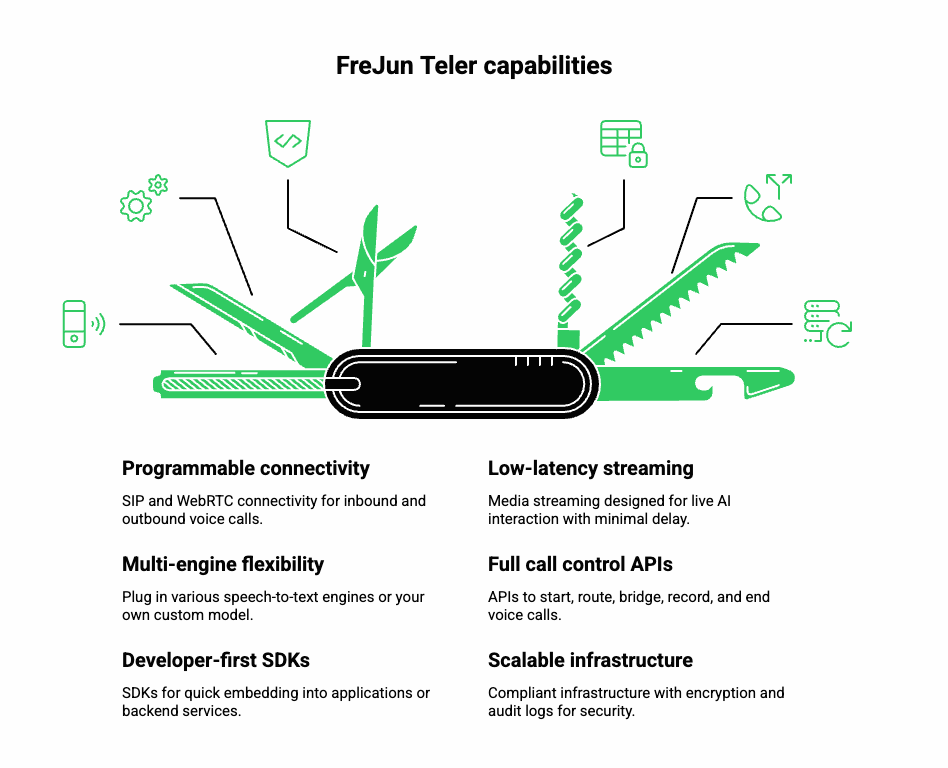
Key capabilities
- Programmable SIP and WebRTC connectivity for inbound and outbound voice.
- Low-latency media streaming designed for live AI interaction.
- Multi-engine flexibility – plug in Google STT, Whisper, Deepgram, or your own model.
- Full call control APIs (start, route, bridge, record, end).
- Developer-first SDKs for quick embedding into your app or backend service.
- Scalable and compliant infrastructure with encryption and audit logs.
Why it’s valuable to engineering teams
FreJun Teler removes the heavy lifting of real-time audio handling. Developers focus on business logic and user experience, while Teler ensures reliable media flow, proper codecs, and consistent quality worldwide.
With Teler, your architecture can look like this:
User → Teler Media Gateway → STT Engine → LLM / Logic → TTS → Teler → User
This separation of concerns accelerates time-to-market and keeps your team agile even as your product scales.
What are the best practices for accuracy and optimization in voice-based systems?
Even with a robust speech recognition API, accuracy depends heavily on configuration and data hygiene.
1. Optimize your audio pipeline
- Use correct sampling (16 kHz for wideband, 8 kHz for telephony).
- Apply noise suppression and echo cancellation.
- Maintain consistent audio gain across devices.
2. Customize your speech model
- Use domain-specific vocabulary lists or “phrase hints.”
- Retrain models periodically if available.
- Detect and adapt to language or accent automatically.
3. Post-process transcripts
- Normalize casing, punctuation, and abbreviations.
- Use contextual re-scoring to fix common misrecognitions.
4. Continuously measure key metrics
| Metric | What it Measures | Ideal Target |
| Word Error Rate (WER) | Overall transcription accuracy | < 10 % |
| Round-Trip Latency | Time from user speech to agent reply | < 300 ms |
| Call Drop Rate | Stability of streaming session | < 1 % |
| Mean Opinion Score (MOS) | Perceived audio quality | > 4 / 5 |
Optimization is an ongoing process. Continually feed your analytics back into tuning both the STT and media layers.
What future trends are shaping voice recognition and smart applications?
As technology matures, several trends are redefining what voice-based applications can do:
- Edge-based speech processing reduces latency and enhances privacy by running models locally.
- Context-aware voice recognition APIs will understand tone, emotion, and speaker state.
- Multimodal interaction – combining voice with visual cues or gestures.
- Tool-calling and workflow automation through voice (“Send report”, “Book meeting”).
- Hybrid human-AI contact centers where voice agents handle repetitive tasks and escalate only complex issues.
Platforms such as FreJun Teler will continue to power these innovations by providing a reliable backbone that bridges AI, telephony, and real-time streaming.
Conclusion
Voice recognition APIs have evolved beyond simple transcription; they now serve as intelligent layers that power responsive, real-time voice systems. From speech-to-text engines to context-aware NLP integrations, businesses are using them to build smarter, more natural voice experiences.
For teams building AI-driven voice agents, FreJun Teler offers the perfect infrastructure. It seamlessly connects your LLM, TTS, and STT systems with a low-latency voice layer, making human-like, two-way conversations possible in milliseconds.
Start building scalable voice solutions today.
Schedule a demo with Teler
FAQs –
- What is a voice recognition API?
A tool that converts speech into text, enabling real-time voice interaction in applications and systems. - How does a speech recognition API differ from speech-to-text?
Speech-to-text focuses on transcription; recognition APIs include language understanding and contextual accuracy. - What programming languages support voice recognition APIs?
Most APIs support Python, Node.js, Java, and Go for real-time voice and NLP integrations. - Can I use voice recognition APIs for call automation?
Yes, they can automate customer calls, route queries, and provide AI-powered responses with real-time speech analysis. - How accurate are modern voice recognition engines?
Top APIs like Google and Microsoft achieve over 95% accuracy in optimal conditions using advanced acoustic modeling. - What industries benefit most from voice recognition APIs?
Healthcare, fintech, customer service, and education leverage APIs for transcription, automation, and conversational intelligence. - How does latency affect voice-based applications?
High latency disrupts conversation flow; platforms like Teler minimize it through optimized streaming and transport layers. - Can I integrate LLMs with voice APIs?
Yes, APIs act as the bridge, connecting LLM text processing with real-time voice input/output. - How secure is voice data processing?
Reputed APIs use end-to-end encryption, anonymization, and secure transport protocols to protect voice data. - What is the future of voice recognition APIs?
They’ll evolve toward multimodal AI – combining speech, context, and emotional tone for more natural interactions.