
Voice interfaces are rapidly evolving from novelty features into production-grade infrastructure for AI systems. For founders and product leaders, enabling real-time voice interaction means connecting multiple moving parts – speech recognition, LLMs, synthesis, and orchestration layers. Yet, building this from scratch often leads to performance bottlenecks and integration fatigue.
This blog explores how to deploy Voice-Enabled LLM Agents using MCP for structured interaction, AgentKit for orchestration, and FreJun Teler for ultra-low-latency global voice delivery. Whether you’re scaling customer support or prototyping intelligent receptionists, this guide gives you the architecture and clarity to build a voice that truly talks.
What’s Driving the Shift Toward Voice-Enabled LLM Agents?
In the last two years, product teams have moved from chat-only interfaces to real-time voice interaction. The reason is simple – users want faster, natural communication that feels human, not typed. Whether it’s customer support, lead qualification, or internal process automation, voice-enabled LLM agents are proving far more effective than static chatbots.
However, building a reliable voice agent is not easy.
Handling audio input and output, maintaining low latency, managing telephony connections, and synchronizing state with an LLM demand a sophisticated setup. What looks simple to the user – “talking to an AI” – actually requires a tightly integrated pipeline behind the scenes.
This guide will break down that complexity and show how to deploy voice-enabled LLM agents step by step using the Model Context Protocol (MCP), AgentKit, and in Part 2, how Teler simplifies the voice infrastructure.
What Really Makes Up a Voice Agent Today?
Before we move to implementation, it’s important to understand what a voice agent really consists of. Modern voice agents are a modular system made of five moving parts:
| Component | Function | Example Technologies |
| Speech-to-Text (STT) | Converts user speech to text in real time | OpenAI Whisper, AssemblyAI Realtime STT |
| Large Language Model (LLM) | Processes input, plans response, triggers actions | GPT-4o, Claude 3.5, Gemini |
| Text-to-Speech (TTS) | Converts LLM response text back into audio | ElevenLabs, Play.ht, Azure Speech |
| Retrieval-Augmented Generation (RAG) | Pulls contextual or company data into the response | VectorDBs like Pinecone, FAISS |
| Tool Calling / MCP | Executes real-world tasks (e.g., booking, data fetch) | OpenAI MCP, LangGraph MCP Servers |
These components form the technical base for any AI voice deployment. The pipeline follows a predictable flow:
- User speaks into a microphone or phone call.
- STT transcribes the audio into text with millisecond latency.
- LLM processes the text, interprets intent, and optionally uses MCP tools to fetch or execute actions.
- Response text is sent to TTS, which generates human-like audio in real time.
- Audio stream is sent back to the user through a WebRTC or telephony channel.
This flow is simple in theory, but the production challenges appear when you need to scale it for thousands of concurrent sessions or deploy across global telephony networks.
That’s where standardization and orchestration become critical – and where the Model Context Protocol (MCP) and AgentKit step in.
Learn how to build ultra-low latency audio streams from your users to your AI model for real-time interactions.
What Is the Model Context Protocol (MCP) and Why Does It Matter?
The Model Context Protocol (MCP) is a new open standard for connecting language models to external tools in a consistent, structured way. Instead of giving your LLM long prompts describing APIs, you can register tools as MCP servers. Each server defines clear schemas, arguments, and authentication methods.
Here’s what makes MCP so powerful for deploying intelligent agents:
1. Standardized Tool Interfaces
Every MCP server follows a common format for exposing actions, so your LLM can easily call a “calendar tool,” “CRM lookup,” or “database query” without custom prompt work.
2. Secure Execution
Because tools live outside the model boundary, they can be audited, versioned, and rate-limited independently of the LLM. This separation improves both control and compliance – a key need for enterprise deployments.
3. Structured Data Flow
MCP uses JSON schemas for inputs and outputs. This ensures predictable, debuggable responses compared to brittle prompt chaining. The model knows exactly what parameters are expected for each call.
4. Scalable Ecosystem
With MCP, teams can build their own internal tool libraries – a catalog of callable microservices that any LLM can use. This is especially valuable when multiple teams share the same infrastructure.
Why MCP Matters for Voice
Voice systems rely on tight timing. Every unnecessary delay – an extra API hop or prompt parse – introduces unnatural pauses in a conversation. MCP’s structured communication eliminates that overhead.
Instead of the model “guessing” how to interact with a tool, it simply performs a defined call:
{
“action”: “get_customer_details”,
“parameters”: { “customer_id”: “1248” }
}
The response arrives as predictable JSON. The LLM interprets it instantly and continues generating speech output, maintaining a fluid voice conversation.
This makes MCP an ideal backbone for real-time voice agents, where predictability and speed directly affect user experience.
How Does AgentKit Turn MCP and LLMs into Deployable Voice Agents?
Even with MCP, stitching together all these moving parts can be complex. This is where AgentKit comes in – it acts as the orchestration layer that manages the real-time dialogue between STT, LLM, TTS, and external tools.
1. What AgentKit Does
AgentKit wraps your AI logic into an event-driven runtime that handles:
- Continuous streaming of user audio – text – model – audio.
- Session state management across multiple tool calls.
- Error handling and retries for external MCP servers.
- Integration hooks for custom business logic or analytics.
It’s essentially the “conversation brain” that keeps all services in sync without developers having to rebuild infrastructure every time.
2. The Agent Session Lifecycle
Here’s what typically happens during one complete voice session:
| Step | Description |
| 1. Input Stream | AgentKit receives the audio stream via WebRTC or SIP. |
| 2. Speech Recognition | STT converts the speech to text, sending partial transcriptions as the user talks. |
| 3. Context Processing | AgentKit forwards the text to the LLM. The model interprets intent and may call MCP tools. |
| 4. Tool Execution | MCP tool performs the action – e.g., check a meeting schedule or update a CRM record. |
| 5. Response Generation | LLM constructs a reply using the MCP result. |
| 6. Audio Response | TTS converts the reply into speech. Audio packets are streamed back to the caller immediately. |
Throughout the process, AgentKit keeps latency under control by using asynchronous streaming. Each subsystem works in parallel, so users experience continuous conversation flow – without waiting for each stage to finish.
3. Developer Benefits
AgentKit reduces both time and risk for teams building voice agents.
- Faster prototyping: Integrate multiple MCP tools without writing boilerplate code.
- Easier debugging: Centralized logs and event streams help trace every audio and model state.
- Flexible architecture: Swap out STT/TTS providers, plug in your own LLM, or connect a different telephony layer.
- Scale-ready: Horizontal scaling of sessions via stateless service workers.
In other words, AgentKit converts a cluster of AI components into a deployable, production-grade voice agent system.
4. Example Architecture (Simplified)
[User Phone/Mic]
↓
(Audio Stream)
↓
[STT Engine] ⇄ [AgentKit Core] ⇄ [MCP Servers]
↓
(Text Response)
↓
[TTS Engine]
↓
(Audio Playback)
↓
[User Hears Reply]
Each arrow in this diagram represents a live, bi-directional stream. The AgentKit layer orchestrates these streams in real time, ensuring all modules work together seamlessly.
5. How This Relates to Real-World Deployment
For founders or PMs, the key takeaway is this:
MCP brings structure, and AgentKit brings coordination.
Once these two are working together, you have a functioning digital agent that can speak, listen, and act. The remaining gap is making it accessible on phone lines, VoIP systems, or global telephony networks – and that’s precisely where FreJun Teler comes in.
Preparing the Ground for Deployment
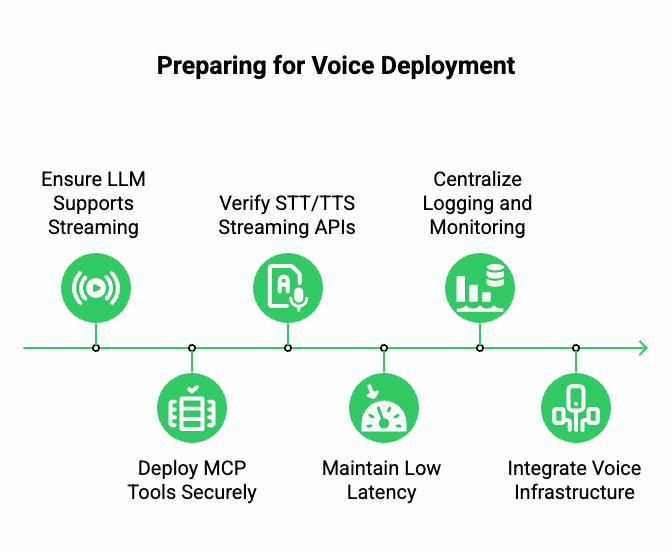
Before you integrate the voice layer, it’s essential to set up your agent environment properly. This ensures that your MCP servers and AgentKit runtime can scale later.
Checklist before adding Teler or any voice interface:
- Your LLM endpoint supports streaming responses (text chunks or audio tokens).
- MCP tools are deployed behind secure, versioned endpoints.
- Your STT/TTS providers offer real-time streaming APIs (not just batch mode).
- Latency between services stays under 300 ms round-trip for a natural voice flow.
- Logging and monitoring are centralized (use event-based logs rather than file-based).
When these basics are ready, connecting a global voice infrastructure like Teler becomes straightforward – it simply acts as the real-time audio bridge between your AgentKit runtime and the user’s voice channel.
Turn your text-based chatbot into a voice-ready agent using speech recognition, synthesis, and real-time communication APIs.
How Does FreJun Teler Simplify Real-Time Voice Deployment?
Once your LLM, MCP, and AgentKit stack are running, the next challenge is connecting it to real phone calls or VoIP channels. This step is where many teams face friction – telephony protocols, audio routing, and latency tuning are not easy to manage.
That’s where FreJun Teler completes the picture.
Teler acts as the global voice infrastructure layer between your AgentKit runtime and the real world. It manages all aspects of voice transport so that your engineering team can focus purely on AI logic and user experience.
Teler’s Core Role in Voice Agent Architecture
Teler’s API is designed to integrate seamlessly with any STT, LLM, and TTS pipeline. Instead of building separate signaling, session management, and audio streaming layers, Teler gives you all of it out of the box.
Here’s how Teler fits into the pipeline:
| Layer | Responsibility | Handled by |
| Session Handling | Call creation, routing, and teardown | Teler |
| Real-Time Audio Streaming | Bidirectional media between caller and agent | Teler |
| Speech Recognition / Synthesis | Audio – text – audio cycle | Your chosen STT/TTS |
| Conversation Logic | Context, state, and tool execution | AgentKit + MCP |
| AI Reasoning | Response generation and decision-making | Your selected LLM |
With this setup, you can deploy voice-enabled LLM agents over any cloud telephony or VoIP network in days rather than months.
How Does Teler Handle Low-Latency, Real-Time Audio?
When people talk to an AI agent, every millisecond matters. A gap longer than one second between user speech and AI response breaks the conversational flow.
Teler solves this through an architecture optimized for streaming voice packets with sub-200 ms latency.
Key Technical Features
- Real-Time Media Streaming:
Teler captures and relays audio in live packets instead of full recordings. This means your STT engine starts transcribing as soon as a user speaks, not after they stop. - Edge-Based Media Servers:
Distributed nodes reduce round-trip time by keeping audio processing close to users, improving responsiveness across regions. - Adaptive Bitrate Control:
Dynamically adjusts stream quality to maintain clarity even under unstable networks. - Parallel Processing:
Teler streams user audio and plays AI-generated responses simultaneously, enabling overlapping dialogue that feels human.
In short, Teler transforms your text-based agent into a continuous conversation system, not a turn-based chatbot.
How to Deploy an End-to-End Voice LLM Agent Using MCP, AgentKit, and Teler
Let’s walk through the deployment process in a practical sequence.
Step 1 – Set Up Your LLM and MCP Tools
- Host or connect to your preferred LLM (e.g., GPT-4o, Claude, or any local model).
- Register your business logic endpoints as MCP servers – for instance, a CRM lookup, appointment scheduler, or internal database connector.
- Verify schema definitions for every tool to ensure structured communication.
Step 2 – Integrate AgentKit
- Configure AgentKit to connect to your LLM endpoint and MCP tools.
- Implement the AgentSession runtime that manages incoming STT text and outgoing TTS responses.
- Add state persistence so the agent can retain short-term context during conversations.
Example (simplified pseudocode):
agent = AgentSession(
llm_endpoint=”https://api.openai.com/v1/chat/completions”,
tools=[“calendar_server”, “crm_lookup”],
stt_provider=”assemblyai”,
tts_provider=”elevenlabs”
)
Step 3 – Connect Teler’s Voice API
This is where the real-time voice interaction begins.
- Use Teler’s REST or WebSocket API to create a call session.
- On call start, Teler streams live audio packets to your AgentKit endpoint.
- Your STT service begins transcribing instantly.
- AgentKit processes the text, interacts with the LLM and MCP tools, and sends back a textual response.
- The response is converted by your TTS engine and streamed back to Teler.
- Teler plays the voice output to the user – completing the conversational loop.
Example JSON structure for session creation:
{
“call_type”: “outbound”,
“destination”: “+14152007986”,
“webhook_url”: “https://yourapp.com/teler/stream”
}
Step 4 – Test Latency and Voice Quality
- Measure end-to-end latency from user speech – AI response – playback.
- Adjust STT chunk size, TTS buffer length, and stream packet size for balance.
- Use Teler’s diagnostic logs to monitor jitter, packet loss, and bandwidth usage.
Step 5 – Deploy and Scale
- Run multiple AgentKit containers behind a load balancer.
- Teler automatically routes audio streams to active containers.
- For global operations, use geographically distributed Teler endpoints to minimize delay.
Within this architecture, MCP = tools, AgentKit = control, and Teler = voice layer – all independent but deeply integrated.
Sign Up with FreJun Teler Today!
What Common Challenges Do Teams Face – and How Teler Solves Them?
Even experienced engineering teams face four major issues when deploying voice-enabled LLM agents at scale.
| Challenge | Impact | Teler’s Solution |
| High Latency | Voice lag between user and response | Optimized media routing + parallel audio streaming |
| Telephony Complexity | Handling SIP, RTP, and call signaling | Unified API abstracts all protocols |
| Scalability | Maintaining quality across regions | Distributed global media servers |
| Integration Overhead | Custom setup for each STT/TTS provider | SDKs for easy plug-and-play integration |
Unlike traditional telephony providers, which only handle call setup, Teler is built for AI-first workflows. It operates as a media transport layer for LLMs, not just a phone system.
How Does Teler Compare to Traditional Voice Platforms?
| Feature | Traditional Voice Provider | FreJun Teler |
| Focus | Call routing and IVR | AI voice streaming + LLM integration |
| Latency Handling | 500 ms + average | Sub-200 ms global |
| Integration | Limited SDKs | Developer-first APIs and webhooks |
| AI Compatibility | Not LLM-ready | Direct STT/LLM/TTS streaming |
| Scaling | Static telecom nodes | Elastic cloud architecture |
This comparison shows why Teler is positioned as an AI-native voice infrastructure, ideal for the next generation of OpenAI-powered voice agents.
How Can Founders and Product Teams Leverage This Stack?
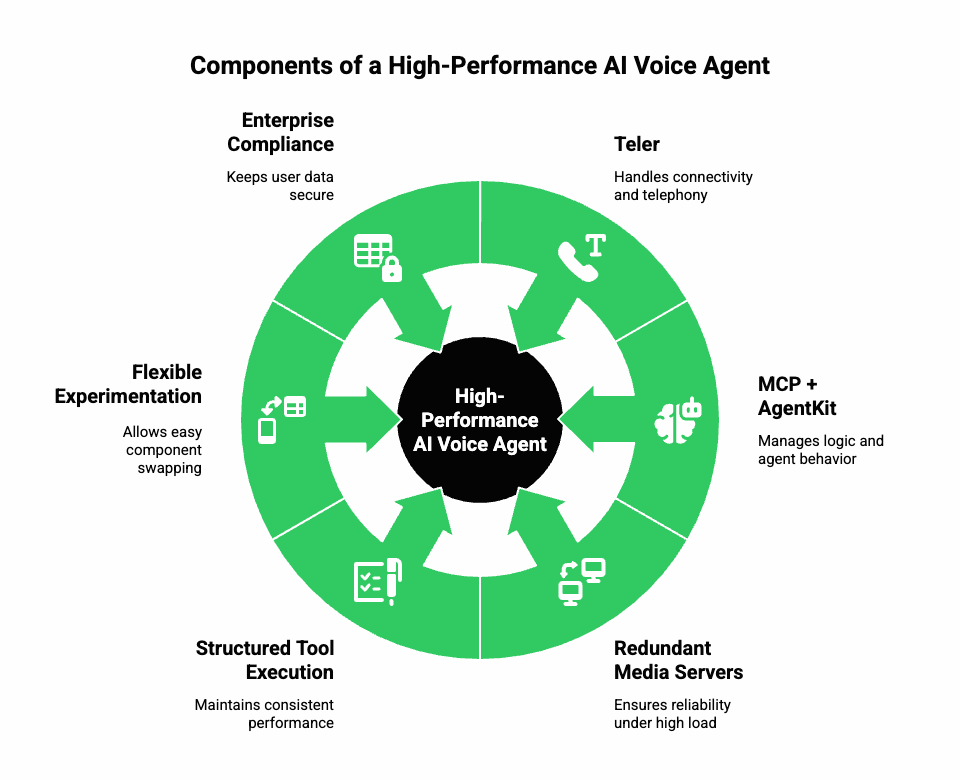
For decision-makers, here’s what this architecture means in practical terms:
1. Faster Go-to-Market
You can launch a fully functional AI voice agent without building custom telephony. Teler handles connectivity; MCP + AgentKit handle logic.
2. Greater Reliability
Redundant media servers and structured tool execution ensure consistent performance – even under high call volumes.
3. Flexible Experimentation
Swap components easily:
- Try a new LLM or local model.
- Switch STT/TTS vendors for cost optimization.
- Add or remove MCP tools without touching voice infrastructure.
4. Enterprise Compliance
Since Teler keeps voice streaming separate from model processing, sensitive user data remains confined to your backend environment.
Example Use Cases in Production
- AI Receptionist
Answers inbound calls, verifies identity, and routes to correct departments. - Lead Qualification Bot
Outbound calling to qualify prospects using CRM data fetched via MCP tools. - Customer Support Copilot
Handles Tier 1 queries with context pulled from RAG pipelines.
Each of these can be deployed using the same core architecture – MCP – AgentKit – Teler.
Best Practices for Sustained Performance
- Maintain STT latency < 250 ms per chunk.
- Stream TTS responses continuously, not in full blocks.
- Use MCP schemas for all tool calls to avoid prompt ambiguity.
- Employ centralized observability (metrics + traces).
- Keep Teler SDK versions updated for latest network optimizations.
When tuned correctly, this stack delivers conversational smoothness indistinguishable from a human call.
What Does the Future of Voice LLM Deployment Look Like?
Voice agents are evolving toward context-aware, multi-tool ecosystems. MCP is becoming the backbone for these systems, while orchestration layers like AgentKit will soon integrate multi-session memory and adaptive learning.
Teler’s roadmap aligns perfectly with that direction – expanding global voice coverage and offering APIs optimized for multimodal AI. As standards around real-time LLM interaction mature, this trio (MCP + AgentKit + Teler) will remain the core stack for scalable, production-grade voice automation.
Final Takeaway
You now have the complete framework for deploying voice-enabled LLM agents that perform in real business environments.
Use MCP to create structured, reliable tool interaction.
Use AgentKit to manage orchestration, session handling, and conversational flow.
And finally, use FreJun Teler to ensure real-time, low-latency voice delivery across any telephony or VoIP network.
Together, they form a seamless, production-ready voice stack that minimizes latency, simplifies integration, and scales globally.
Start small – build a simple prototype that answers calls and retrieves data – then expand without rewriting your architecture.
Schedule a demo or start building with Teler’s Voice API today.
Bring your LLM to life – and let it talk.
FAQs –
- What’s the main difference between text and voice agents?
Voice agents handle real-time audio processing with latency constraints, unlike text-based chatbots limited to text-only exchanges. - Do I need a specific LLM to build a voice agent?
No, any API-accessible LLM can work with streaming capabilities, including GPT-4, Claude, or open-source models. - What role does MCP play in voice agent architecture?
MCP standardizes how your AI calls tools, reducing complexity and ensuring structured, repeatable actions within the conversation. - Why is latency critical in voice systems?
Because delays beyond 300ms break natural conversational flow and drastically reduce user satisfaction and engagement. - How does AgentKit simplify multi-turn dialogue management?
It coordinates context, tool calls, and session states across speech inputs and LLM outputs, maintaining fluid conversations. - Can I connect my own STT and TTS services?
Yes, you can plug in any streaming-capable Speech-to-Text and Text-to-Speech service through AgentKit or Teler integration. - Is Teler compatible with cloud telephony providers?
Absolutely – Teler integrates seamlessly with major cloud telephony and VoIP systems to handle inbound and outbound voice traffic. - How secure is deploying voice AI through Teler?
Teler implements encryption, token-based authentication, and compliance-grade infrastructure for secure, enterprise-level deployments. - What’s the best way to test voice agent performance?
Monitor end-to-end latency, call drop rate, audio jitter, and conversation accuracy during pilot deployment phases.
Can startups deploy a prototype without heavy infrastructure?
Yes – start with one LLM, one voice line, and Teler’s API sandbox to test before scaling.