
You have built a powerful AI voice platform. Your AgentKit is a marvel of conversational intelligence, powered by the latest LLMs, capable of understanding nuance and solving complex problems. It is a brilliant, silent brain. Now comes the final, crucial step: connecting that brain to the real world.
To do this, you need a bridge to the global telephone network, a bridge that is not only reliable and scalable but also intelligent enough to speak the language of your AI. This is the role of elastic SIP trunking.
Integrating a voice channel into your AI platform can seem like a daunting task, a journey into the arcane world of telecommunications. But with a modern, developer-first provider, this process is no longer a complex, month-long project. It is a logical, API-driven workflow that can be mastered by any competent software developer.
This guide will provide a clear, step-by-step framework for how to seamlessly integrate elastic SIP trunking with your AI voice platform, transforming your text-based AI into a fully-fledged, production-ready voice agent.
Table of contents
Why is a Developer-First Approach to Elastic SIP Trunking So Critical?
Before we dive into the “how,” it is essential to understand the “what.” Not all elastic SIP trunking providers are created equal. The traditional providers were built for a different era; they were designed to connect to hardware PBXs and were managed by IT administrators through web portals. For an AI platform, this model is a non-starter.
An AI-first integration demands a provider that is built on a developer-first philosophy. This means:
- 100% API-Driven: Every function, from buying a phone number to configuring a call’s routing, must be controllable via a clean, well-documented API.
- Programmable Voice and Media: You need more than just call termination. You need deep, programmatic control over the call itself, including the ability to access the real-time audio stream.
- Comprehensive Webhooks: The provider must be able to send you real-time event notifications (webhooks) for every stage of a call’s lifecycle, from “ringing” to “answered” to “completed.” The rise of event-driven architecture is a major trend, with one report indicating that over 80% of organizations are increasing their use of event-driven APIs.
This developer-centric model is the core of the FreJun AI platform. Our Teler engine is not just an elastic SIP trunking provider; it is a fully programmable voice infrastructure designed to be the foundational layer for your AI applications.
What is the High-Level Architecture of the Integration?
The integration architecture is a model of elegant simplicity, based on a clear separation of concerns. This decoupled design is what makes the system so powerful and flexible.
Here are the key components:
- Your AI Voice Platform (AgentKit): This is your domain. It is where your AI’s “brain” lives, your STT, LLM, and TTS models, along with your business logic and conversational state management.
- The FreJun AI Platform (Teler Engine): This is our domain. We provide the carrier-grade elastic SIP trunking infrastructure. We handle the immense complexity of connecting to the global telephone network, managing phone numbers, and processing real-time media.
- The Bridge (APIs and Webhooks): This is how our two worlds communicate. Your platform tells our platform what to do via API commands. Our platform tells your platform what is happening on the call via webhooks.
This architecture ensures that you can focus on your core competency, building intelligence, while we focus on ours: delivering a reliable, scalable, and low-latency voice network.
A recent industry analysis projected that the global market for Communication Platform as a Service (CPaaS), which is built on this architectural principle, will grow to over $45 billion by 2027, a clear indicator of the power and demand for this model.
Ready to start building this bridge? Sign up for FreJun AI and get your API keys to begin the integration.
Also Read: Handling Delivery Calls with Voice AI
How Do You Integrate for Inbound Calls? A Step-by-Step Guide
Let’s walk through the most common use case: enabling your AI agent to answer an incoming phone call.
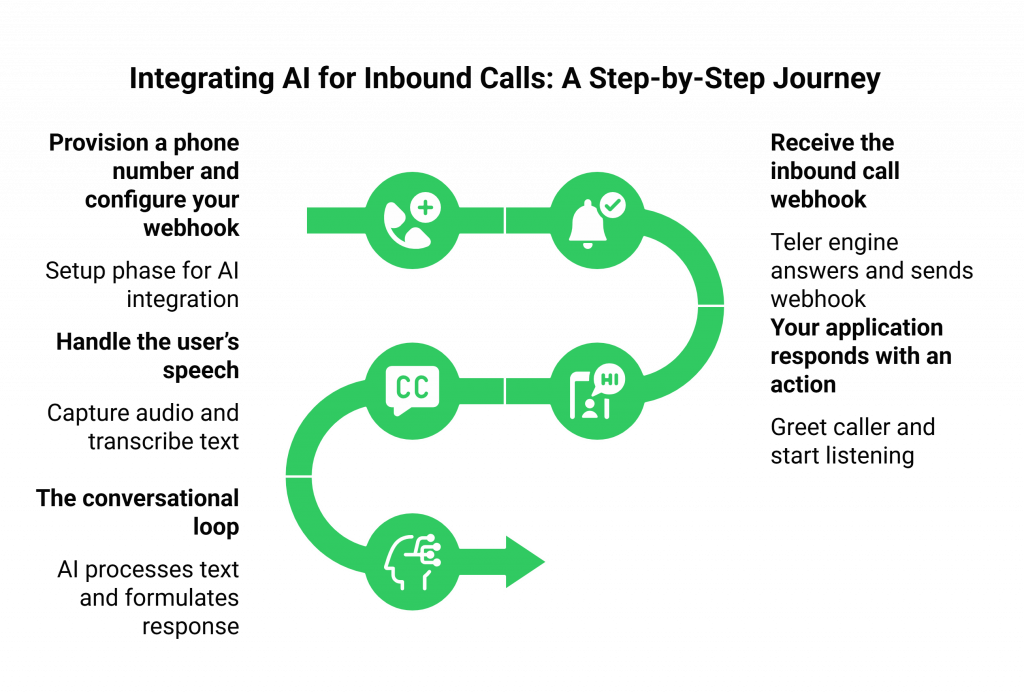
Step 1: Provision a Phone Number and Configure Your Webhook
This is the setup phase, and it can be done in minutes via the FreJun AI API or our dashboard.
- Acquire a Number: Search for and purchase a phone number in the geographic region you need.
- Set Your Webhook URL: This is the most important step. You will configure your new phone number so that when an incoming call arrives, FreJun AI will send an HTTP request (a webhook) to a specific URL on your application server. This is the “front door” to your AI platform.
Step 2: Receive the Inbound Call Webhook
A customer dials your new number.
- Our Teler engine answers the call on the edge of our network.
- It immediately sends a webhook to the URL you configured. This webhook is a data-rich payload containing essential information like the unique CallSid, the caller’s phone number (From), and your number that was dialed (To).
Step 3: Your Application Responds with an Action
Your application receives this webhook. It now knows a new call has started and needs to decide what to do next. Your application must respond to this webhook with a set of instructions, typically in an XML or JSON format that we call FML (FreJun AI Markup Language).
- The First Action: Your first response will likely be to greet the caller and start listening. Your FML response might contain a <Gather> verb. This single verb tells our Teler engine to do two things: play a welcome message (either pre-recorded or synthesized on the fly) and then immediately start capturing the caller’s speech.
Also Read: AI Voicebot for Shipment Tracking
Step 4: Handle the User’s Speech
Once the caller starts speaking, the real-time interaction begins.
- Teler captures the audio.
- It sends this audio to the STT engine you have configured.
- Once the caller finishes speaking, Teler sends another webhook to your application. This webhook contains the transcribed text of what the user just said.
Step 5: The Conversational Loop
Your application receives the transcribed text. This is where your AI’s brain takes over.
- Your LLM processes the text, understands the intent, and formulates a response.
- Your application then responds to the webhook with a new set of FML instructions, perhaps using a <Say> verb to speak the LLM’s response back to the user, followed by another <Gather> to continue the conversation.
This loop, Teler sending a webhook with the user’s speech, and your application responding with the AI’s next action, continues until the conversation is complete.
This step-by-step process is summarized in the table below:
| Step | Triggering Event | FreJun AI’s Teler Engine Action | Your AI Platform’s Action |
| 1 | Customer dials your number. | Answers the call, sends an “inbound call” webhook. | Receives the webhook, prepares for the call. |
| 2 | Your app’s response. | Receives your first FML command (e.g., <Gather>). | Responds to the webhook with the first action. |
| 3 | User finishes speaking. | Plays your greeting, listens, transcribes, and sends a “speech” webhook. | Awaits the transcribed text. |
| 4 | Your app’s next response. | Receives your next FML command (e.g., <Say>). | Receives the text, processes it with the LLM, and responds with the next action. |
| … | The conversation continues. | The loop repeats. | The loop repeats. |
What About Outbound Calls?
The process for making an outbound, AI-driven call is just as simple and is initiated by your platform.
- Initiate the Call via API: Your application makes a single API call to the FreJun AI platform, specifying the number to call (To), the FreJun AI number to call from (From), and a Url.
- Teler Makes the Call: Our Teler engine places the outbound call.
- The Webhook Loop Begins: As soon as the person on the other end answers the phone, Teler sends a webhook to the Url you provided. From this point forward, the conversational loop is exactly the same as it is for an inbound call.
Also Read: Citizen Feedback Systems Using Voice AI
Conclusion
The integration of elastic SIP trunking with a modern AI voice platform is no longer a black art reserved for telecom engineers. It is a structured, API-driven workflow that has been made accessible to all software developers.
By following a logical, step-by-step process and leveraging a developer-first voice infrastructure like FreJun AI, you can successfully bridge the gap between your intelligent AgentKit and the real-time world of voice calls.
This integration is the final and most important step in unleashing the true potential of your AI, transforming it from a silent brain into a powerful, conversational agent ready to engage with the world.
Ready to see this integration in action? Schedule a demo for FreJun Teler!
Also Read: UK Mobile Code Guide for International Callers
Frequently Asked Questions (FAQs)
It is a modern, IP-based method for connecting a business’s phone system to the public telephone network. Its “elastic” nature allows a business to instantly scale its call capacity up or down and only pay for what it uses.
A webhook is an automated message sent from an application when a specific event occurs. In this context, the FreJun AI platform sends webhooks to your application to notify you of real-time call events, like an incoming call or a user finishing their sentence.
No. As long as your application has a publicly accessible URL to receive our webhooks, you can host it anywhere you like—on AWS, Google Cloud, Azure, or even on your own on-premise servers.
FML stands for FreJun AI Markup Language. It is a simple set of XML-based tags (like <Say>, <Gather>, and <Play>) that your application uses to tell our Teler engine what actions to perform on a live phone call.
All communication between your platform and ours, including webhooks and API calls, uses HTTPS for security, and we sign requests to ensure the webhooks you receive genuinely come from FreJun AI and have not been tampered with.
Yes. While this guide focuses on a direct-to-application integration for AI, you can also configure our elastic SIP trunking service to terminate to a standard IP-PBX, allowing you to take advantage of our scalability and cost savings with your existing phone system.
Our <Gather> verb and our more advanced Real-Time Media API are the primary mechanisms for this. They allow you to capture the caller’s speech and have it transcribed by your chosen STT engine, which is the first step in any AI conversation.
You can configure a fallback URL in your FreJun AI settings. If our platform cannot reach your primary webhook URL, it will automatically try the fallback URL. You can also set a default behavior, like playing a pre-recorded error message or forwarding the call to a different number.
It is better because it provides a much higher level of control and real-time eventing. A traditional SIP connection is a “black box” that just delivers a call. The API model turns the call into a fully programmable entity that your application can orchestrate step-by-step, which is essential for a dynamic AI conversation.
FreJun AI provides the foundational elastic SIP trunking infrastructure (our Teler engine) and the powerful set of APIs and webhooks that act as the bridge to your application. We handle all the underlying telecom complexity so you can focus on building your AI’s intelligence.